

Dell’s UK Wi-Fi 7 catalogue includes the Dell Pro 16 and Dell 16 Plus, making them sensible laptop candidates for a business shortlist. Buy only after confirming the exact wireless configuration and testing it on your office network. Phone selection needs the same model-level discipline. A Wi-Fi 7 label alone does not establish which multi-link features will work with your drivers and access point, as Microsoft’s driver requirements demonstrate.
What Wi-Fi 7 support means for a UK business
Separate three questions when buying. Does the manufacturer specify Wi-Fi 7 for the exact device? Can that device establish the required connection on your network? Does the resulting connection improve the work your staff do?
Those questions require different evidence. A product specification answers the first. Connection records from a pilot answer the second. Timed transfers, application responsiveness and reliable calls help answer the third.
For a small business, make the supplier responsible for identifying the exact UK stock code and wireless specification. For a mid-sized organisation with an IT team, add the operating-system build, driver version and access-point configuration to the acceptance record.
Do not replace a functioning fleet simply to standardise a wireless label. Our buying recommendation is to introduce Wi-Fi 7 through scheduled device replacement unless a measured connectivity problem justifies earlier spending.
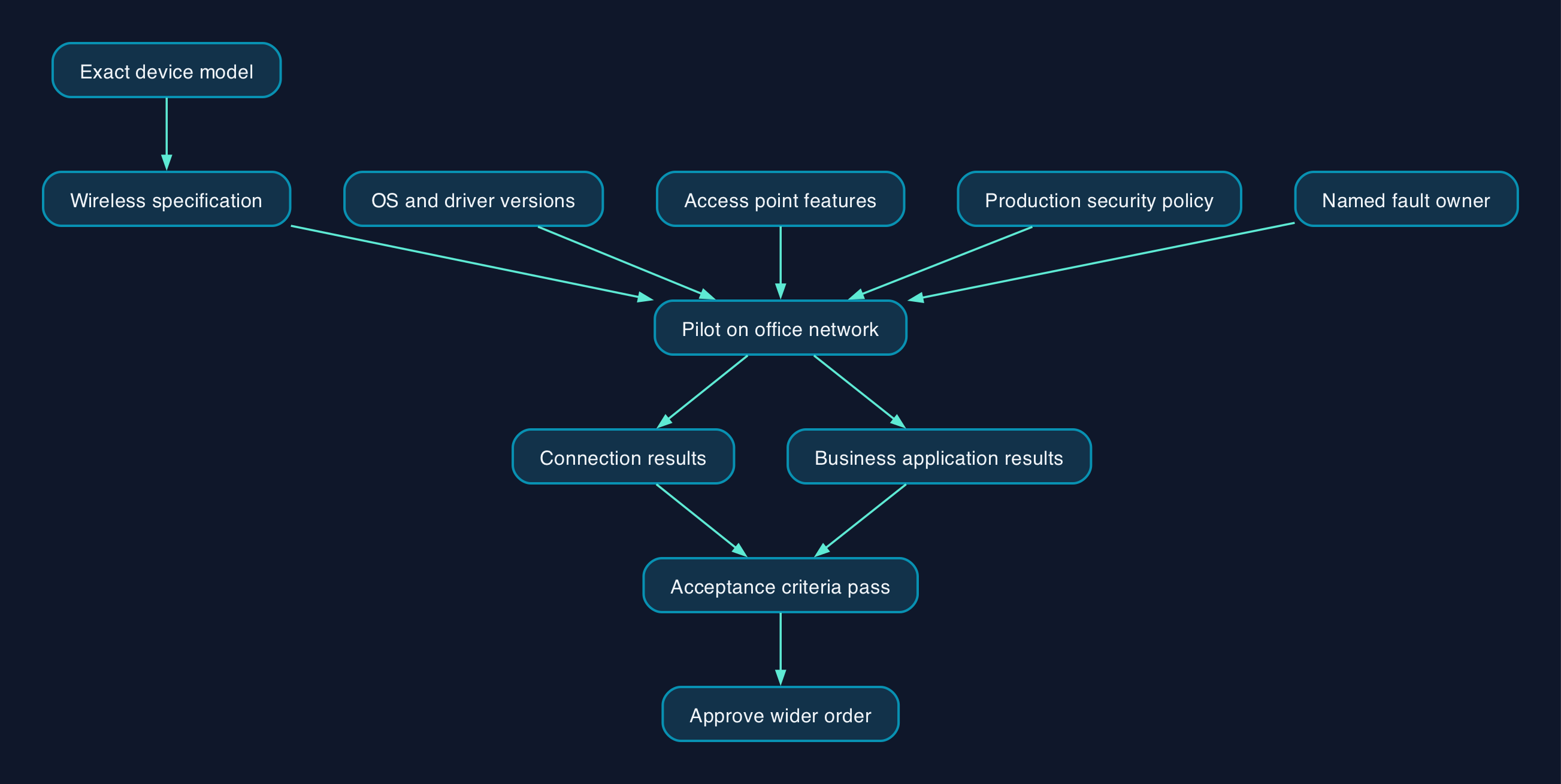
How the device and office network work together
Microsoft’s documentation describes Multi-Link Operation, or MLO, as using multiple simultaneous channels to an access point. It also describes driver capability declarations, access-point discovery and authentication requirements. That makes Wi-Fi 7 operation a compatibility question across several components, rather than a property of the laptop alone.
Use the following responsibility split for a purchase or managed-network project.
| Component | Evidence to request | Suggested owner |
|---|---|---|
| Laptop or phone | Exact UK model, wireless specification and supported software | Device supplier |
| Operating system and driver | Approved versions and manufacturer support route | Internal IT or device support provider |
| Access point | Supported features, firmware and compatibility with the proposed devices | Network supplier |
| Authentication | Successful connection using the organisation’s actual security policy | IT or managed service provider |
| Business application | Recorded results for representative work in normal locations | Application owner and pilot users |
Ask one named person to own faults that cross these boundaries. Otherwise, a connection problem can become an unresolved exchange between the device supplier and network provider.
Pricing and cost model
The following figures are advertised UK base-model prices from a listing snapshot dated 28 September 2026. They are per laptop, not subscription charges or complete deployment costs.
Dell’s listing explains that starting prices refer to base or recommended configurations and that customisation and support selections can alter them. The supplied extract does not establish VAT treatment or the exact wireless configuration attached to each starting price. Request a quotation that resolves both before comparing totals.
| Laptop in Dell’s Wi-Fi 7 catalogue | Advertised base price | What the quotation must resolve |
|---|---|---|
| Dell 16 Plus 2-in-1 DB06250 | £1,089.60 | Wireless configuration, operating-system edition, support and VAT |
| Dell 16 Plus DB16250 | £1,108.80 | Wireless configuration, operating-system edition, support and VAT |
| Dell Pro 16 PC16250 | £1,590.00 | Wireless configuration, support scope and VAT |
These figures compare advertised entry prices within one supplier’s catalogue. They do not measure the price premium for Wi-Fi 7 or establish equivalent specifications.
Build the business case over your intended ownership period, including the following items.
| Cost component | What to include |
|---|---|
| Devices | Final configuration, warranty, spares and replacement arrangements |
| Network work | Survey, access points and any associated cabling, switching or power work identified by the design |
| Configuration | Device enrolment, approved software, wireless profiles and authentication testing |
| Staff time | Pilot participation, deployment, training and disruption |
| Support | Responsibility for driver, firmware and connection faults |
| Retirement | Data migration, secure disposal and any contract exit charges |
Keep unknown costs visible as quotation items. A laptop subtotal is not total cost of ownership.
Migration and rollout checklist
Use a small pilot before approving a fleet order.
- [ ] Define the problem. Record the affected application, location and observable failure or delay.
- [ ] Inventory the existing setup. Capture device models, wireless adapters, software versions, access points and security settings.
- [ ] Specify the purchase precisely. Obtain the UK stock code and written confirmation of the wireless capabilities required.
- [ ] Agree acceptance criteria. Set measurable requirements for connections, application behaviour and recovery after interruption.
- [ ] Assign support ownership. Name the person responsible for coordinating device and network suppliers.
- [ ] Prepare recovery. Back up affected configurations and retain a working device and network profile for rollback.
- [ ] Pilot under normal security controls. Test with the production authentication method, permissions and device-management policies.
- [ ] Test normal working conditions. Include meeting rooms, movement between work areas, sleep and wake, calls and representative file transfers.
- [ ] Record the result. Save connection details alongside application results and unresolved faults.
- [ ] Approve deployment and handover. Release the wider order only when acceptance criteria pass and support staff have the configuration record.
Network security changes can disconnect existing devices. Schedule them, preserve the previous configuration and prove rollback before extending the change.
Vendor and option comparison
The laptop shortlist has manufacturer catalogue evidence from Dell and a narrower discovery lead from HP. For phones, El Output’s compatibility roundup dated 30 July 2025 lists the Apple, Google and Samsung models below.
Manufacturer-level phone specifications and UK variant details were not available in the research supplied for this article. The phone entries are therefore reported candidates for verification, not a confirmed or exhaustive buying list.
| Supplier and candidate | Evidence position | When to investigate it | Required buying check |
|---|---|---|---|
| Dell Pro 16 PC16250 | Listed in Dell’s UK Wi-Fi 7 catalogue with Windows 11 Pro | A Windows business-device procurement | Confirm the ordered wireless configuration and run the office-network pilot |
| Dell 16 Plus DB16250 or 16 Plus 2-in-1 DB06250 | Listed in the same catalogue with Home or Pro choices | A procurement comparing conventional and convertible designs | Specify the operating-system edition and compare support terms |
| HP Wi-Fi 7 laptop range | UK manufacturer category exists, but the extract does not identify a suitable business model | An alternative supplier quotation | Obtain a named UK stock code and its full wireless specification |
| Apple iPhone 16, 16 Plus, 16 Pro or 16 Pro Max | Reported compatible by the phone roundup | An organisation considering those iPhone models | Verify the exact handset specification and required network features |
| Google Pixel 9, 9 Pro, 9 Pro XL or 9 Pro Fold | Reported compatible by the same roundup | An organisation considering those Pixel models | Verify the UK variant, software requirements and office-network behaviour |
| Samsung Galaxy S24 Ultra, S25, S25+ or S25 Ultra | Reported compatible by the same roundup | An organisation considering those Galaxy models | Check the exact model rather than extending a claim across a product family |
| Retain the current fleet | Requires your own performance and support assessment | Staff can complete their work reliably | Establish whether coverage, configuration or another dependency needs attention first |
For laptops, compare memory, storage, screen, portability, management requirements and support alongside wireless capability. For phones, include application compatibility, enrolment, repair arrangements and the intended support period.
Neither shortlist supports a universal winner. Choose the device that passes your business requirements and network test at an acceptable overall cost.
Editorial analysis
The strongest buying requirement is a demonstrated connection on the network staff will use. A supplier’s specification is necessary evidence, but it should not be the final acceptance test.
We would retain existing devices where they meet application needs and remain supportable. During a planned refresh, we would shortlist Wi-Fi 7 models, require configuration-level evidence and test representative units before committing to volume.
An outsourced IT provider can perform that work, but the contract should state the deliverables. Ask for an inventory, proposed configuration, pilot results, fault ownership and a handover record. Avoid accepting “Wi-Fi 7 ready” as the entire service description.
Sources
- Dell UK — Wi-Fi 7 laptop catalogue, supplied listing snapshot dated 28 September 2026.
- HP UK — Wi-Fi 7 laptops, partial extract supplied with research dated 28 September 2026.
- Microsoft Learn — WiFiCx Wi-Fi 7 feature requirements, source record dated 22 May 2024.
- El Output — Wi-Fi 7 Compatible Phones, published 30 July 2025.