
A neural processing unit can run supported AI tasks on a laptop, including real-time translation, image generation and meeting effects. Its value depends on software that explicitly uses it, rather than the presence of an AI badge. For UK small and mid-sized businesses, the sensible buying test is whether a specific feature improves someone’s working day enough to justify the device and support costs. Microsoft’s developer guidance explains that software dependency.
Where an NPU helps a UK business
An NPU runs the calculations behind a compatible AI model. Using a trained model to produce an output, such as recognising speech or processing an image, is called inference. Microsoft describes its NPU-enabled Windows features as using models optimised for this work on the device. Microsoft’s developer guide
For a business buyer, the useful question is which recurring task benefits. Meeting effects are an understandable starting point because staff can assess the result directly. HP describes noise filtering and video framing on supported Snapdragon laptops, giving a prospective buyer specific features to demonstrate. HP’s UK guide
Consider a hypothetical UK consultancy whose staff spend much of the day on client calls. Its pilot could compare call quality, battery endurance and responsiveness while staff use their normal applications. Those measurements would establish whether the complete laptop helps that team; they would not isolate the NPU’s contribution unless the test controlled the other variables.
Translation and image generation offer further possibilities. Microsoft identifies these as NPU-related workloads, but the purchasing decision still needs an application, a supported feature and a useful output. A demonstration that generates an image says little about whether that image meets a business’s editorial or design requirements. Microsoft’s NPU guidance
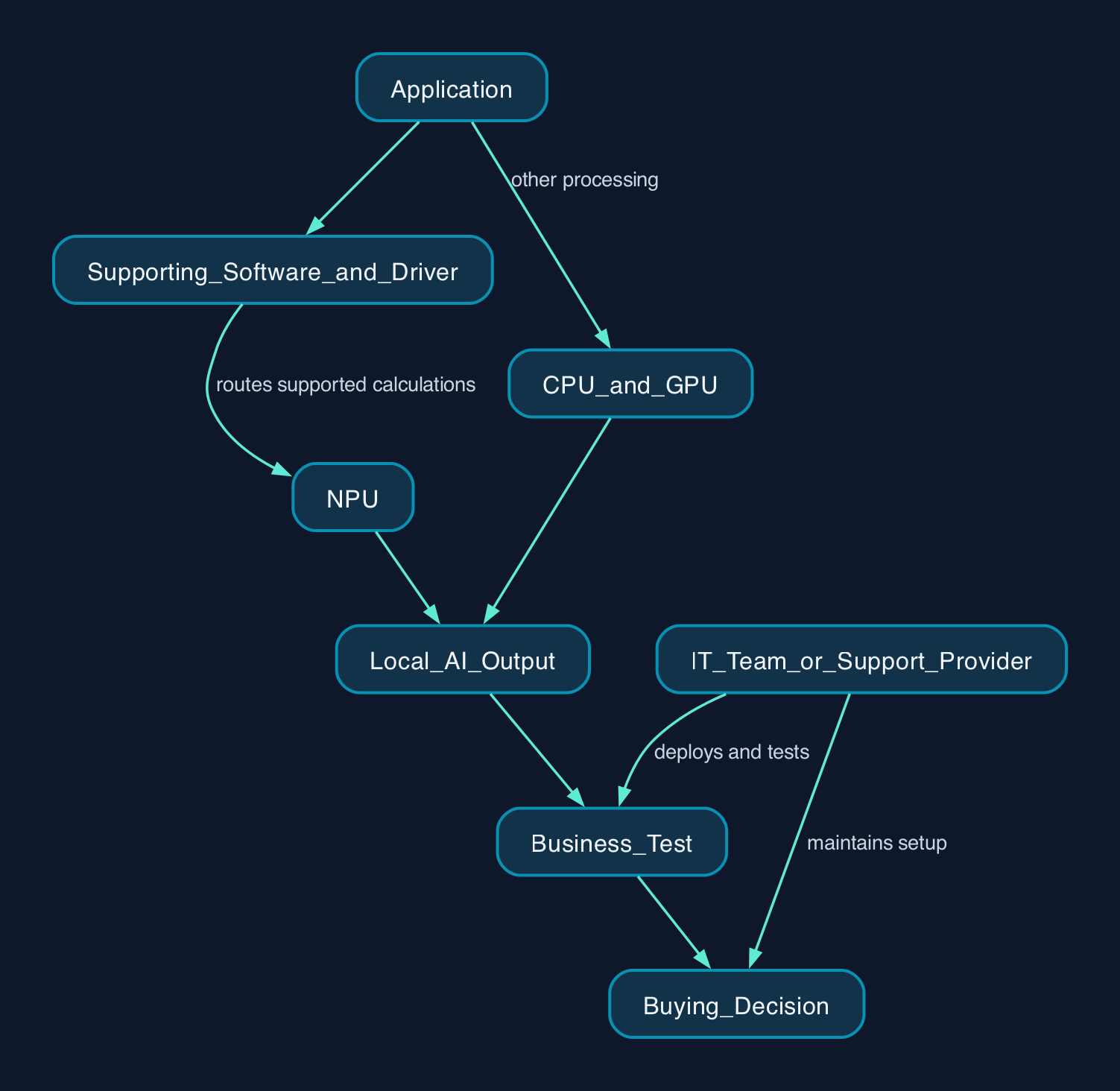
How the application reaches the NPU
The application and its supporting software determine whether the NPU participates. Microsoft explicitly says that software must be programmed to use the resource. Intel’s architecture documentation also describes a compiler that organises calculations and data movement for its NPU. Microsoft’s software requirements and Intel’s compiler explanation
The following is a simplified responsibility map, rather than a promise about every application.
| Component | Role in a supported local AI feature | What the business should establish |
|---|---|---|
| Application | Provides the feature and invokes supported AI processing | Does this exact application version use the laptop’s NPU? |
| Supporting software and driver | Connect the application’s model to the available hardware | Who maintains compatibility when software or drivers change? |
| NPU | Executes supported AI calculations | Does the intended feature actually run on it? |
| CPU and GPU | Continue handling the application’s other processing and supported workloads | Does normal work remain responsive while the AI feature runs? |
| IT team or support provider | Deploys, tests and maintains the complete setup | Who owns faults that cross application, driver and hardware boundaries? |
The hardware and software relationship above follows Microsoft’s developer guidance and Intel’s NPU overview. The ownership questions are CTC’s suggested acceptance criteria.
Local processing also needs a feature-specific check. Ask what runs on the laptop, what requires a connection and what information leaves the device. A local computation does not, by itself, describe the application’s entire data flow.
What the specification does not tell you
An NPU rating does not establish how much faster an employee will finish a task. Microsoft’s 40+ TOPS requirement identifies a hardware qualification for Copilot+ PCs, while its developer guidance makes benefits conditional on software targeting the NPU. Neither provides a measured productivity result for your applications. Hardware requirements and software dependency
Nor should you assume an NPU improves a cloud service’s response time. If the model computation happens on the provider’s servers, there is no local model computation for the laptop’s NPU to accelerate. Ask the supplier to identify a local processing step before attaching an NPU benefit to a browser-based workflow.
Battery life deserves the same scrutiny. Microsoft describes energy-efficiency benefits for suitable NPU workloads, but that is not a quantified saving for a particular laptop or working day. Test the complete device using the applications, screen settings and working conditions your staff need. Microsoft’s NPU efficiency explanation
Memory requirements illustrate another distinction. Microsoft specifies 4 GB as the standard Windows 11 minimum and 16 GB for Copilot+ PCs. These are eligibility requirements, not recommendations for a well-equipped business laptop or evidence of a corresponding performance increase. Microsoft’s memory requirements
Comparing Intel, AMD and Qualcomm options
The documented Windows options span several suppliers. Microsoft’s requirements list includes AMD Ryzen AI 300 and 400 series, Intel Core Ultra 200V and 300V series, and Qualcomm Snapdragon X series. Treat that as a starting point for checking an exact laptop configuration, rather than assuming every similarly named processor qualifies. Microsoft’s processor list
| Processor option | What the cited evidence establishes | What to test before buying |
|---|---|---|
| Intel Core Ultra 200V and 300V families | Listed among compatible Copilot+ processor families | The exact application’s NPU support, normal workload performance and support arrangements |
| AMD Ryzen AI 300 and 400 families | Listed among compatible Copilot+ processor families | The same application, workload and support criteria used for Intel |
| Qualcomm Snapdragon X family | Listed among compatible Copilot+ processor families | The same criteria, plus compatibility of required software and peripherals on the chosen Windows on Arm device |
The qualification information comes from Microsoft’s system requirements. HP’s UK guide identifies Snapdragon’s Arm architecture and acknowledges that some specialised and legacy software remains unoptimised, making compatibility testing particularly relevant. HP’s Windows on Arm discussion
These sources do not establish a fair performance ranking between the three suppliers. CTC’s recommendation is to compare complete laptops under the same workload, rather than turn processor branding into a universal winner.
Pricing and the business cost model
The available evidence does not establish comparable UK laptop prices or an NPU-specific price premium. Obtain GBP quotations for complete configurations, with VAT treatment, warranty, delivery and support stated separately.
For a small business using an external IT provider, include the provider’s deployment and compatibility-testing work. For a mid-sized organisation with internal support, include staff time and the cost of maintaining another device configuration.
| Cost component | What to request or measure |
|---|---|
| Laptop purchase | Exact processor, memory, storage, warranty and price including or excluding VAT |
| Application access | Any licence or subscription needed for the intended feature |
| Deployment | Device setup, application installation, data transfer and testing |
| Support | Responsibility for application, driver and hardware problems |
| Training | Time required to use the feature and recognise unsuitable output |
| Ongoing services | Cloud or other service charges that remain after buying the laptop |
Treat any claimed cloud saving as conditional until a local feature demonstrably replaces a paid workload. A purchase calculation that leaves deployment and support unpriced is a hardware subtotal, not total cost of ownership.
Editorial analysis
The strongest case for an NPU is a named, supported feature that staff use repeatedly. The weakest case is paying extra because a specification suggests unspecified future benefits.
For a UK business replacing laptops anyway, NPU capability can be one selection criterion alongside application compatibility, repair arrangements, memory and battery endurance. For a business whose current devices still meet its needs, this evidence provides no basis for an automatic fleet replacement.
Make the supplier demonstrate the intended feature on the quoted configuration. Then let representative staff decide whether the result solves a problem worth paying for.