

UK businesses should approve AI for a specific task only after it passes realistic tests, respects access permissions and routes uncertain or consequential outputs to an accountable person. Start with draft-only use, compare answers against approved records and test failure cases before enabling actions. Keep finance, HR, legal and customer-service owners responsible for acceptance. Supplier guidance supports repeatable testing and human review for high-impact scenarios.
Define exactly what the business is approving
Approve a bounded task such as drafting an explanation of an invoice discrepancy from supplied records. Treat permission to change a ledger, alter an employee record or send a customer response as a separate decision.
For a small business, the starting point can be a spreadsheet of test cases and a named subject specialist. Record the task, permitted information, expected answer, prohibited actions and person who can authorise release.
Make the UK context part of the expected result. Test pounds and pence, unambiguous dates, the relevant employing entity and the policy that applies to the employee’s location. For legal drafting, identify the intended jurisdiction and approved source documents before asking the system to produce an answer.
The following examples are proposed tests, not reported customer deployments or product capabilities.
| Workflow | Illustrative task | Evidence needed to pass | Failure that should block release |
|---|---|---|---|
| Finance | Explain an invoice discrepancy | Every amount matches approved records; arithmetic reconciles; uncertainty is identified | Invented transaction, incorrect total or attempted payment |
| HR | Answer a leave-policy question | Correct policy version, employee context and escalation route | Disclosure of another employee’s information or invented entitlement |
| Legal | Summarise a supplied contract | Clauses and qualifications match the document; omissions are visible | Fabricated clause, authority or unsupported legal conclusion |
| Customer service | Draft a refund response | Correct order, applicable policy and authorised remedy | Wrong customer details, invented promise or unauthorised refund |
These are task-specific acceptance conditions. A finance manager should set the finance conditions; an IT supplier should not decide whether an accounting explanation is acceptable.
Build a test set with known answers
Create a reference set of prompts, source records and expected outcomes before adjusting the AI’s instructions. Otherwise, reviewers can end up accepting whatever answer the system happens to produce.
Microsoft’s custom evaluation strategy distinguishes critical scenarios, less critical cases and guardrail tests. Apply that distinction to the workflow being approved.
Include these categories:
- Routine work using complete, consistent source information.
- Missing information where the correct response is to ask a question or stop.
- Conflicting records where the system must identify the disagreement.
- Boundary cases such as a contractor asking about an employee benefit.
- Access failures where a user requests another person’s information.
- Manipulative content such as a document instructing the system to ignore its rules.
- Action failures such as a rejected update or an unavailable connection.
Use synthetic records initially. Where representative business records are necessary, have the responsible data owner approve their use and remove unnecessary personal information.
Keep some cases out of the prompt-adjustment process. Use that reserved set to check whether improvements extend beyond the examples the team has repeatedly corrected.
Record enough detail to reproduce a failure
For each case, retain the input, user role, source version, expected outcome, actual output and reviewer decision. Record the model or application version where available, alongside relevant settings and connection permissions.
Repeat important cases and vary their wording. Microsoft’s testing guidance identifies both variable responses and sensitivity to phrasing, and recommends historical baselines for version comparisons.
A failed test should become a permanent regression case: an example rerun to check that the same fault has not returned.
Assign responsibility from input to approval
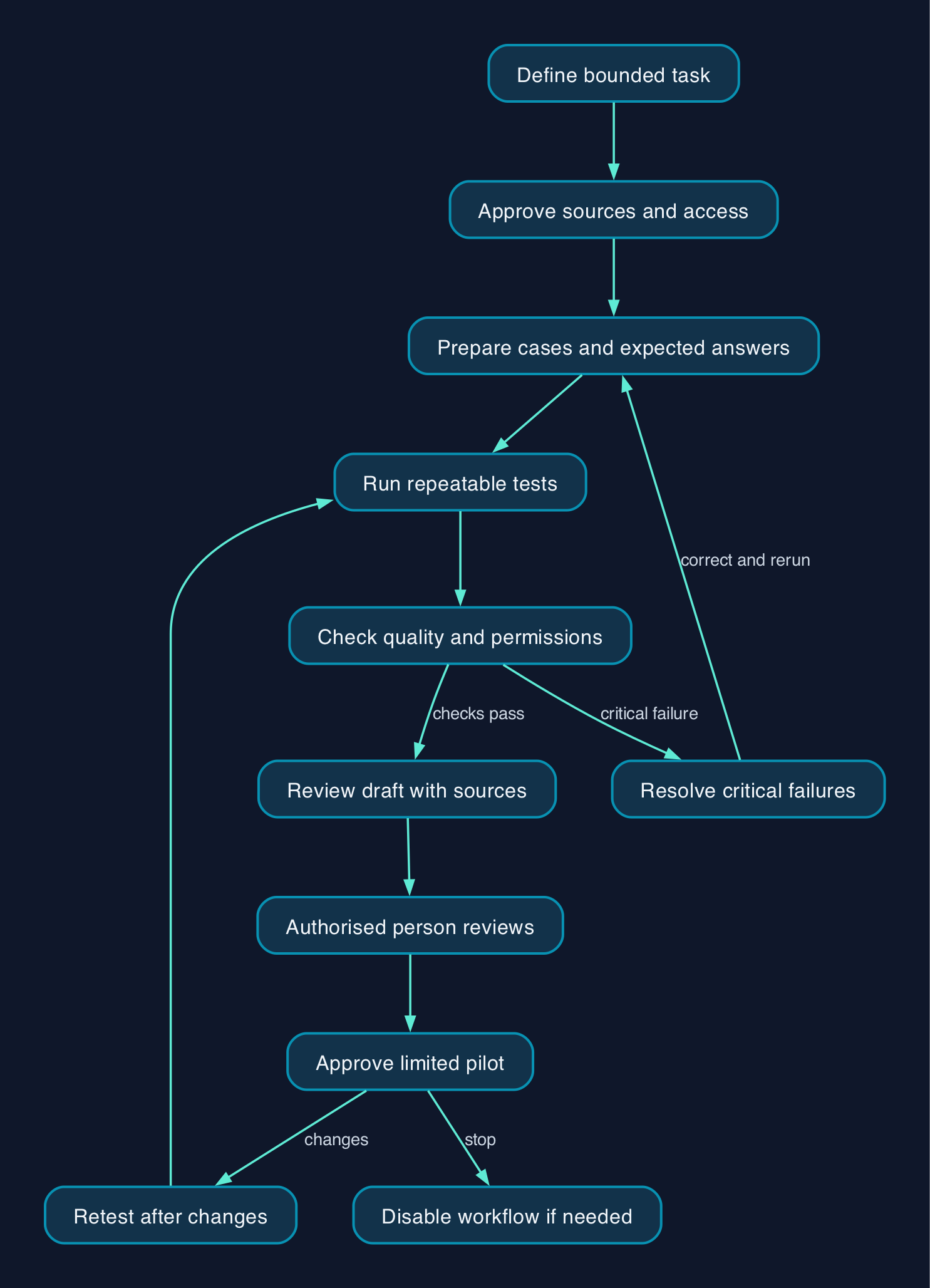
Use a proposed pilot workflow in which approved information enters the system, the AI produces a draft, checks identify problems and an authorised person decides whether the result can proceed.
Keep the boundary between generating text and taking action explicit. The reviewer needs to see the proposed recipient, record change or transaction before approving it.
| Stage | Responsible person | Required evidence |
|---|---|---|
| Define the task | Finance, HR, legal or service owner | Written permitted use and release conditions |
| Prepare information | Record or policy owner | Approved sources, versions and access rules |
| Configure the system | Internal IT or delivery provider | Documented permissions and available actions |
| Check output | Subject specialist | Comparison with source records and recorded errors |
| Approve action | Authorised business reviewer | Visible proposed action and approval record |
| Handle failures | Named operational owner | Escalation route, stop procedure and recovery steps |
Small organisations may combine roles, but the approval record should still identify who made each decision.
OpenAI’s workspace-agent page describes approval before actions such as sending messages or updating records. Treat that as a capability to demonstrate in the actual configured workflow. Test whether a rejected approval really prevents the action.
Budget for checking and correction
The cost of a pilot includes preparing reference answers, configuring access, running tests, reviewing failures and repeating checks after changes. A subscription price does not capture that work.
The available evidence does not establish comparable evaluation prices across suppliers. Obtain costs for the actual configuration and record the charging unit, currency, billing commitment and VAT treatment before approving a budget.
| Cost component | What to measure or request |
|---|---|
| Reference-set preparation | Staff time to select cases and approve expected answers |
| Technical setup | Configuration, connections, permissions and test-environment work |
| Automated runs | Model usage, evaluator usage and any separately charged platform capacity |
| Human review | Time spent checking sources, calculations and proposed actions |
| Correction | Time spent resolving errors and rerunning affected cases |
| Ongoing operation | Monitoring, incident handling, policy updates and staff training |
| Exit | Export of test cases, results, configuration and business records |
Compare pilot performance with the existing process. Record the time needed to reach a correct, approved result, including rework.
If a provider builds the workflow, request ownership and export of the test set, acceptance evidence and configuration documentation. Specify who pays for retesting after a supplier-driven change.
Run the pilot and decide whether it passes
Use the following checklist as a practical release process. These are editorial recommendations, not a certification standard.
- [ ] Name the owner. A business owner has signed off the task, permitted sources and prohibited actions.
- [ ] Prepare a safe environment. Tests cannot send real messages, make payments or alter live employee and customer records.
- [ ] Preserve the current process. Staff can continue the existing workflow if the pilot stops.
- [ ] Approve expected outcomes. Subject specialists have checked the reference answers and escalation conditions.
- [ ] Verify permissions. Allowed and denied users have been tested against the same information.
- [ ] Run quality checks. Review correctness, completeness, source support, tone and UK context separately.
- [ ] Run misuse checks. Test confidential-data requests, misleading instructions and attempted actions outside scope.
- [ ] Test recovery. A failed connection or rejected approval produces a visible failure and a safe handover.
- [ ] Train reviewers. Staff can identify unsupported claims, stop an action and record a correction.
- [ ] Approve a limited pilot. The owner has reviewed outstanding failures and documented the permitted operating scope.
- [ ] Set retest triggers. Changes to models, prompts, policies, sources or permissions trigger relevant checks.
- [ ] Prove rollback. The team can disable the AI workflow and identify affected outputs or actions.
Before enabling any live write access, preserve affected records and test recovery. Reversing a configuration change will not necessarily reverse a message already sent or a transaction already executed.
Separate critical failures from quality scores
Set blocking conditions before looking at results. A confidential-data disclosure, invented financial figure or unauthorised action should stop the relevant workflow’s release until the cause is resolved.
Then assess ordinary quality problems separately. An answer can be correct but incomplete, or well written but unsupported. Record those distinctions so that the fix targets the problem.
The Microsoft Agent Evaluations CLI reference illustrates why settings need interpretation. Relevance, coherence, groundedness and similarity each use a 1–5 scale and a default passing threshold of 3. Those four thresholds describe evaluator configuration, not measured product performance or an acceptable error rate for your business.
Groundedness checks whether the answer is supported by the supplied context. It does not establish that the underlying policy or record is itself correct. Have the source owner approve that material first.
Check outcomes as well as answers
Run the pilot in draft-only mode first. Review the answer alongside its source material, then separately test any proposed action.
For an invoice workflow, compare extracted figures and totals with the original record using an independent calculation. For a customer response, check the intended recipient and promised remedy. For an HR answer, confirm that the policy applies to that person.
Microsoft states that Copilot in Customer Service output is not intended for use without human review or supervision. Apply an equally explicit operating rule to whichever product you select, based on its documented intended use and the consequences of error.
Compare tools by the evidence they expose
Choose tools around the system already being evaluated and the evidence reviewers need. A testing dashboard is useful only if the team can connect its scores to actual business failures.
| Approach | Evidence available here | Suitable starting point | What remains to verify |
|---|---|---|---|
| OpenAI workspace agents and connected apps | Action approvals and conditional app-access controls | Testing whether a connected workflow respects approval and access boundaries | Exact plan, supported app actions, evaluation facilities and exportable records |
| Microsoft Copilot Studio evaluations | Custom test sets, user profiles, result export and reruns | Repeatable testing of an agent built in the relevant environment | Required access, configuration, applicable charges and coverage of the intended workflow |
| Microsoft Agent Evaluations CLI | Configurable relevance, groundedness, matching and other evaluators | A technical team needing repeatable scoring with explicit configuration | Setup effort, evaluator costs and agreement with specialist reviewers |
| Business-owned manual test register | Proposed method in this guide | A narrow pilot where staff can inspect every result | Review capacity, consistent scoring and a reliable record of changes |
The supplied evidence covers OpenAI and Microsoft, so it cannot support a fair feature or price ranking against Google, AWS, open-source tools or UK delivery providers. Put those alternatives through the same demonstration: run the business’s own cases, show failed results, prove permissions and export the evidence.
For outsourced testing, require named deliverables and an escalation process. Retain business ownership of acceptance, even when a provider operates the test tooling.
Editorial analysis
The strongest release decision is specific enough to withdraw. “Approved to draft refund replies from these policies, with staff approval before sending” gives the business a testable boundary.
“Approved for customer service” leaves the scope unresolved. It says nothing about compensation, record changes, unusual cases or who intervenes when a connection fails.
For a UK small or mid-sized business, start with the narrow task whose correct result staff can verify. Expand only when the testing record supports the additional responsibility and the team can still stop the workflow.
Sources
Source scope is the supplied evidence pack dated 28 September 2026; linked pages were not independently reopened for this article.
- Microsoft Learn — Best practices for testing the Copilot capability, updated 3 May 2026.
- Microsoft Learn — Create a custom evaluation strategy for your Employee Self-Service agent.
- Microsoft Learn — Run different kinds of tests using the Copilot Studio evaluator tool.
- Microsoft Learn — Evaluators reference for Agent Evaluations CLI.
- OpenAI — Workspace agents for business.
- OpenAI — Plugins and connected apps.
- Microsoft Learn — Responsible AI FAQ for Copilot in Customer Service.