

Yes, passkeys can reduce exposure to credential phishing without making employee onboarding harder, provided registration, device choice and recovery are designed together. Their protection comes from credentials bound to the intended service, rather than passwords staff can disclose to an impostor. For UK small and mid-sized businesses, start with a supported group and test the complete new-starter journey before requiring passkeys, following the FIDO Alliance’s staged approach.
What passkeys change for a UK employer
A passkey replaces a typed password with proof that the employee controls a registered credential. The service stores a public key; the authenticator uses the corresponding private key to answer a sign-in challenge. A local PIN or biometric action unlocks its use. The documented authentication flow explains how the service verifies that response.
That changes the sign-in task. It does not decide who should receive an account, which applications they need or whether a caller requesting recovery is really an employee. The FIDO Alliance explicitly includes recovery methods when evaluating protection against phishing.
For a UK business with limited IT cover, the practical question is whether a new starter can register, work and recover access using equipment the employer actually provides. Do not make a personal smartphone an unstated condition of joining. Include employees using shared computers, remote starters and people who need an alternative to biometric interaction in the pilot.
The evidence supplied supports the protective mechanism. It does not establish a percentage reduction in account takeover for UK small businesses or prove that employee onboarding becomes faster.
Choose the credential and assign responsibility
Separate the identity service from the place that stores the passkey. The identity service controls access to connected applications; the authenticator holds or accesses the credential used to prove possession. Microsoft’s passkey enablement guide, for example, supports security keys, passkey providers and Microsoft Authenticator as different credential options.
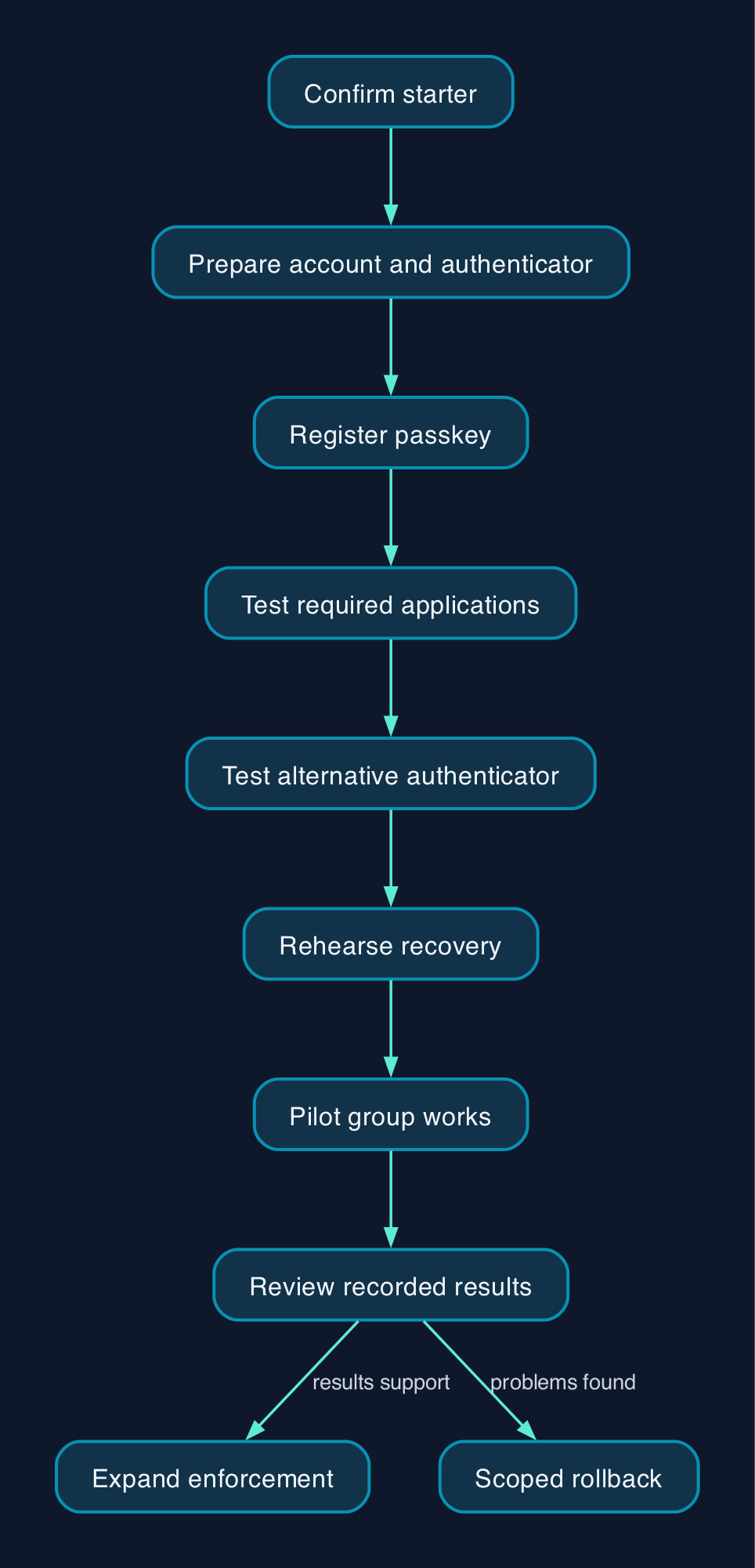
Use the following as a proposed operating model, with names assigned before the pilot.
| Part of the journey | Suggested owner | Required outcome |
|---|---|---|
| Confirm the starter | Hiring manager and HR | Approved identity, start date and access request |
| Prepare access | IT administrator or managed IT provider | Account, application permissions and approved authenticator ready |
| Register the passkey | Employee with supervised IT support | Credential attached to the intended account through a verified setup process |
| Test everyday work | Employee and application owner | Successful sign-in to every application needed for the role |
| Recover access | Named support team | Identity checked, replacement access issued and lost credential addressed |
| Remove access | HR and IT | Account access withdrawn and company equipment recovered |
For outsourced support, put registration, identity checking, lost-key handling and out-of-hours recovery explicitly in scope. Request a demonstration of each workflow before accepting the service.
Budget for the complete rollout
The supplied evidence does not establish comparable UK prices for hardware keys, managed deployment or every identity platform. Obtain GBP quotations covering VAT, delivery, replacement equipment and support hours before choosing a route.
One documented reference point is Microsoft Entra ID. Its enablement guide says passkeys are available in every edition, including Free, without extra licences. Its deployment prerequisites identify P1 capabilities for Conditional Access enforcement and deployment reporting.
The supplied UK pricing page, dated 28 September 2026 in the evidence pack, lists P1 from £5.40 per user per month, paid yearly with an annual commitment. It also lists P1 as included with Microsoft 365 Business Premium and Microsoft 365 E3. The extract does not establish VAT treatment or minimum quantities, so confirm both before ordering and check existing entitlements first.
Your rollout budget should cover:
- Any additional identity-policy licences.
- Primary authenticators, spares, delivery and replacement.
- Application compatibility checks and configuration.
- Supported registration sessions and accessible instructions.
- Recovery staffing, training and escalation.
- Credential removal and equipment handling when staff leave.
Treat those as quotation components, not a priced total cost of ownership. A free authentication feature does not establish that deployment and operation cost nothing.
Rollout checklist for new starters and existing staff
The following is CTC’s recommended acceptance checklist. Complete it on a limited group before changing access requirements across the business.
Prepare accounts and equipment
- [ ] Inventory the actual sign-in routes. List browser applications, desktop clients, remote access and shared workstations. Record which routes use the identity service and which retain separate credentials.
- [ ] Choose approved authenticators by working arrangement. Specify a route for managed laptops, shared computers, remote starters and employees without an approved phone.
- [ ] Confirm administrative permissions. Record who can change policy, register credentials and authorise recovery.
- [ ] Preserve the current configuration. Save policy settings, group membership and an authorised restoration procedure. Verify emergency administrative access before enforcement.
- [ ] Write the first-registration procedure. State how staff identity is checked and how the initial account access is delivered. Do not leave the helpdesk to improvise this step.
For Microsoft Authenticator specifically, the official prerequisites require Android 14 or later, or iOS 17 or later. Cross-device registration and authentication require Bluetooth and internet connectivity on both devices. The same guide says cross-device registration is unavailable when attestation is enabled, so test the chosen policy rather than assuming a QR-code journey will work.
Run the complete onboarding journey
- [ ] Start with an unconfigured test account. Run through the same invitation, equipment and registration steps a real starter will receive.
- [ ] Provide short, device-specific instructions. Show the expected prompts and the support contact. Have someone outside IT follow them without coaching.
- [ ] Test required applications. Record successful access and unresolved failures for each role.
- [ ] Test the alternative authenticator. Confirm that employees who cannot use the default option still have a supported route.
- [ ] Record effort. Measure time to first successful work session, failed registrations and support contacts.
Rehearse recovery before enforcement
- [ ] Simulate a lost phone or key. Confirm that support can verify the person without relying solely on a message from the affected account.
- [ ] Test replacement registration. Complete a replacement-device journey and verify that the employee can resume work.
- [ ] Address the lost credential. Check the provider’s removal process and confirm the organisation’s intended access restrictions.
- [ ] Review fallback methods. Record which remain available, who may use them and when exceptions will be reviewed.
FIDO’s staged adoption model supports evaluating recovery alongside ordinary login. Registering a passkey while leaving a weaker recovery route uncontrolled does not establish complete phishing resistance.
Enforce gradually and keep rollback controlled
Requiring a new authentication method can lock people out. Proceed only after pilot users have a working credential, tested application access and an approved recovery route.
- [ ] Apply the policy to the pilot group. Confirm that the intended requirement is enforced, rather than merely offered.
- [ ] Test excluded users and applications. Verify that policy scope matches the approved plan.
- [ ] Approve expansion against recorded results. Resolve unexplained lockouts and registration failures before adding another group.
- [ ] Use a scoped rollback if needed. Restore the affected group’s previous approved policy, record the exception and investigate before retrying.
Compare options by their role in onboarding
These suppliers operate at different layers. A passkey store, a hardware authenticator and an identity-policy service are complementary components, not interchangeable subscriptions.
| Option | Documented role | When to evaluate it | What to prove in your pilot |
|---|---|---|---|
| Google Password Manager | Synced passkey provider identified in Microsoft’s documentation | Staff use compatible devices and the organisation permits the proposed sync arrangement | Account ownership, recovery, accepted credentials and leaver handling |
| Apple iCloud Keychain | Synced passkey provider identified in the same documentation | Apple devices feature in the intended working environment | Compatibility, account control and replacement-device access |
| Yubico YubiKey | Hardware device-bound passkeys described by Yubico | A physical credential fits the role or an approved phone is unavailable | Connector compatibility, PIN use, spare-key registration and replacement |
| RSA Authenticator | Device-bound passkeys on iOS and Android, according to RSA | The business is assessing an app-based device-bound route | Supported identity integrations, device requirements, licensing and recovery |
| Microsoft Entra ID | Identity service with group-targeted passkey profiles and optional enforcement described in its enablement guide | Applications already depend on Entra or there is a separate case for adopting it | Application coverage, profile behaviour, enforcement licensing and recovery |
The supplied material does not establish equivalent workforce administration, UK commercial terms or integration coverage across these options. Use the table to choose pilot candidates, not to infer a universal winner.
Editorial analysis
CTC’s recommendation is to make the first working day the acceptance test. An employee should receive suitable equipment, register through a clear process and reach the applications needed for the role without an improvised recovery call.
There is evidence that routine sign-in can be quicker. Microsoft’s deployment guidance reports consumer-account password sign-ins taking up to 24 seconds on average, compared with 3 seconds for synced passkeys. Those are supplier-reported consumer figures, not measurements of employee onboarding or a forecast for a UK business.
Measure onboarding separately from subsequent sign-in. Compare registration completion, support contacts and recovery outcomes with your existing process. Expand when those results justify it.
Sources
- FIDO Alliance — Passkeys, the journey to prevent phishing attacks, Part 1, March 2025
- Microsoft Learn — Passkeys authentication method in Microsoft Entra ID
- Yubico — FIDO Alliance design guidelines and passkey usability
- RSA — Are passkeys ready for enterprise use?
- Microsoft Learn — How to enable passkeys in Microsoft Entra ID
- Microsoft Learn — Microsoft Entra authentication overview
- Microsoft Learn — Prerequisites for phishing-resistant passwordless deployment
- Microsoft Security — UK Microsoft Entra plans and pricing
- Microsoft Learn — Enable passkeys in Microsoft Authenticator