
Protect the source documents, databases and recovery configuration behind each assistant, then test whether you can restore a usable service with the right access permissions. Set separate targets for acceptable data loss and downtime. For a small or mid-sized UK business, the practical starting point is a named recovery owner, protected backup access and a rehearsed restore procedure. Buy additional tooling only where your existing arrangements fail those tests.
Start with the information the assistant actually needs
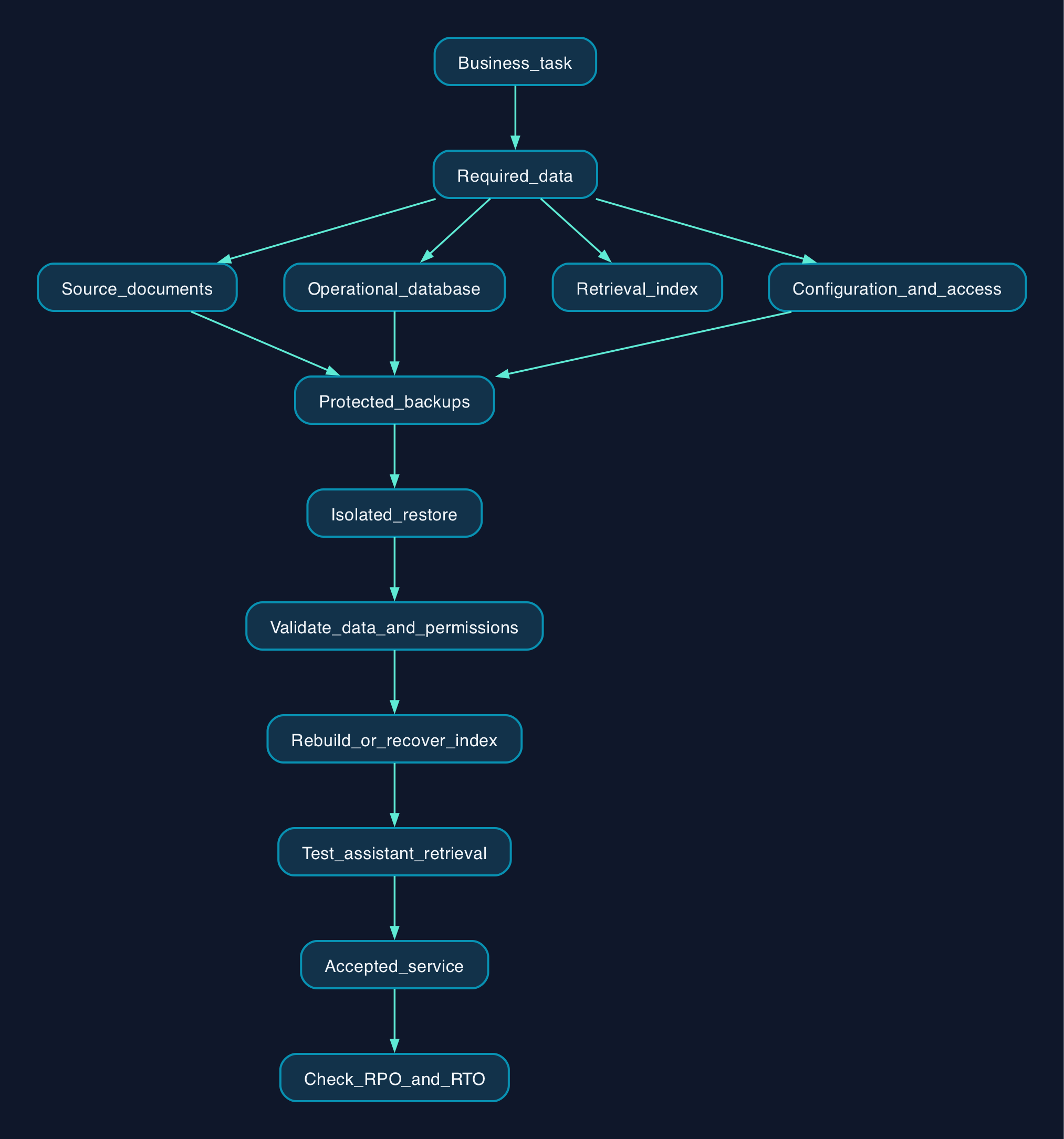
Build the recovery plan around a business task, such as answering customer questions from approved product documents and an order database. Record which information must be available for that task to work, who owns it and where it lives.
For each assistant, inventory:
- Authoritative documents and database records.
- Approved outputs that the business needs to retain.
- Search indexes, including any vector index used to retrieve related content.
- Connector settings, application configuration and deployment instructions.
- Access rules and the identities used to retrieve information.
- Encryption-key recovery arrangements and relevant audit records.
Treat this as a proposed inventory to check against your system. Some assistants will use only a document library; others will depend on several separately operated services.
The available product evidence is concentrated on Microsoft 365 backup. It supports the supplier examples below, but does not establish backup capabilities for Google Workspace, AWS databases or self-hosted systems. For those environments, apply the same acceptance checks and require platform-specific recovery documentation before selecting a product or running a restore.
Define what successful recovery means
Write down a recovery point objective, or RPO, for each important dataset. This is the maximum gap in recoverable changes the business will accept. Also set a recovery time objective, or RTO, covering the time allowed to return the business task to use.
Measure the second target from disruption to an accepted service. Include locating a healthy copy, obtaining approval, restoring data, rebuilding any retrieval index and checking access.
Choose the restore method as carefully as the schedule. For example, Microsoft’s documentation distinguishes full account or site restore points from individual-file restore points. A frequent full-site restore point does not establish that an individual document can be recovered at the same interval.
Set the retention period according to how far back the business may need to investigate an error. Record who approves that period and how expired copies will be removed. Do not select indefinite retention simply because a supplier offers it.
Assign ownership across the recovery chain
For an assistant that retrieves business information, use the following responsibility map as a starting point. Assign actual names or contracted teams before enabling production use.
| Component | Recommended protection | Responsible role | Acceptance check |
|---|---|---|---|
| Source documents | Recoverable content, required versions and relevant metadata | Document owner and backup operator | Approved files open correctly and have the intended access |
| Operational database | Backup and recovery method documented for the specific database engine | Database administrator or contracted provider | Application checks and agreed reconciliation queries pass |
| Retrieval index | Tested rebuild procedure, or a supported backup where rebuilding would miss the recovery target | Application owner | Test questions retrieve the expected source material |
| Connectors and configuration | Protected configuration records and a documented credential-recovery process | Application and identity administrators | Connections work with approved permissions |
| Saved assistant outputs | Explicit inclusion where outputs are business records | Business owner | Required outputs can be located and recovered |
| Recovery procedure | Instructions and contacts accessible during the incident being tested | Recovery owner | Another authorised operator can complete the exercise |
Make index recovery a deliberate choice. If rebuilding is the proposed method, test its duration and preserve the inputs needed to reproduce it. If that test misses the recovery target, assess supported index backup or another recovery approach.
For databases, require an application-consistent recovery procedure: one that returns the database to a usable state for the application. Do not accept a copied folder as sufficient evidence. Ask the responsible administrator to demonstrate the recovery method for the actual engine, version and hosting arrangement.
Protect the backups from the incident
Use a separate, tightly controlled backup administration role. Keep the assistant’s routine identity out of backup deletion and retention administration. Where supported, require multifactor authentication and additional approval for destructive backup changes.
Assess whether an attacker controlling production administration could also erase the recovery copies. Where the chosen service supports immutable retention, which prevents changes or deletion for a defined period, confirm its limits and test the permitted administration paths. Record who can change future retention and who can close the account.
Protect access to recovery instructions and encryption keys as well. Test the incident assumption that matters to your business, such as an unavailable office, a locked primary administrator account or a compromised production tenant.
For UK buyers, put storage location, support access and subcontractor arrangements into the quotation and contract review. A provider describing both UK and European storage has not, by that statement alone, committed your backups to a specific UK location.
Budget for recovery work as well as storage
The supplied research dated 28 September 2026 contains the following published commercial references. They use different charging units and include different services, so they are not a like-for-like price ranking.
| Offering | Published charging basis | Conditions and unanswered quotation questions |
|---|---|---|
| Microsoft 365 Backup | US$0.15 per GB per month, pay as you go | Azure subscription required. Confirm billable volume, UK billing currency, VAT and any additional charges. Published price |
| Veeam Data Cloud Foundation | US$2.63 per user per month, billed annually | Advertised figure reflects a volume discount for 251 or more users. It is not an established price for a smaller business. Purchasing terms |
| Veeam Data Cloud Advanced | US$3.33 per user per month, billed annually | Entra ID protection included. Confirm local price, eligibility and contractual minimums. Purchasing terms |
| Veeam Data Cloud Premium | US$7.00 per user per month, billed annually | Confirm the required recovery capabilities and regional terms before choosing the tier. Purchasing terms |
| Cyberfort managed Veeam service | £35 per terabyte per month in its G-Cloud listing | Listing also describes pricing based on capacity and user count. Obtain the full schedule, VAT treatment, minimum commitment and eligibility for the proposed purchase. Supplier listing |
The Veeam figures are monthly equivalents under annual billing, not verified monthly rolling-contract prices. Its page says prices vary by region and are available in local currencies. The supplied extracts do not establish VAT treatment or complete regional and minimum-quantity terms for every plan.
For a managed service, establish whether user licensing is bundled. Veeam’s service-provider licensing guide describes per-user licensing for Veeam Backup for Microsoft 365; that licensing model is distinct from a provider’s final customer tariff.
Build a total-cost worksheet covering setup, initial backup, database protection, storage, monitoring, staff training, recovery exercises, incident assistance and exit. Include temporary recovery infrastructure and index rebuilding where relevant. Do not add storage or infrastructure charges again where the selected subscription already includes them.
No complete total cost can be calculated from these prices without your workload size, retention requirements and operating responsibilities.
Rollout and recovery checklist
Use a limited pilot before expanding protection. Each item should produce evidence that the recovery owner can inspect.
- [ ] Approve the inventory. Match every required document store, database and configuration dependency to a named owner.
- [ ] Agree recovery targets. Record acceptable data loss, downtime and retention for each business task.
- [ ] Confirm the supported method. Obtain documentation for the precise workload, database version, product edition and restore destination.
- [ ] Review permissions. Grant only the access required for backup and recovery; record approval for any wider provider access.
- [ ] Configure protection. Complete the initial backup and confirm that the intended objects are included.
- [ ] Test alerts. Create a safe test failure and verify that a named operator receives and acknowledges it.
- [ ] Restore into an isolated destination. Recover representative documents and a database copy without exposing them to production users or assistants.
- [ ] Validate the data. Check document contents, metadata and database consistency using acceptance criteria approved by the data owners.
- [ ] Validate access. Test with permitted and restricted accounts before reconnecting the assistant.
- [ ] Validate retrieval. Rebuild or recover the index, then run agreed questions and inspect the underlying sources.
- [ ] Measure the whole exercise. Record elapsed recovery time, missing changes, manual work and unresolved failures.
- [ ] Approve production recovery and rollback. Document who authorises the switch and how to return to the previous state if acceptance fails.
- [ ] Schedule the next exercise. Set a review date and repeat relevant checks after material changes to data sources, permissions or hosting.
An in-place restore can replace newer information. Microsoft explicitly documents that behaviour for original-location recovery. Prefer a separate destination for investigation where supported, and preserve the current state before authorising an overwrite. Microsoft’s restore options
Keep ingestion and assistant write actions paused during recovery where the application permits it. Reconcile legitimate changes made after the chosen restore point before reopening the service.
If jobs fail or lag, investigate the actual error before increasing concurrency. For its Microsoft 365 integration, NAKIVO recommends reducing request volume or concurrent tasks and allowing time before retrying when throttling occurs. NAKIVO’s recovery guidance
Compare operating models against the same tests
Retain an existing backup arrangement if it passes the workload, access and recovery tests. Add or replace a service when a demonstrated gap justifies the cost.
| Option | Relevant documented scope | When to evaluate it | What still needs proving |
|---|---|---|---|
| Microsoft 365 Backup | SharePoint, OneDrive and Exchange recovery within Microsoft’s service boundary | Your priority is those workloads and your team can operate recovery | Required restore granularity, actual recovery duration and protection for dependencies outside Microsoft 365 |
| Veeam Data Cloud for Microsoft 365 | Managed backup infrastructure and storage, with workload coverage dependent on plan | You want supplier-operated backup infrastructure | Exact edition, location, permissions recovery and who performs incident restores |
| BackupVault | Provider-described Microsoft 365 copies outside Microsoft, held in UK and European facilities | Separation from the production platform is a selection criterion | Contracted location, retention, recovery performance and export arrangements |
| Cyberfort managed Veeam service | Scheduled Microsoft 365 protection and restoration on request | You need an operator as part of the service | Recovery completion targets, customer approval process, access requirements and exit support |
Sources for the stated scope are Microsoft, Veeam, BackupVault and Cyberfort’s supplier listing. These are supplier descriptions, not independent performance tests.
Ask every candidate to demonstrate the same recovery scenario using representative data. Compare time to accepted recovery, operator effort, restored permissions and the ability to retrieve your data when leaving.
Editorial analysis
Make successful recovery of the business task the acceptance criterion. A completed backup job is useful evidence, but it should not be the final sign-off.
For a small business, the first practical improvement is often to assign an operator and rehearse a restore using existing tools. For a mid-sized organisation with separate application, database and infrastructure teams, require a joint exercise. The recovery owner should see the documents, database, access controls and assistant working together before accepting the service.
Sources
- Microsoft — Microsoft 365 Backup product scope and pricing
- Microsoft Learn — Restore data in Microsoft 365 Backup
- Veeam — Backup for Microsoft 365 product coverage
- Veeam — Data Cloud pricing and purchasing options
- Veeam — Backup for Microsoft 365 rental licensing and usage reporting
- BackupVault — Microsoft 365 backup service description
- Digital Marketplace — Cyberfort Backup for Microsoft365 service listing
- NAKIVO — Backup job delays due to Microsoft 365 API throttling