
UK IT teams should approve an AI upgrade only after checking the exact server configuration, software compatibility, power, cooling and impact on existing applications. Start with a measured workload and a reversible pilot. HPE’s accelerator QuickSpecs explicitly require platform-specific configuration checks, including enablement kits. Treat a supported configuration and an agreed operating owner as prerequisites, then compare the full upgrade cost with running the workload separately.
Define the workload before specifying an upgrade
Write a short acceptance brief before requesting hardware quotations. For a UK business sharing servers between finance, file services and other applications, that brief should protect the existing services as explicitly as it defines the AI task.
Record what the application must do, the data it may use, expected simultaneous users, acceptable response time and how its output will be assessed. Distinguish running an existing model, commonly called inference, from adapting or training a model.
For a document assistant, specify the collection it can search and the permissions it must preserve. For image analysis, identify the image size, arrival rate and acceptable processing delay. These are proposed test inputs, not grounds for choosing a particular accelerator without measurement.
Keep the workload fixed during the comparison. Changing the model, input size or concurrency between tests makes the results difficult to interpret.
The available primary evidence supports HPE configuration checks and a specific Lenovo implementation. It does not establish Dell retrofit compatibility, UK stock availability or a validated upgrade for any particular installed machine. Use this guide to prepare the assessment; obtain configuration approval before ordering parts.
Check the installed machine and its support position
Record the model, generation, serial number, processors, memory, storage layout, expansion cards, power supplies and firmware versions. Include photographs or an inventory export where they help the supplier identify the installed configuration.
Ask for a written bill of materials tied to that inventory. It should identify the accelerator, installation components, firmware requirements and support coverage.
| Existing estate | Evidence to request before purchase | Acceptance condition |
|---|---|---|
| Dell PowerEdge | Dell documentation for the exact model and configuration, supported accelerator part numbers, installation requirements and support confirmation. Dell PowerEdge GPU server overview | The proposed retrofit is documented for the installed machine |
| HPE ProLiant | Exact platform QuickSpecs alongside the accelerator documentation, including configuration rules and enablement kits | The accelerator and every required supporting component are accounted for |
| Lenovo ThinkSystem | Product and installation documentation for the exact machine type, plus hardware and software support confirmation | The proposal matches the installed server rather than relying on a different ThinkSystem example |
HPE’s accelerator QuickSpecs explicitly send readers to platform QuickSpecs for configuration rules. Apply the same purchasing discipline across all three suppliers, without assuming their rules are interchangeable.
Have the supplier resolve card dimensions, slot placement, expansion-slot connectivity, processor requirements, power cables and cooling components. Ask which existing components must move or be replaced.
Also establish who handles a failure involving the server, accelerator and software. A useful quotation identifies the support provider, covered components, service hours, UK site coverage, replacement arrangements and exclusions.
Check memory, power and the complete software stack
Treat memory capacity as a starting point
The HPE accelerator list provides three useful memory-capacity examples.
| Accelerator listed by HPE | Published accelerator memory |
|---|---|
| NVIDIA L4 | 24GB |
| NVIDIA L40S | 48GB |
| NVIDIA RTX PRO 6000 Blackwell Server Edition | 96GB |
These figures compare memory capacity only. They are neither a performance ranking nor a list of interchangeable upgrades.
Measure memory use with the intended model and representative demand. Include startup, simultaneous requests and the largest permitted inputs. Record system-memory consumption separately from accelerator memory, and reject a configuration that passes only a reduced demonstration.
Get facilities approval before installation
Give the facilities owner the proposed configuration and its documented electrical and cooling requirements. Ask them to confirm rack capacity, power distribution, uninterruptible power supply capacity, airflow and the intended redundancy arrangement.
Do not approve the change from the power-supply label alone. Require a documented capacity assessment and a plan to measure the complete server under representative load.
Schedule any disruptive installation in an agreed maintenance window. Work on electrical infrastructure belongs with appropriately qualified personnel.
Validate the versions together
Lenovo describes a deployment spanning hardware and firmware through drivers, Docker, CUDA and the AI framework. Its implementation paper illustrates why checking only the accelerator is insufficient.
Create a version record for the operating system, server firmware, accelerator driver, runtime, application framework and model. Where virtual machines or containers are involved, obtain support evidence for the intended deployment method.
Treat the older Lenovo implementation as a reference workflow, not an instruction to install its versions unchanged. Avoid applying generic BIOS tuning advice without documentation for your exact configuration and a tested recovery route.
Map the workload and assign responsibility
For an illustrative internal document assistant, describe the path from user sign-in through document retrieval to model execution and the returned answer. Identify every place documents, prompts, responses and logs may be stored or sent.
The following is a proposed responsibility map, not a vendor reference architecture.
| Component or activity | Suggested owner | Evidence required for handover |
|---|---|---|
| Server, accelerator and firmware | Infrastructure administrator | Approved configuration, inventory and maintenance record |
| Drivers and AI application runtime | Application engineer or contracted specialist | Tested version list and repeatable deployment instructions |
| Documents and access permissions | Business data owner | Approved collection and successful permission tests |
| Power, cooling and rack installation | Facilities owner or hosting provider | Capacity assessment and installation approval |
| Monitoring and incident response | IT service owner | Alert destinations, escalation contacts and recovery procedure |
| Output quality and acceptable use | Business process owner | Test cases and signed acceptance results |
For a small IT team, assign a deputy or contracted escalation route for the specialist software tasks. Lenovo’s stated prerequisites include Linux, scripting, containers and AI deployment knowledge; include that work in the staffing assessment.
Build the full UK cost model
No verified GBP upgrade prices are available in the supplied evidence. Request an itemised quotation in GBP, stating VAT treatment, delivery, installation, quote validity and support term.
Use the same evaluation period for every option. Separate one-off implementation costs from recurring operation.
| Cost component | What the quotation or assessment should include |
|---|---|
| Hardware | Accelerator, enablement parts, memory, storage and any required power or cooling changes |
| Implementation | Configuration assessment, installation, software setup, testing and scheduled downtime |
| Software | Applicable model, runtime, virtualisation and support licences, with renewal terms |
| Operation | Electricity, cooling, monitoring, patching and staff time |
| Support and recovery | Hardware cover, specialist assistance, backups and recovery testing |
| Exit or replacement | Configuration export, data transfer, removal, disposal and replacement planning |
For electricity, calculate measured incremental average power in kilowatts multiplied by operating hours and your business tariff in pounds per kilowatt-hour. Price cooling separately where it creates an additional charge; avoid counting it twice if already included in a hosting fee.
Compare upgrading the existing server, retaining it unchanged while running AI elsewhere, and commissioning a dedicated system. Keep unknown costs visible rather than presenting a hardware subtotal as total cost of ownership.
Follow a reversible rollout checklist
Installation, firmware changes and restarts can interrupt existing services. Agree the maintenance window and recovery procedure before making changes.
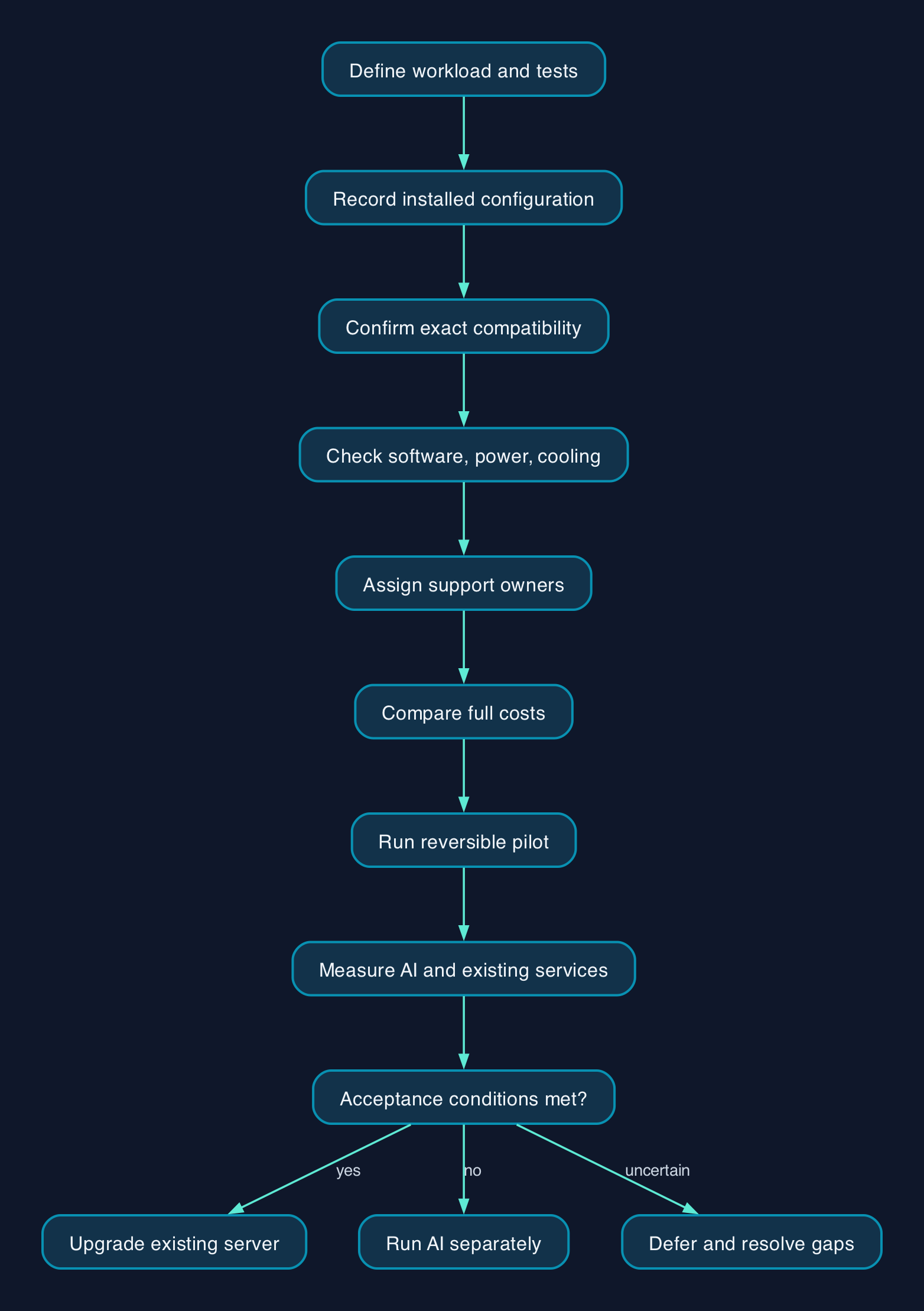
- [ ] Approve the workload brief. Record the model, permitted data, expected demand, quality tests and response-time target.
- [ ] Capture the existing baseline. Measure application response times, resource use and backup completion before introducing AI.
- [ ] Confirm the complete configuration. Obtain written compatibility evidence and an itemised parts list for the installed server.
- [ ] Approve facilities capacity. Record power, cooling, rack and redundancy acceptance from the responsible owner.
- [ ] Prepare recovery. Verify relevant backups and restore procedures, and document how to return the server to its previous supported configuration.
- [ ] Record the software versions. Identify the supported firmware, driver, runtime and application combination before installation.
- [ ] Restrict the pilot. Use an approved dataset and named users; confirm that unauthorised documents cannot be retrieved.
- [ ] Install through the approved procedure. Have the administrator or contracted specialist record changes and resolve hardware health alerts.
- [ ] Test representative demand. Measure output quality, response time, memory consumption, power and errors alongside existing application performance.
- [ ] Exercise failure and rollback. Confirm how to stop the AI service, recover it and restore normal business operation.
- [ ] Complete the handover. Assign alert ownership, patching, licence renewals, incident escalation and capacity review.
- [ ] Sign off against the original brief. Expand access only when both the AI workload and existing services meet their acceptance conditions.
Keep an explicit stop condition. If the pilot breaches a business application’s agreed performance limit, pause the AI workload and investigate before increasing capacity or access.
Decide whether to reuse, separate or defer
These are delivery choices, not claims that one server supplier performs better than another.
| Approach | When to consider it | Evidence needed |
|---|---|---|
| Upgrade an existing server | Compatibility is confirmed and the shared-service pilot passes | Supported configuration, measured spare capacity and a workable recovery procedure |
| Run AI on a separate system | You want to preserve the existing server’s operating configuration | Separate infrastructure costs, integration tests and clear support ownership |
| Keep the current setup and defer | Demand, skills or application requirements remain uncertain | A defined information gap and a limited next test |
For all three server families, reject proposals that substitute a product-family brochure for approval of the installed configuration. The comparison should use your workload, your support terms and your operating costs.
Editorial analysis
The strongest reason to reuse a server is a successful, supported pilot with an affordable operating plan. Existing ownership alone is not enough.
For a small or mid-sized business, put a limit on the investigation before buying parts. If configuration approval, facilities work or specialist staffing remains unresolved, retain the existing server for its current role and evaluate the AI workload separately.
Sources
- HPE — NVIDIA Accelerators for HPE QuickSpecs. Supplied extract reviewed on 28 September 2026; publication or update date not established.
- HPE — ProLiant artificial intelligence.
- Lenovo Press — Implementing AI Workloads using NVIDIA GPUs on ThinkSystem Servers. Supplied extract reviewed on 28 September 2026; the example configuration is identified in the paper.
- Server Parts — Dell PowerEdge GPU servers. Secondary source; use it as background when requesting exact-model documentation.