
GitHub Copilot Business is a credible choice for a UK software team that wants centrally assigned access and controls over available features and models. GitHub documents these organisation-level controls. Buy it only after testing the restrictions your team needs in its actual development tools. Content exclusions have material exceptions, so a managed subscription should support your engineering controls rather than become the sole barrier protecting sensitive code.
What central control means for a UK software team
The buying decision is whether your engineering lead can govern the ways developers use AI assistance without taking on more administration than the team can support.
Copilot Business provides controls over access, features and models. However, GitHub says policies generally govern users who receive a licence from the relevant organisation or enterprise; only some policies govern everyone interacting with particular resources. Policy scope therefore matters as much as the setting itself.
For a small team, start by writing down the decisions that need an owner. These might include which developers receive access, which repositories are suitable, whether agents may work on tasks, which models are approved and who investigates unexpected usage.
For a UK agency handling client code, make client permissions and contractual restrictions part of that assessment. For an internal software team, identify the repositories whose sensitivity makes a failed restriction unacceptable. These are procurement checks, not claims that a particular contract prohibits Copilot.
The available evidence supports an assessment of administration and deployment. It does not establish a current UK Business price, VAT treatment, support commitments, model-training terms, retention periods or UK-only processing. Obtain those commercial and data-handling terms before purchase if they determine suitability.
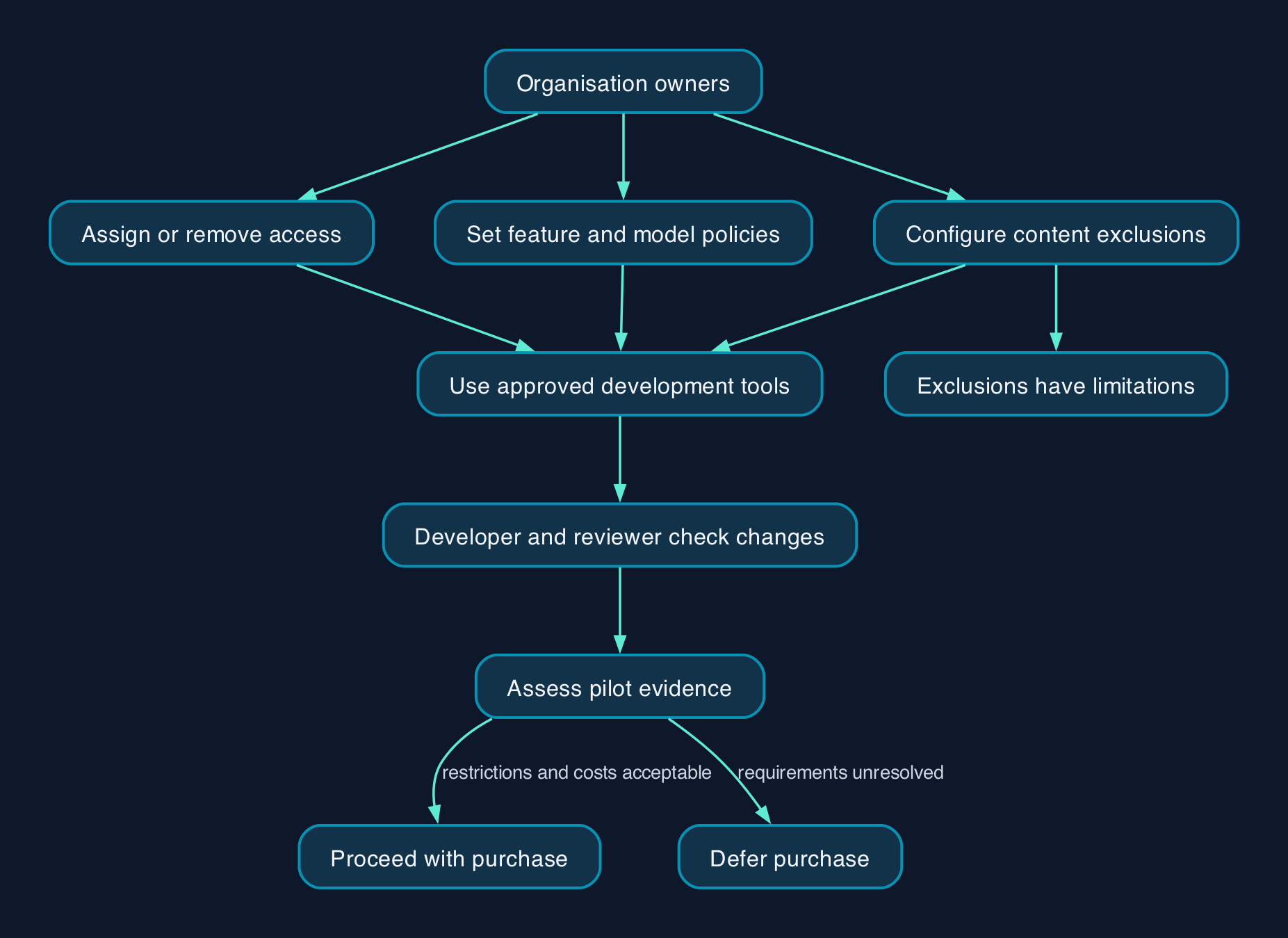
How administration and development work connect
A useful operating model separates subscription administration from responsibility for the code that reaches production.
GitHub lets organisation owners configure Copilot policies, while enterprise owners can enforce policies across their organisations or delegate decisions. Repository administrators can configure exclusions within their scope. These are distinct policy responsibilities with different exclusion scopes.
The following is a proposed responsibility map for a small or mid-sized team.
| Responsibility | Suggested owner | Evidence needed before rollout |
|---|---|---|
| Assign and remove access | Organisation owner | Pilot users can sign in; a removed user loses the assigned access |
| Approve features and models | Engineering lead with the policy administrator | Each permitted development tool behaves as intended |
| Identify restricted code | Repository owner | Sensitive paths are documented and restrictions are tested |
| Maintain network access | IT or network administrator | Approved access works through the office and remote-working routes |
| Review generated changes | Developer and code reviewer | Changes pass the team’s normal tests and review requirements |
| Monitor cost and adoption | Budget owner | Charges can be reconciled with assigned access and actual use |
| Handle failures and exit | Engineering lead | Developers can continue essential work without Copilot |
Network setup needs particular care. GitHub’s allowlist reference warns against allowing the general Copilot wildcard endpoint when using subscription-based routing to restrict plans. Ask the network administrator to test both an allowed Business connection and a blocked individual-plan connection.
That test only establishes behaviour on the route tested. A developer using a different connection needs equivalent coverage if network enforcement is part of your control design.
Test restrictions in each development tool
Do not assume an exclusion behaves identically in an editor, browser and command-line tool.
GitHub states that excluded content can still contribute indirect semantic information, such as type information supplied by the development environment. It also says exclusions do not apply to symbolic links or repositories on remote filesystems. Those qualifications appear in its content exclusion documentation.
Agent controls also need individual review. GitHub documents separate policies for Copilot cloud agent and third-party agents; disabling one does not automatically disable the others. See enterprise agent management.
For a team requiring all model access to pass through approved providers, the local model-key exception in Copilot CLI is a specific acceptance issue. Resolve it through your approved tool configuration and endpoint controls before enabling that workflow.
Pricing and the full cost of ownership
A reliable Business budget cannot be built from the supplied pricing extract. The captured GitHub plans page shows individual-plan information but does not establish the Business subscription price or its included usage.
Use the following cost model when requesting purchasing terms. It distinguishes missing prices from work that still consumes staff time.
| Cost component | What to establish | How to budget it |
|---|---|---|
| Copilot Business subscription | Price, billing currency, charging unit, commitment, minimum quantity and seat-removal terms | Use the current purchasing terms for the planned access level |
| Additional model or feature usage | Included allowance, charging basis and available spending controls | Set a pilot allowance and review actual charges |
| Existing GitHub subscription | Whether the current Free or Team organisation meets requirements | Count only additional costs caused by the decision |
| Deployment | Account setup, client updates, proxy configuration and policy testing | Estimate administrator hours at an internal cost rate |
| Training and review | Approved uses, sensitive-code handling and review of generated changes | Include developer and reviewer time |
| Ongoing administration | Access changes, policy reviews, usage reconciliation and support | Assign recurring staff time |
| Exit | Access removal, configuration cleanup and workflow handover | Include the work needed to return to the retained development process |
GitHub confirms that Free and Team organisations can buy Business in its setup instructions. Additional model availability may carry costs, according to its policy management guidance.
For a UK budget, record the invoice currency and VAT treatment explicitly. If purchasing terms are in US dollars, any GBP planning figure should show the exchange-rate assumption and relevant payment fees.
Over your chosen evaluation period, total cost should include subscription charges, additional usage, deployment, training, administration, review and exit. Keep the result conditional until those inputs are known. Faster drafting alone is not sufficient evidence of savings if reviewers spend longer correcting the output.
Migration and rollout checklist
Treat rollout as a test of both usefulness and enforceability.
- [ ] Name the administrator and budget owner. Record who can approve access, change policies and authorise extra spending.
- [ ] Inventory accounts and development tools. Include organisation memberships, existing personal subscriptions, editor extensions, command-line clients and remote development environments. GitHub says an individual plan is cancelled when its user joins Business or Enterprise, so check this transition with affected developers using the policy guidance.
- [ ] Agree the initial policy settings. Record approved features, models, previews and agents. Check the public-code matching setting explicitly: GitHub documents it as allowed by default for Business users in its enterprise policy instructions.
- [ ] Choose a bounded pilot. Select a repository with reliable tests and an accountable reviewer. Establish review time and rework before introducing assistance.
- [ ] Preserve a recovery route. Start from a recoverable source-control state and keep normal review and release approvals in place.
- [ ] Configure and test exclusions. Follow GitHub’s exclusion configuration instructions, then test with harmless representative files.
- [ ] Check propagation before accepting the test. Existing development environments may take up to 30 minutes to receive exclusion changes. GitHub’s troubleshooting guidance also describes reloading settings.
- [ ] Test network routes and client versions. Verify the approved setup from the office and supported remote-working locations against GitHub’s network-routing requirements.
- [ ] Train users on the permitted workflow. Each participant should know what material is prohibited and who reviews generated changes.
- [ ] Exercise rollback and offboarding. Demonstrate removal of assigned access and confirm that essential development work continues.
- [ ] Make the purchase decision from pilot evidence. Review code quality, rework, administration and charges against the acceptance conditions agreed at the start.
Which deployment option fits
The practical alternatives here are ways to govern the named product and the option to defer it. The evidence does not support a feature or price ranking against other coding-assistant suppliers.
| Option | Suitable circumstances | Administration and compatibility | Cost and exit considerations |
|---|---|---|---|
| Copilot Business in an existing organisation | A team needs centrally assigned access and organisation policies | Organisation owners manage access and available features; test the actual clients in use | Establish Business pricing and usage terms; plan seat removal and configuration cleanup |
| Copilot Business under an existing enterprise | Several organisations need common rules or delegated administration | Enterprise policies can enforce decisions across organisations | Include governance effort; do not assume a Copilot Enterprise upgrade is required merely for enterprise policy management |
| Individual Copilot subscriptions | A developer-led evaluation where company administration is not the acceptance criterion | This does not establish the organisation-managed controls assessed in this guide | Individual prices are not a proxy for Business costs; account transition needs attention |
| Retain the current development workflow | Restrictions, contractual requirements or pilot results remain unresolved | Keep existing testing and review ownership | Avoid a new subscription while resolving the specific blocker |
The first option is supported by GitHub’s organisation administration documentation. Enterprise-level policy management is explicitly documented for both Business and Enterprise in GitHub’s enterprise policy guide.
Do not select Business if a non-negotiable requirement depends on an exclusion working in a mode GitHub explicitly lists as unsupported. Restrict the proposed workflow or establish another suitable control before proceeding.
Editorial analysis
Copilot Business is worth piloting when the immediate problem is unmanaged access and inconsistent rules across a software team. Its documented administration controls address those decisions directly.
The harder buying question is who will maintain those controls. A small team should favour a limited, understood configuration over enabling features that nobody has time to test or review. An engineering lead should be able to explain what is permitted, demonstrate a blocked action and identify who approved the latest policy change.
Our recommendation is conditional: proceed when the pilot demonstrates enforceable restrictions, acceptable review effort and a complete commercial case. Defer when the intended workflow relies on unsupported exclusions or unresolved data-handling terms.
Sources
The supplied evidence was retrieved on 28 September 2026. Publisher update dates were not established.
- GitHub Docs — Managing policies and features in your organisation
- GitHub Docs — Managing policies and features in your enterprise
- GitHub Docs — Copilot policies for enterprises and organisations
- GitHub Docs — Managing Copilot in your organisation
- GitHub Docs — Setting up Copilot for your organisation
- GitHub Docs — Agent management for enterprises
- GitHub — Copilot plans and pricing
- GitHub Docs — Content exclusion for Copilot
- GitHub Docs — Excluding content from Copilot
- GitHub Docs — Managing Copilot access to your organisation’s network
- GitHub Docs — Troubleshooting common Copilot issues
- GitHub Docs — Copilot allowlist reference
- GitHub Docs — Administering Copilot CLI for your enterprise
- GitHub Docs — Reviewing changes to content exclusions