
A UK company should approve Claude access for a defined task, named users and a limited set of data before connecting business systems. Start with reading, then approve changes separately after testing permissions and recovery. The distinction matters because Anthropic’s Microsoft 365 connector supports write actions when enabled, while Claude Code permissions depend on its operating mode and configuration. Neither product should receive unrestricted access simply to make a pilot easier.
Define the access your business actually needs
Write an approval statement before installing anything. For example, a hypothetical engineering consultancy might permit its support team to search approved equipment manuals, while excluding customer contracts, personnel records and source-code repositories.
That statement gives the administrator a testable boundary. “Help staff work faster” does not identify which documents Claude needs, what it may change or who accepts responsibility for mistakes.
Separate the proposed access into three routes.
| Route | What the supplied documentation establishes | Recommended approval boundary |
|---|---|---|
| Microsoft 365 connector | Uses the member’s existing access to SharePoint, OneDrive, Outlook and Teams; write actions depend on administrator enablement. Documentation | Named users, reviewed document permissions and an explicit decision on each write capability |
| Claude Code | Reads files and can edit or execute commands according to its permission configuration. Security documentation | A selected repository, restricted credentials and a recorded permission mode |
| Custom business-system connection | Model Context Protocol, or MCP, servers can expose tools, databases and APIs to Claude Code. MCP documentation | An approved server operator, limited backend permissions and an agreed tool list |
For a small business without a dedicated administrator, make configuration, testing and access removal explicit deliverables in the IT provider’s work order. Retain an internal owner who can decide whether a requested expansion serves the original business task.
Resolve data handling before connecting sensitive records
The supplied evidence supports an access-control guide, but it does not establish complete contractual terms for retention, model training, international transfers or UK data residency across every Claude deployment. Obtain the applicable terms before approving confidential or personal information.
Ask procurement or the person responsible for data protection to record:
- Which Claude product, account type and inference provider will process the information.
- What happens to prompts, retrieved documents, outputs, logs and backups.
- Whether information may be used for model training under the selected terms and settings.
- Where processing occurs, who else processes the data and how deletion works.
- Whether customer confidentiality agreements permit the proposed use.
Anthropic says its Microsoft 365 connector retrieves content on demand and does not cache file content. That is a statement about the connector’s operation, not sufficient evidence for a conclusion about every downstream copy, conversation record or processing location.
Treat missing answers as a reason to narrow the pilot to synthetic or non-confidential material. Do not treat successful sign-in as approval to process customer records.
Assign responsibility at every access boundary
For Microsoft 365, the documented route involves a user signing in, an Anthropic-hosted connector and access to Microsoft services through delegated permissions. Anthropic manages the connector’s credentials in its backend infrastructure. Microsoft 365 connector security guide
Use the following responsibility map as a proposed operating arrangement.
| Boundary | Accountable person | Evidence to retain before launch |
|---|---|---|
| Business purpose and document selection | Department or data owner | Approved task and excluded information |
| Claude account and organisation settings | Claude administrator | Approved account route and enabled connectors |
| Microsoft identity and consent | Microsoft 365 administrator | Assigned users, granted permissions and access-test results |
| Repository and execution environment | Engineering lead | Selected repository, permission rules and available credentials |
| Custom connector and backend system | Application owner or contracted provider | Server operator, tool inventory and backend access scope |
| Review and incident response | Named operational owner | Review procedure, escalation contact and tested shutdown steps |
One person may fill several roles in a smaller company. The important requirement is that each decision has an owner and each connection has someone who can disable it.
Check document permissions before Microsoft 365 consent
Begin with ordinary staff accounts, not the administrator account used to grant consent. Because the connector uses existing Microsoft 365 access, an over-permissioned employee account creates an over-broad starting point for Claude. Delegated access model
Review shared libraries and groups before the pilot. Use harmless test documents to check that a pilot user can retrieve an approved document and cannot retrieve a deliberately restricted one. Include both search and direct retrieval where the enabled tools support them.
Restrict who can connect as well as what they can read. Anthropic documents group-based Conditional Access and an “Assignment required” setting on both Claude applications as ways to limit connector access. Microsoft 365 connector security guide
Test Conditional Access through an actual connector request. Anthropic reports that later requests originate from its servers and can carry the device record from the original connection, rather than the device currently in use. A successful test in a normal Microsoft 365 browser session therefore does not establish how the connector behaves. Conditional Access behaviour
Keep write tools disabled during the initial document-search pilot. Enabling them requires the additional consent and configuration described in Anthropic’s administrator setup guide. Approve that expansion only after testing the intended action and its recovery procedure.
Restrict source-code access and executable tools
Start Claude Code in the selected repository with only the credentials needed for the task. Exclude production credentials, unrelated client repositories and confidential exports from the pilot environment.
Do not mistake the working directory for a complete read boundary. Anthropic says Manual mode prompts before its Read, Grep and Glob tools access paths outside that boundary, but read-only Bash commands have broader access unless sandbox restrictions are configured. Its documented sandbox read restrictions apply only when sandboxing is enabled. Claude Code security controls
Choose the permission mode deliberately. Manual mode asks before file modifications and most shell commands; auto mode uses a classifier to review actions instead of the user. Accept Edits mode automatically approves specified file operations within the working directory. Permission modes and protections
Inspect effective rules with `/permissions` before testing. Anthropic documents persistent approvals for some commands and domains, so yesterday’s “don’t ask again” choice can affect today’s session. Permission management
Require a developer to review the resulting diff and relevant test results before merging or deploying. If a pilot is intended only to explain code, do not provide deployment credentials or approve write tools to overcome a blocked request.
Inspect business-system connectors individually
Approve each MCP server as a separate integration. Record its operator, hosting location, authentication method, exposed tools and the backend account it uses.
A connector’s availability does not make its entire tool catalogue suitable for the pilot. Anthropic’s Messages API MCP connector supports enabling or disabling individual tools, including allowlists and denylists. That is an API-specific control; check the equivalent controls on the Claude surface being deployed. Messages API MCP connector
For a customer-management system, a sensible initial scope might allow searching selected records while excluding deletion, bulk export and outbound messages. Enforce those limits through the connector and backend permissions wherever possible, then test them with synthetic records.
Include a harmless prompt-injection test. Place an instruction in a test document asking the assistant to disclose a synthetic secret or perform an unauthorised action. The expected result is refusal or an enforced block, with no real data movement. Anthropic’s MCP guidance explicitly identifies external content as a prompt-injection risk; treat this test as one check, not proof against every attack.
Budget for administration as well as subscriptions
Individual subscription prices provide a spending reference, but they do not establish the cost of an organisation-managed rollout.
The supplied 28 September 2026 Anthropic pricing extract lists Pro at US$20 per month when billed monthly and Max from US$100 per month. These are individual-plan prices, exclude applicable tax and remain subject to usage limits. They are not GBP quotations or equivalent usage allowances; the extract does not establish UK VAT treatment.
Request the applicable business-plan quotation and budget separately for:
- Document-permission cleanup and identity configuration.
- Connector setup, testing and maintenance.
- Staff training and output review.
- Monitoring, incident investigation and access reviews.
- Additional usage and the work required to remove integrations.
Do not present the subscription subtotal as total cost of ownership. For this decision, administrator time and the ability to enforce policy belong in the purchasing assessment.
Rollout and recovery checklist
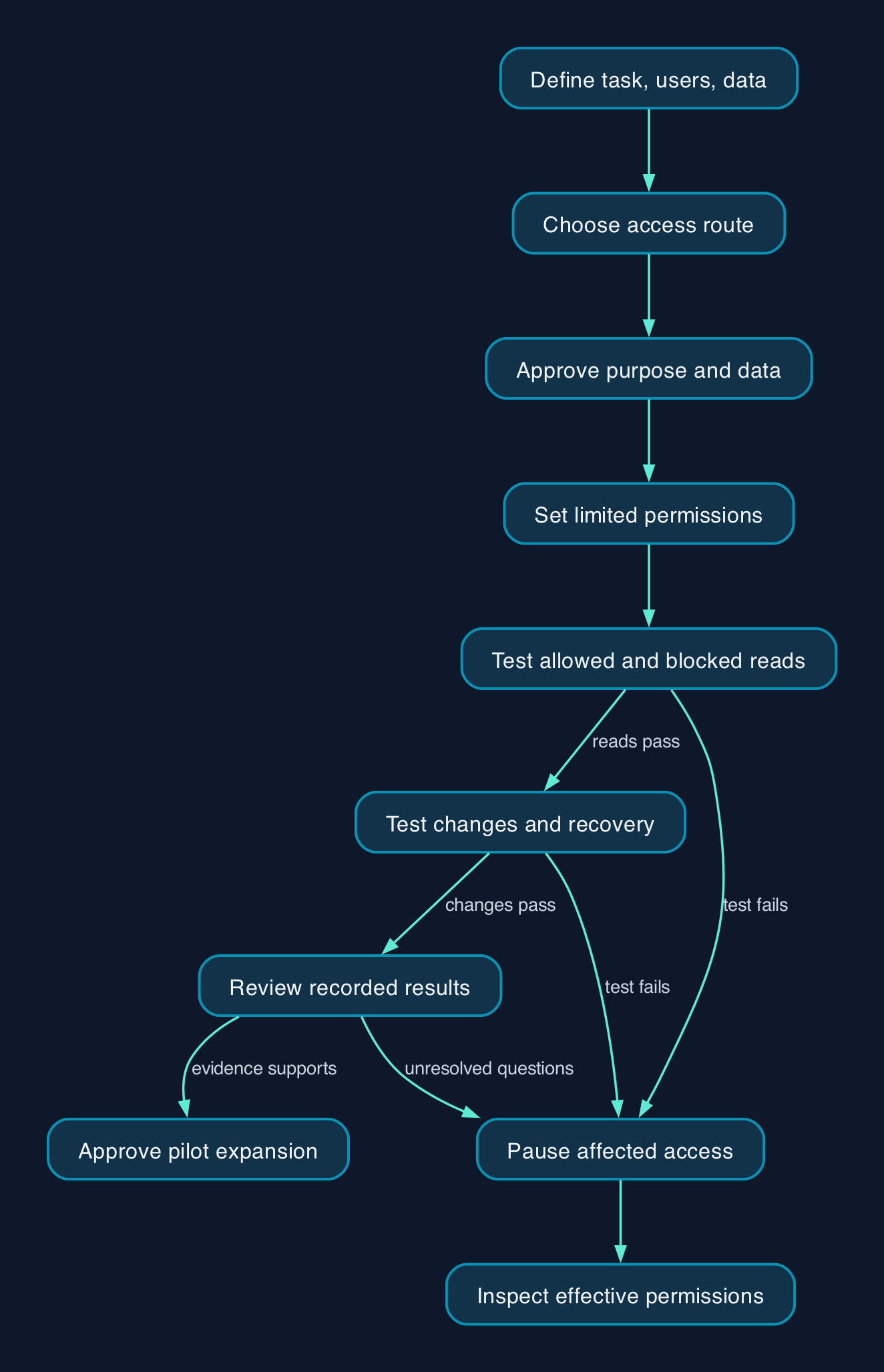
Complete these checks before expanding beyond the pilot.
- [ ] Record the task and owner. The approval names the users, systems, permitted actions and excluded information.
- [ ] Approve data handling. The responsible person has accepted the applicable terms for the intended data.
- [ ] Confirm the account route. Pilot users authenticate through the approved organisation or provider.
- [ ] Capture the starting configuration. Retain granted permissions, connector settings and Claude Code rules so changes can be reversed.
- [ ] Prepare recovery before allowing writes. Confirm backups or version history and test restoration on disposable material.
- [ ] Test permitted and forbidden reads. An approved document is accessible and a restricted test document remains inaccessible.
- [ ] Test changes separately. An authorised change succeeds on a test record; an excluded action is blocked.
- [ ] Test malicious document instructions. Synthetic content cannot trigger the excluded action in the agreed test.
- [ ] Train pilot users. Each user demonstrates how to review an action, reject it and report unexpected access.
- [ ] Rehearse shutdown. Disable the connection or revoke the relevant access, then confirm that a fresh retrieval attempt fails.
- [ ] Approve expansion from recorded results. The owner reviews failures and unresolved questions before adding users or data.
If a test fails, pause that access route and inspect the effective permissions before adding broader privileges. For Microsoft 365, Anthropic documents organisation-level disabling and capability-specific permission revocation. Connector access restrictions
Warn affected users before revoking a shared integration. Removing access is a containment step; separately inspect and restore any records already changed.
Editorial analysis
The most useful acceptance question is whether an ordinary employee account can complete the approved task while failing to retrieve excluded information or perform excluded actions.
That gives a UK small or mid-sized business a concrete purchasing test. Choose the account, configuration and support arrangement that can demonstrate those boundaries and sustain them when staff leave, permissions change or new tools become available. Expand access when the evidence supports the next task.
Sources
- Anthropic — Microsoft 365 connector
- Anthropic — Microsoft 365 connector security guide
- Anthropic — Set up the Microsoft 365 connector
- Anthropic — Claude Code security
- Anthropic — Configure Claude Code permissions
- Anthropic — Settings files and precedence
- Anthropic — Connect Claude Code to tools via MCP
- Anthropic — Messages API MCP connector
- Anthropic — Claude plans and pricing