
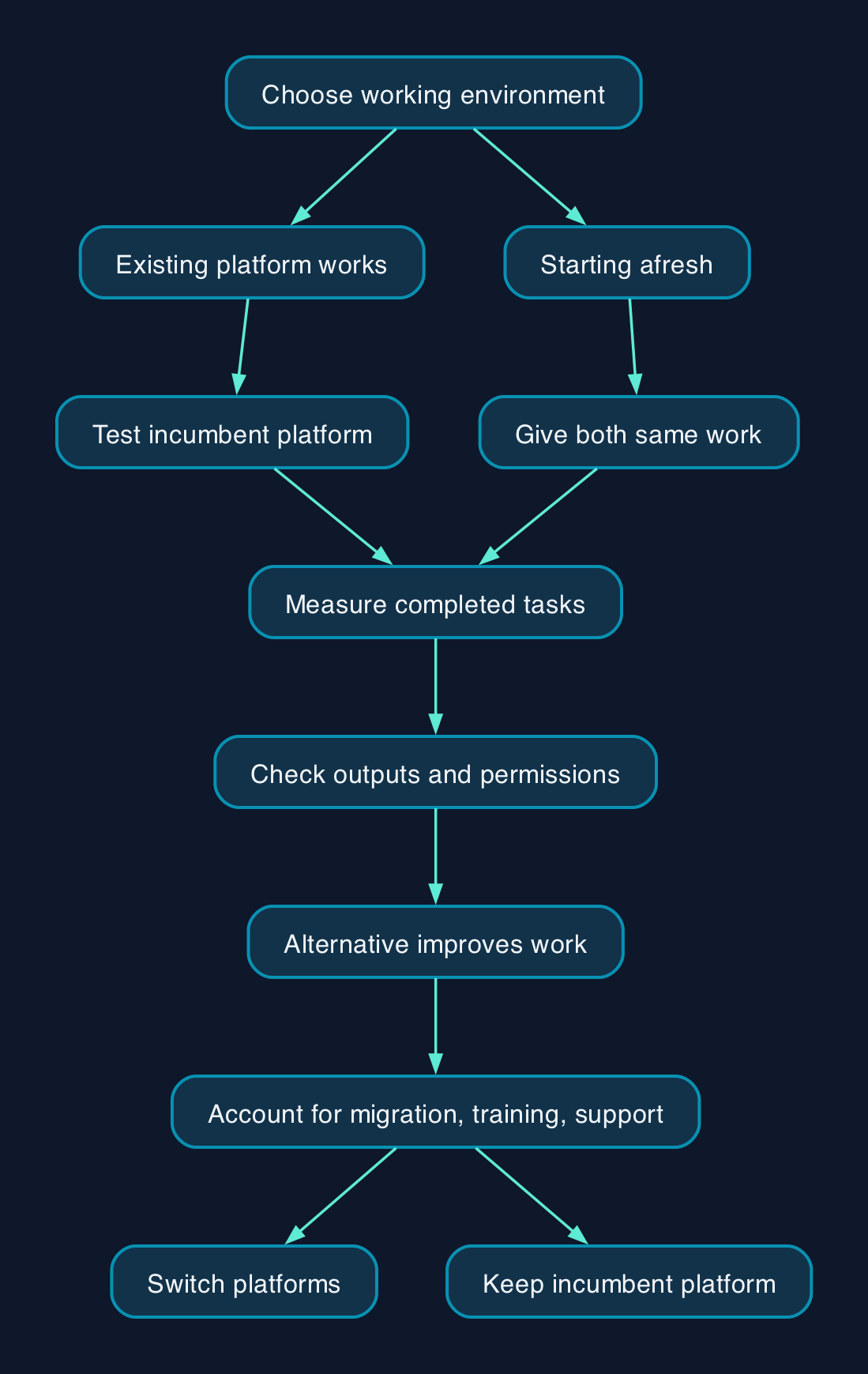
Choose the productivity platform your staff can run effectively, then assess its AI features. Google confirms Gemini access within qualifying Workspace editions; Microsoft’s deployment guidance requires qualifying licensing and an assigned Copilot licence. For an existing customer, our recommendation is to test the incumbent platform first. Switching should depend on demonstrable improvements to everyday work, after accounting for migration, training and support. Google’s edition guidance and Microsoft’s prerequisites establish those licensing distinctions.
Choose the working environment before the assistant
The decision is larger than which assistant produces the most convincing demonstration. A UK business choosing its next platform must establish whether staff can complete their normal work, whether customers can use the resulting files and whether someone can support the system.
The product names also need care. Microsoft’s documentation updated on 8 September 2026 says Microsoft 365 Copilot is now named Microsoft Copilot. This comparison concerns that business productivity offering, previously known as Microsoft 365 Copilot. Microsoft’s naming and application guidance
Google’s Privacy Hub covers Gemini within Workspace applications including Gmail, Docs, Drive and Meet, alongside the Gemini app. Microsoft documents Copilot integration with applications including Word, Excel, Outlook and Teams. Those application lists establish where to investigate suitability; they do not establish equivalent functionality or output quality. Google’s product scope and Microsoft’s application scope
For an established company, start with its dependencies. Ask finance to identify the spreadsheets it cannot replace, sales to supply its proposal templates and operations to identify shared mailboxes and approval processes. Test those assets before committing to a platform change.
For a business starting afresh, give both platforms the same work samples. A useful comparison measures whether staff can finish a task correctly, including checking the AI output and preparing it for a customer.
How the platforms connect to company information
Both evaluations need an owner for identity, information access and support. Our recommended responsibility split is below; it is a procurement and operating model, rather than a claim that either subscription includes these services.
| Responsibility | Google Workspace with Gemini | Microsoft 365 with Copilot | Buyer’s acceptance check |
|---|---|---|---|
| Accounts and access | Confirm qualifying Workspace editions and administrator settings. Access guidance | Confirm qualifying licences, Copilot assignment and Entra ID accounts. Requirements | Named administrator can grant and remove access. |
| Company information | Google says Gemini accesses relevant Workspace content within the user’s permissions. Privacy Hub | Microsoft recommends reviewing SharePoint access and search policies before deployment. Setup guidance | Test accounts cannot retrieve restricted material. |
| Email readiness | Confirm the selected edition’s required Gmail and Gemini capabilities during the pilot. | Check primary mailbox location and supported mailbox types. Application requirements | Required email tasks work with representative accounts. |
| External systems | Establish each required integration’s availability and release status; Google lists some integrations within Gemini Beta. Beta guidance | Establish whether a connector copies content into an index or queries it at runtime. Connector prerequisites | Data owner approves access, credentials and support arrangements. |
| Output review | Assign a business owner to approve customer-facing outputs. | Assign a business owner to approve customer-facing outputs. | Review catches incorrect figures, omissions and unsupported statements. |
A Google administrator should distinguish Gemini within Workspace from the separate Gemini app when setting retention. Google’s Privacy Hub describes different retention arrangements for these experiences, so one assumed policy is insufficient. Google’s retention table
For Microsoft, connection work can have its own licensing and administration requirements. Synced connectors index external content, while federated connectors query the source at runtime; Microsoft specifies a Copilot add-on licence for each user querying a federated source. Microsoft’s connector prerequisites
The practical implication is to scope external data access separately from basic drafting and summarisation. An assistant that works in a document editor has not thereby passed a test involving your finance system or customer records.
Pricing and the full cost of ownership
Compare the complete productivity subscription with the AI capabilities each role needs. Google’s documentation establishes Gemini app access in qualifying Business editions, while Microsoft distinguishes Copilot Chat from the paid offering and metered agents. That prevents a simple comparison between a Google suite price and a Microsoft AI add-on price. Google’s qualifying editions and Microsoft’s licensing distinctions
For an indicative UK reference, Happy Webs reported Workspace Business Standard at £11.80 per user per month with a 12-month commitment, or £14.00 per user per month on flexible billing, excluding VAT, on 7 September 2026. These are secondary-source budgeting references, not supplier-verified prices for this decision; the supplied evidence also lacks a supplier-verified Microsoft UK price. Reported Workspace UK rates
Use the following cost model to obtain comparable quotations.
| Cost component | What to establish for Google | What to establish for Microsoft |
|---|---|---|
| Base subscription | Exact Workspace edition, users and included Gemini capabilities | Exact Microsoft 365 plan, users and included applications |
| Additional AI costs | Whether the required features or usage need an upgrade | Which users need paid Copilot and whether agents introduce consumption charges |
| Contract terms | GBP rate, commitment, payment schedule, minimum seats and VAT treatment | GBP rate, commitment, payment schedule, minimum seats and VAT treatment |
| Preparation | Information cleanup, access settings and account configuration | Information cleanup, identity, mailbox and application readiness |
| Migration | Mail, calendars, files, permissions, links and workflow testing | Mail, calendars, files, permissions, links and workflow testing |
| Training and support | User training, administrator time and escalation arrangements | User training, administrator time and escalation arrangements |
| Connections and controls | Integration setup, maintenance and required edition upgrades | Connector setup, maintenance and any separately licensed controls |
| Transition and exit | Overlapping contracts, export testing and supplier handover | Overlapping contracts, export testing and supplier handover |
Budget assumptions should be explicit. Use the same evaluation period, staff population and required tasks for both options. Record separately how many people need advanced AI features, how much migration work is required and who supplies ongoing support.
Calculate total cost as subscription and usage charges plus implementation, migration, training, administration, support and exit costs. Deduct only costs you can actually retire. A retained application or overlapping contract remains part of the budget.
Microsoft’s setup guidance explicitly warns that some management and protection features described there may require additional licences. Include those dependencies in the quotation before treating its proposed configuration as affordable. Microsoft’s setup and licensing guidance
Comparing the options against your working practices
The recommendations below are editorial judgements about how to evaluate the platforms. They are not results from CTC performance testing.
| Decision criterion | Google Workspace with Gemini | Microsoft 365 with Copilot |
|---|---|---|
| Existing working environment | Start here if the company already operates effectively in Workspace. Test the required Gemini features in its exact edition. | Start here if the company already operates effectively in Microsoft 365. Check readiness before adding licences. |
| Everyday usability | Test drafting, document collaboration and information retrieval with the staff who will use them. | Test the same tasks in the relevant Microsoft applications, including the review work needed afterwards. |
| Files and compatibility | Validate important customer files, templates and spreadsheet workflows before approving migration. | Validate the same assets and required application versions; existing familiarity is not an acceptance test. |
| Administration | Confirm account qualification, access controls, retention and whether any essential feature is in Beta. | Confirm identity, mailbox location, app deployment, network access and content governance. |
| Commercial suitability | Establish whether the selected edition covers the required work without unnecessary upgrades. | Establish which roles need paid Copilot beyond Chat and which workflows introduce metered costs. |
| Support | Require a named owner for user problems, permissions and supplier escalation. | Require the same ownership, including responsibility across Microsoft administration tools. |
| Reasons to defer | Defer if essential workflows depend on unproven compatibility or a Beta capability your business cannot accept. | Defer if required mailbox, identity or governance work has no funded owner. |
| Exit | Require a demonstrated export and handover plan for the information and workflows you depend on. | Apply the same requirement before signing the contract. |
Google’s edition-dependent access and Beta controls support the first option’s readiness questions. Microsoft’s prerequisite and setup documents support the second option’s implementation questions. Neither set of documents establishes that one platform needs less support in your organisation. Google’s access guidance, Google’s Beta controls and Microsoft’s setup guidance
Editorial analysis
Our position is that an AI feature should earn its place through a completed business task. A persuasive draft matters less if correcting its figures and moving it into the required format takes longer than the original process.
An incumbent platform therefore deserves the first pilot when it already meets the company’s operational needs. The challenger must demonstrate enough improvement to justify migration, retraining and the loss of familiar procedures.
For a new platform purchase, require each supplier to demonstrate the same customer proposal, internal information search and spreadsheet task. Include permission tests and a support incident. Award the contract against the complete workflow and quotation, rather than the most impressive isolated answer.
Sources
The supplied research extracts were retrieved on 28 September 2026. Publication or update dates are included below where the source text identifies them.
- Google Workspace Help, Turn the Gemini App on or off.
- Google Workspace Help, Generative AI in Google Workspace Privacy Hub, updated 14 August 2026.
- Google Workspace Help, Turn access to Google Workspace with Gemini Beta on or off.
- Microsoft Learn, Minimum requirements to deploy Microsoft Copilot in your organization, updated 8 September 2026.
- Microsoft Learn, Microsoft 365 app and network requirements for Microsoft Copilot.
- Microsoft Learn, Prerequisites for managing agents in Microsoft 365.
- Microsoft Learn, Set up Microsoft Copilot and assign licenses.
- Microsoft Learn, Prerequisites for deploying connectors.
- How Much Does Google Workspace Cost a UK Small Business in 2026?, published 7 September 2026.