
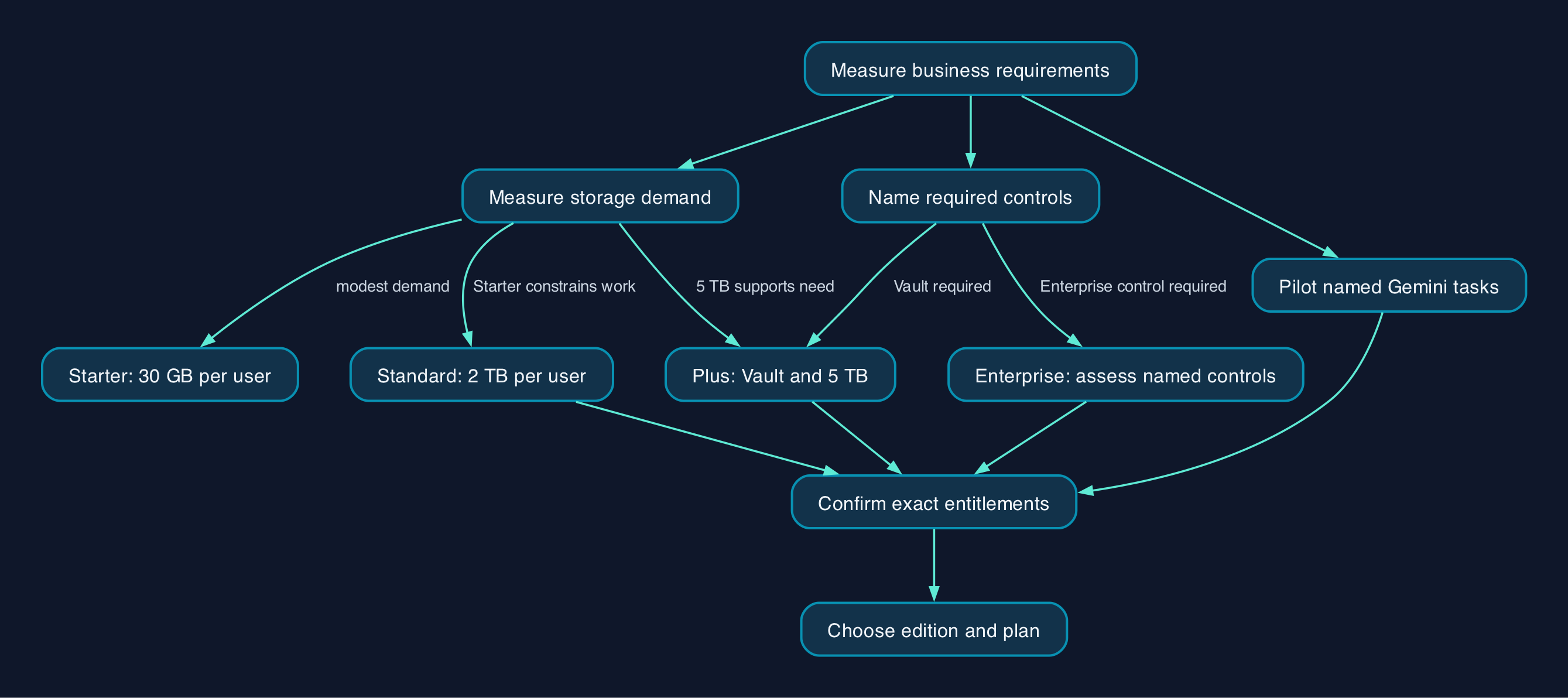
Business Standard is the sensible starting point if your team needs substantially more storage than Starter, but Gemini access alone does not justify upgrading. Google includes the Gemini app across all three Business editions; Standard raises pooled storage from 30 GB to 2 TB per user, while Plus adds Google Vault and 5 TB. Choose against your actual AI tasks, storage demand and named security requirements, rather than buying the highest tier by default. Google’s Business comparison
Start with the work your business needs to do
For a UK small or mid-sized business, the useful question is which requirement makes the cheaper edition inadequate.
Starter deserves consideration when email and document collaboration dominate, storage demand is modest and its controls meet your requirements. Standard becomes a stronger candidate when the storage allowance constrains work. Plus deserves a separate assessment when you need Vault or its larger storage pool. Those distinctions follow Google’s published storage and service availability tables; the suitability judgement is ours. Compare Business editions
An existing customer should measure usage before changing subscriptions. Ask the administrator for current storage consumption, growth, service settings and unresolved control requirements. Keeping Starter can be the right decision if that review finds no material gap.
Separate Gemini app access from embedded AI features
The Gemini app and Gemini features inside individual Workspace applications need separate checks. Google’s Business comparison confirms the app with data protections across Starter, Standard and Plus. Gemini app availability
The supplied primary-source extracts do not establish the complete current allocation of generally available Gemini features inside Gmail, Docs, Sheets and Meet, or their edition-specific usage limits. An AI-led purchase therefore needs written confirmation of the exact tasks, limits and edition before commitment.
Google’s Beta documentation illustrates why feature names matter. It lists Gemini in the Apps Script editor and certain cross-application creation and scheduling features for Standard and Plus, while some third-party integration previews also include Starter. These are explicitly Beta capabilities, so they should not be treated as the baseline for routine production work. Gemini Beta feature availability
Build the pilot around a few recognisable tasks, such as drafting a customer reply or summarising a document. Record whether each task is available, whether its result is accurate enough after review, and whether it saves staff time.
Security requirements should name a control and an owner
Starter is not an unmanaged consumer account. Google describes an Admin console for account and security settings, controls over service access, mobile management, audits and reporting. A higher subscription should solve a requirement those controls cannot meet. Business Starter controls
For Plus, the clearest additional governance capability established by the supplied primary evidence is Vault. Before buying it, define what information must be governed, who will administer the system and what a successful retrieval exercise should demonstrate. Vault inclusion in Business Plus
If the requirement is data loss prevention, which detects sensitive information and restricts sharing, or access policies based on device condition and user context, investigate Enterprise. Google describes these capabilities within its Enterprise portfolio, but the supplied overview does not allocate every control to a specific Enterprise edition. Obtain an edition-specific response against your requirements. Enterprise security overview
Google describes Enterprise storage as flexible. Do not turn its absence of a user cap into an assumption of unlimited storage. Enterprise edition comparison
How administration and day-to-day use fit together
Google’s edition overview describes the fuller feature set available after domain verification and warns that email-only sign-up leaves some features unavailable. Establish who controls the business domain before planning the rollout. Business edition prerequisites
The following is a proposed responsibility model, not a claim that the subscription performs these tasks automatically.
| Area | Proposed owner | Acceptance check |
|---|---|---|
| Subscription and renewal | Finance lead with IT | Edition, licence quantity, commitment and renewal date recorded |
| Domain and administrator access | Internal administrator or contracted provider | Domain ownership verified and administrator recovery tested |
| Accounts and sharing | Administrator with department owners | Pilot users can reach approved resources without unintended access |
| Gemini use | Business process owner | Approved tasks, permitted information and human review recorded |
| Storage | Administrator with file owners | Usage measured and growth allowance agreed |
| Governance and recovery | Named information owner with IT | Required retrieval and recovery exercises completed |
| Support | Internal IT or contracted provider | Escalation route, hours, scope and charges documented |
Google lists 24/7 Workspace support in its Starter overview. If you hire a provider, specify separately who handles migration, user training, configuration changes and ongoing administration. Google’s support description
Pricing and the full cost model
The figures below are a pricing snapshot for 28 September 2026, in GBP per user per month. Google’s supplied payment-plan table directly confirms the Starter and Standard rates. Happy Webs reports the Plus rates and describes these UK prices as excluding VAT; the Plus figures are therefore secondary-source indications to confirm in your quotation.
| Edition | Monthly equivalent with a one-year commitment | Flexible monthly rate | Price evidence |
|---|---|---|---|
| Business Starter | £5.90 | £7.00 | Google’s GBP payment-plan table |
| Business Standard | £11.80 | £14.00 | Google’s GBP payment-plan table |
| Business Plus | £18.40 | £22.00 | Reported UK prices dated 7 September 2026 |
| Enterprise | Obtain quotation | Obtain quotation | Google’s Enterprise pricing route |
Business editions start at one user. These are subscription rates, not a quotation for migration, training or managed administration. Confirm the applicable VAT treatment, contractual minimum quantity, billing schedule and any promotional conditions before ordering. Business edition user range
Google’s Flexible plan allows account numbers to rise or fall and permits cancellation without a penalty. Annual/Fixed-Term plans commit you to purchased licences, allow reductions at renewal and require payment of the remaining commitment if you cancel early. Monthly invoicing does not remove that obligation. Google’s payment-plan comparison
For a seasonal business, compare the annual saving with the cost of retaining licences through quieter periods. For a stable workforce, the annual arrangement deserves consideration once the pilot has confirmed the edition.
Include the work around the subscription
Build a first-year budget with these separate lines.
| Cost component | What to include |
|---|---|
| Licences | Agreed edition, billable accounts, commitment and applicable tax |
| Migration | Mailbox and file inventory, transfer work, permissions checks and temporary overlap with the previous service |
| Setup | Domain configuration, account structure, security settings and administrator recovery |
| Training | Staff time, guidance for common tasks and review of AI-generated work |
| Administration | Account changes, sharing reviews, storage monitoring and support |
| Recovery | Required protection, restoration tools and recovery exercises |
| Exit | Export work, handover, replacement migration and remaining commitments |
Use licences + setup + migration + training + administration + recovery provision + exit allowance as the budgeting structure. Until each relevant line has an input, the subscription figure remains a subtotal.
Migration and rollout checklist
- [ ] Record the requirements. Name the AI tasks, storage needs and security controls that the chosen edition must satisfy.
- [ ] Confirm entitlements. Obtain an edition-specific answer for each required Gemini feature, usage limit and administrative control.
- [ ] Secure administrative ownership. Verify domain access, name the administrators and test account recovery.
- [ ] Inventory the existing environment. Record mailboxes, shared files, permissions, connected applications and current storage usage.
- [ ] Prepare recovery and rollback. Agree how data will be protected and how service will be restored if migration fails.
- [ ] Pilot representative users. Test email, files, mobile access and the actual Gemini tasks before accepting the rollout.
- [ ] Check access boundaries. Confirm that staff and external collaborators can reach only the intended material.
- [ ] Control previews. Keep Beta features outside essential workflows unless the owner explicitly accepts the preview conditions.
- [ ] Train staff and assign support. Give users practical instructions and a documented escalation route.
- [ ] Approve the cutover. Before changing mail routing or retiring the old service, confirm migration results, rollback readiness and business-owner acceptance.
- [ ] Record renewal actions. Schedule a licence and edition review before the contractual opportunity to reduce commitments.
The preview and renewal checks reflect Google’s Gemini Beta conditions and payment-plan terms. The remaining checks are editorial deployment recommendations.
Compare the editions against your requirements
| Option | Established distinction | When to shortlist it | What must be resolved |
|---|---|---|---|
| Business Starter | 30 GB pooled storage per user, Gemini app with data protections and central administration | Modest storage needs and no demonstrated requirement for a higher edition | Exact embedded AI requirements and whether existing controls meet your needs |
| Business Standard | 2 TB pooled storage per user and shared drives described in Google’s overview | Storage and shared-file working justify the additional cost | Required Gemini tasks, ongoing administration and migration effort |
| Business Plus | 5 TB pooled storage per user and included Vault | A defined governance requirement or storage demand supports the upgrade | Who will configure and operate the additional capability |
| Enterprise Standard or Plus | Advanced security portfolio and flexible storage | A named control requirement needs Enterprise assessment, or the Business user range is insufficient | Exact edition entitlement, storage terms, implementation scope and quotation |
Product distinctions come from Google’s Business comparison, Business overview and Enterprise documentation. Suitability assessments are CTC editorial judgement.
Apply the same procurement questions to every option. Can your administrator operate it? Do the applications and devices you rely on work in the pilot? Who owns support? What will migration and exit require? The supplied evidence does not establish edition-specific export differences, so this comparison does not score portability.
Editorial analysis
Our recommendation is to shortlist Standard first when storage is already a constraint, then test whether Starter would still meet the business’s requirements. The jump from 30 GB to 2 TB per user is established in Google’s documentation and gives that assessment a measurable basis. Storage comparison
Plus should have a named justification, such as a Vault requirement with an administrator assigned to it. Enterprise should have a control requirement that the supplier can map to an exact edition. Paying for capabilities without the staff time to configure and maintain them leaves the operational problem unresolved.
For Gemini, make the buying decision conditional on a successful task-based pilot. A checkbox saying “AI included” does not establish that the specific workflow you want is available or useful.
Sources
Source extracts supplied for this article on 28 September 2026. Publisher update dates were not established in the supplied Google excerpts.
- Google Workspace Help, Compare Business editions.
- Google Workspace Help, Business editions.
- Google Workspace Help, Compare Flexible and Annual/Fixed-Term payment plans.
- Google Workspace Help, Compare Enterprise editions.
- Google Workspace Help, Enterprise editions.
- Google Workspace Help, Turn access to Google Workspace with Gemini Beta on or off.
- Happy Webs, How Much Does Google Workspace Cost a UK Small Business in 2026?, published 7 September 2026.