


UK small and mid-sized businesses should start replacing passwords with passkeys on supported critical accounts, with email first. Our position is that successful recovery should be a condition of rollout, rather than a problem left for the help desk. The NCSC recommends prioritising passkeys for staff email. Start account by account, decide who controls credential storage, and test how an authorised employee regains access after losing a device.
Key pointers
- Start with supported email and business-critical accounts.
- Assign an owner to each account and its recovery procedure.
- Choose where business passkeys may be stored before staff enrol.
- Evaluate device-bound credentials for administrators with extensive access.
- Test device loss, credential removal and staff departure before expanding the pilot.
- Budget for configuration, training and continuing support.
- Keep any remaining passwords strong, unique and protected by two-step verification.
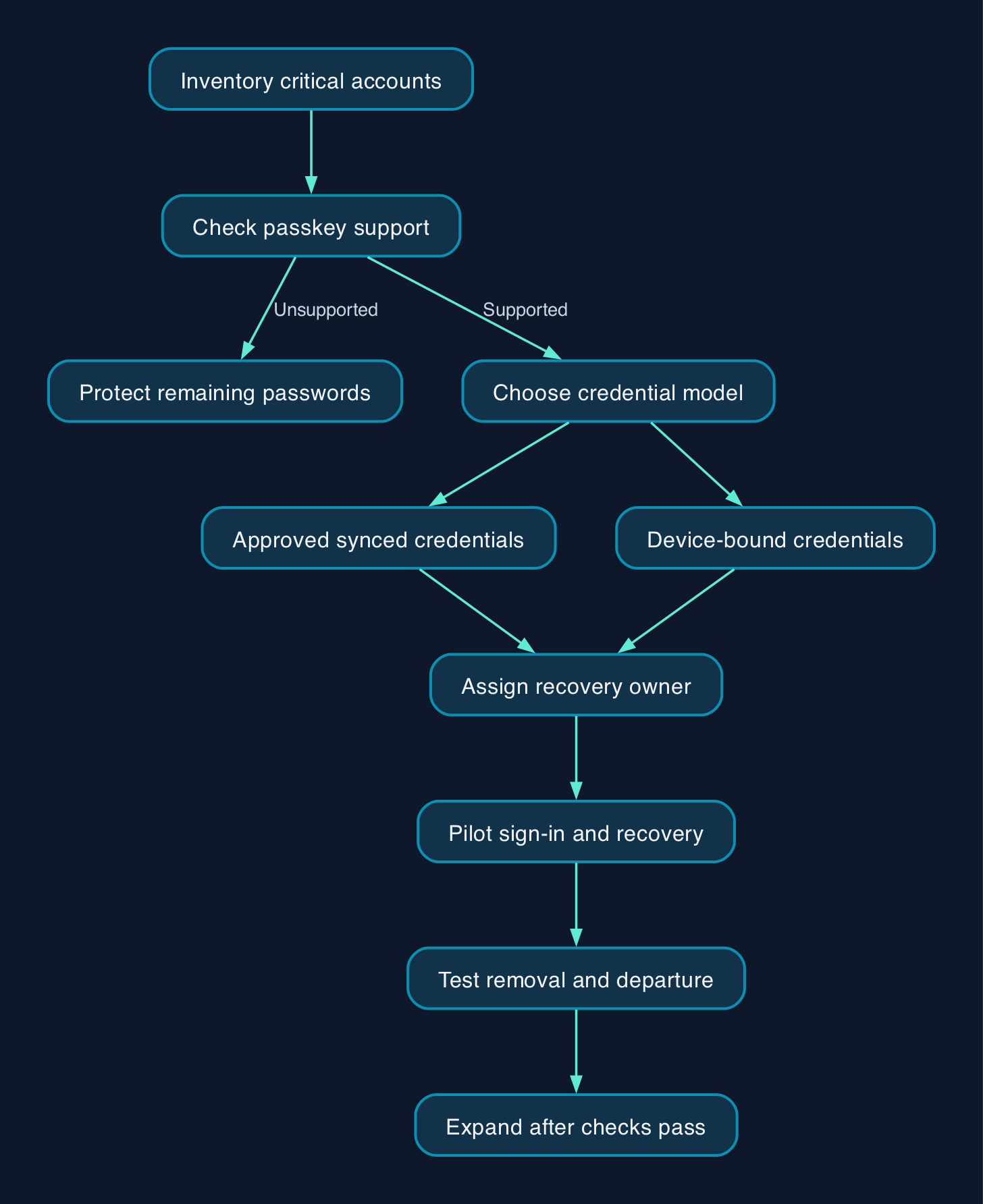
Start with the accounts that could stop the business
A compromised inbox can expose private information, enable impersonation and provide a route into other accounts through password resets. That is why the NCSC prioritises protecting business email.
Our recommendation is to follow email with an inventory of accounts whose loss would interrupt trading. The official small-organisation guidance identifies banking, HR, payroll, online storage, websites and point-of-sale systems as examples.
That list establishes priorities, not universal passkey availability. Ask each supplier which sign-in methods the actual account supports.
For a business using outsourced IT, the first deliverable should be an account inventory with named owners, supported authentication methods and recovery arrangements. Management should be able to understand who can restore access without needing to interpret an identity-platform configuration.
Do not make universal application support a prerequisite for starting. Protect the supported accounts, record the exceptions and retain appropriate protection for the rest.
Decide who controls the credential
Passkeys change how a service verifies a user. Instead of receiving a shared password, it verifies proof generated using a private cryptographic key. The FIDO enterprise introduction explains that the service does not hold that private credential.
The storage model determines an important part of the business’s control. Synced passkeys make credentials available across devices through a provider; device-bound credentials remain on their issued device. The same guidance anticipates organisations needing different approaches for different use cases.
Our editorial preference for ordinary staff accounts is an approved credential manager whose recovery arrangements the business has tested. For administrator accounts with extensive powers, evaluate device-bound credentials first and arrange recovery separately. This is a recommendation based on the consequences of losing control of those accounts, not a universal requirement.
Make the responsibilities explicit before enrolment.
| Activity | Proposed owner | Acceptance question |
| --- | --- | --- |
| Permitted sign-in methods | Internal IT lead or contracted provider | Can we identify and remove registered methods? |
| Credential storage and synchronisation | Approved provider, overseen by IT | Who controls the account that makes credentials available elsewhere? |
| Device protection | Device owner under business policy | Are updates and screen-lock settings maintained? |
| Recovery | Named support owner | Can an authorised employee regain access through the agreed procedure? |
| Staff departure | Line manager and IT | Has business access been withdrawn and checked? |
This is a proposed responsibility model. Use it to expose unanswered questions before a lost phone becomes an urgent support request.
Compare the roles before comparing suppliers
A credential manager, a hardware security key and an enterprise authentication platform perform different roles. Buying teams should establish which role they need before comparing features.
| Option | What the evidence supports | What to establish before adoption |
| --- | --- | --- |
| Apple Passwords, Google Password Manager and Samsung Pass | The [NCSC identifies these as built-in credential managers](https://www.ncsc.gov.uk/passkeys). | Device-fleet suitability, control of synchronisation accounts, recovery and staff departure procedures. |
| Device-bound FIDO security keys | FIDO’s enterprise guidance describes credentials that cannot leave their issued device. | Application compatibility, connection requirements, replacement arrangements and enrolment support. |
| RSA Authenticator | [RSA states that its iOS and Android app supports device-bound passkeys](https://www.rsa.com/resources/blog/passwordless/are-fido-passkeys-ready-for-enterprise-use/). | Required platform components, application coverage, licensing and recovery procedures. |
| HYPR Enterprise Passkeys | [HYPR describes a device-bound enterprise offering](https://www.hypr.com/resources/guide-to-fido-passkeys) covering desktop-to-cloud use cases. | Exact operating-system coverage, deployment scope, support and total quoted cost. |
The supplier statements establish stated capabilities, not comparative performance or delivery quality. None of these entries establishes that a particular configuration will suit the reader’s business.
For a small firm satisfied with its existing applications, our recommendation is to test their available passkey support before buying another platform. Consider a specialist offering when the pilot identifies a specific unmet need, such as an unsupported sign-in workflow or required administrative control.
Budget for rollout and recovery
The evidence does not establish comparable UK licence or hardware prices. A defensible budget therefore needs supplier quotations and an estimate of internal work.
Request separate costs for account discovery, configuration, compatibility checks, enrolment, training, recovery testing and continuing support. If physical security keys are proposed, include replacement arrangements and administration. Ask which required controls depend on a paid edition.
An outsourced rollout quotation should also identify support hours, responsibility for locked-out employees and configuration handover at contract exit. A setup charge alone cannot answer those questions.
There is evidence of a convenience benefit. The NCSC reports passkey logins can be up to 8 times faster than signing in with a username, password and two-step-verification code, citing Microsoft research.
Treat 8 as the reported upper-bound multiplier, not a forecast for your workforce. It does not establish a payroll saving. Measure sign-in completion, recovery effort and support demand during the pilot before assigning a financial return.
The strongest objection is loss of control
The strongest case against adoption is that synchronisation and recovery introduce dependencies the business may not control. FIDO’s enterprise guidance recognises that managing credentials through a third-party service creates additional considerations and may not meet every organisation’s requirements.
That objection should change the deployment design. It does not justify a blanket rejection of synced passkeys.
The NCSC’s analysis addresses synchronisation directly, identifying the strength of authentication protecting the sync account as the key control. Its assessment considers common credential attacks from an individual user’s perspective, so it should not be mistaken for a complete assessment of workforce administration.
Our position is to accept synchronisation only where its ownership and recovery arrangements meet the business’s needs. Where tighter control is necessary, evaluate device-bound credentials and test the consequences of losing the device.
The decision should turn on demonstrated control of access. A successful first login is insufficient evidence for either model.
Make recovery part of acceptance
Before widening the pilot, require the account owner and support provider to demonstrate the following.
- Complete normal sign-in on the devices and applications within scope.
- Demonstrate the agreed route back into an account after device loss or replacement.
- Identify and remove a registered credential.
- Withdraw a departing employee’s access and verify the result.
- Test the shared-device workflow if the business uses one.
- Record who handles failed recovery and how that request is escalated.
Do not remove an existing access route until the replacement and recovery procedure have passed these checks. Where passwords remain, maintain the strong-password and two-step-verification protections recommended for passkey-enabled accounts.
The next management action is to name a pilot owner and require evidence of both sign-in and recovery before approving expansion.
FAQ
Should a UK small business wait until every application supports passkeys?
No. Our recommendation is to begin with supported critical accounts and manage exceptions separately. The NCSC recommends passkeys where available and strong passwords with two-step verification where they are not.
Do employees need fingerprints or facial recognition?
No. The NCSC explains that a lock-screen PIN can also authorise passkey use. Test the supported verification methods during the pilot so staff have an appropriate way to sign in.
What happens when someone loses their phone?
The answer depends on the credential model and recovery arrangements. The NCSC describes how credential-manager backups and synchronisation can help preserve access. Test the actual recovery route before relying on it.
Does enabling a passkey remove the password?
Do not assume that it does. Check the account’s remaining sign-in methods and recovery settings. The NCSC explicitly advises protecting passwords that remain on passkey-enabled accounts with strong, unique passwords and two-step verification.
Sources
- NCSC - Secure your email
- NCSC - Secure your important online accounts
- NCSC - Passkeys, what you need to know
- NCSC - Passkeys are more secure than traditional ways to log in
- FIDO Alliance - Deploying Passkeys in the Enterprise, Introduction
- RSA - Passkeys, Are They Ready for Enterprise Use?
- HYPR - The Complete Guide to Deploying FIDO Passkeys for Your Customers