
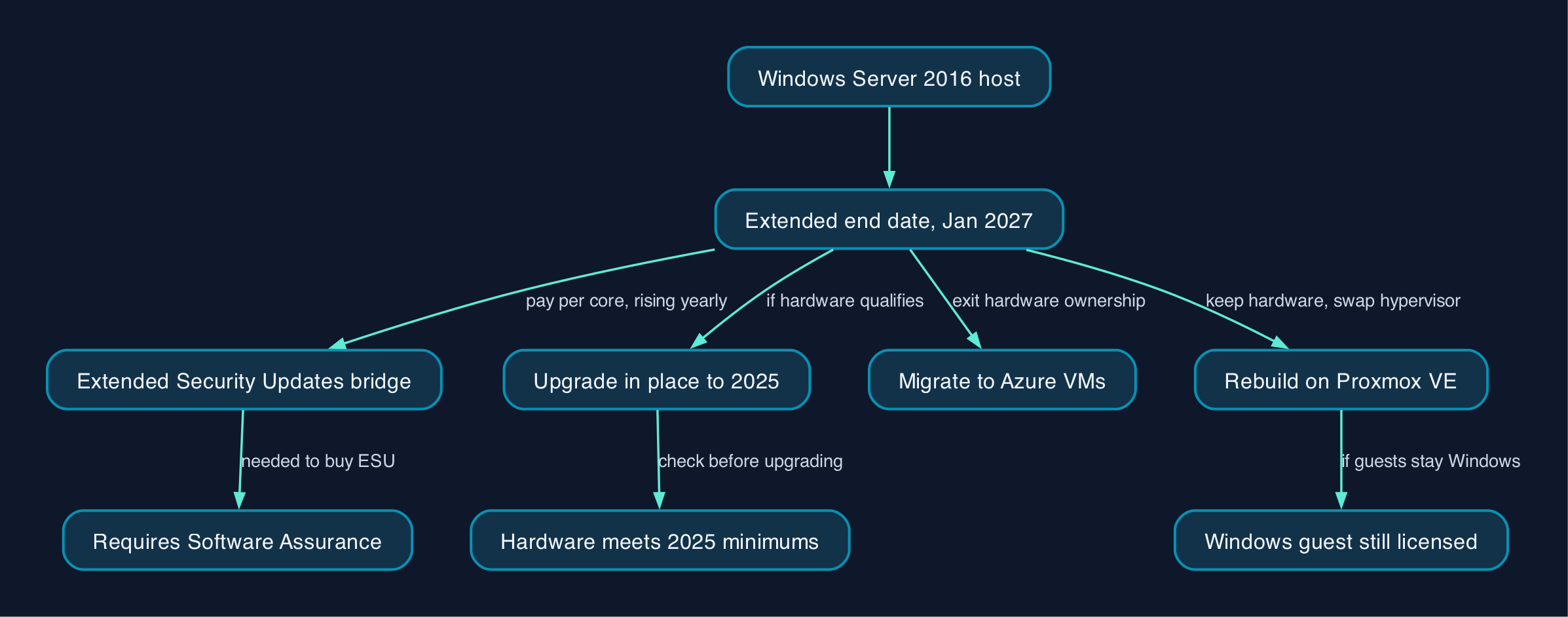
Windows Server 2016 reaches its Extended End Date on 12 January 2027, when free security patches stop. A UK mid-market IT director running 2016 hosts has three realistic routes: an in-place upgrade to Windows Server 2025, a move to Azure virtual machines, or a rebuild on the open-source hypervisor Proxmox VE. Each carries a different mix of capital cost, ongoing spend and admin effort, and none of them removes the Windows Server licensing bill entirely.
Key pointers
- Free security patching for Windows Server 2016 ends on 12 January 2027; after that date every unpatched host is a live vulnerability, not a hypothetical one.
- Microsoft's own upgrade path table confirms a direct in-place upgrade from 2016 to 2025 is supported, but 2025 raised its minimum CPU and RAM requirements, so check the hardware before assuming no refresh is needed.
- A 16-core Windows Server 2025 Standard licence pack with 10 CALs lists at £1,769 through Microsoft's UK store, before any CAL top-ups or hardware costs.
- On Azure, bringing your own eligible licence through Azure Hybrid Benefit cuts a comparable VM from roughly £218.20 to £119.28 a month, based on Microsoft's own live UK South pricing.
- Proxmox VE itself is free to run; its optional vendor support subscriptions run £318 to £945 a socket a year, but any Windows guest VM still needs its own Windows Server licence.
- Ask every quote to state whether the cost is per core, per socket, per VM or per host. The three pricing models do not line up, and that mismatch is the easiest way to under-budget.
- Extended Security Updates (ESU) buy time, not a permanent fix; they run for three years past end of support, through January 2030, at a rising price.
- Cyber Essentials treats unsupported software as a scope risk, so a business that holds or wants that accreditation should not plan to leave Windows Server 2016 unpatched past January 2027.
What Windows Server 2016 End of Support Means for UK Mid-Market IT
An "extended end date" is Microsoft's term for the last day a product receives free security fixes under its Fixed Lifecycle Policy. For Windows Server 2016, that date is 12 January 2027. It applies whether the box is a domain controller, a file and print server, a line-of-business application host, or the physical machine running Hyper-V underneath a stack of virtual machines. After that date, any newly discovered vulnerability in the operating system stays unpatched unless the business buys Extended Security Updates or moves off the platform.
This is a different kind of deadline from a routine hardware refresh. A server that still runs perfectly well on ageing hardware is not the problem; the problem is that Microsoft stops shipping fixes for flaws that get found after the cut-off. For a mid-market business that holds, or wants, Cyber Essentials accreditation, that is not an abstract risk. The scheme requires all in-scope software to receive updates within 14 days of release and treats software that no longer gets those updates as something that must be removed from the network or walled off from it entirely.
Smaller organisations wondering whether they need an on-premises server at all should start with our guide on whether a small business needs its own server; this piece assumes a mid-market estate that already depends on Windows Server and needs a considered route off 2016, not a decision about whether to run a server in the first place.
The three named routes below sit alongside a fourth, temporary option: paying for Extended Security Updates while you plan. ESU is a bridge, not a destination. It is priced to make migration the cheaper long-term choice, and it requires the same Software Assurance entitlement that would let you upgrade for free in many cases anyway.
Pricing and Cost Model
All prices below were checked on 29 September 2026. Microsoft's on-premises and Azure prices are shown in GBP as published; Proxmox VE's prices are published in EUR and have been converted at the European Central Bank's reference rate of 18 September 2026 (EUR 1 = GBP 0.8588). Treat the Proxmox figures as an estimate, not Proxmox's own quoted UK price; exchange rates move daily.
Do nothing yet, buy Extended Security Updates
ESU is not a fix, it is a countdown with a price tag. Licensing analysts at Microsoft Negotiations describe the structure as a percentage of Microsoft's current per-core Windows Server list price, escalating each year: roughly 75% in year one, 100% in year two, and 125% in year three. Because the underlying list price itself rises over that period, the cash cost of year three is well above 125% of what you would pay today. ESU requires active Software Assurance or an equivalent Server Subscription; a business that already has that entitlement is often better off spending the same money on the Windows Server 2025 upgrade the entitlement already grants. Billing for Windows Server 2016 ESU delivered through Azure Arc starts on 13 January 2027, with a back-billing charge for any licence provisioned after that date, so the sums do not improve by leaving the decision late.
Upgrade in place to Windows Server 2025
A 16-core Windows Server 2025 Standard licence pack with 10 Client Access Licences lists at £1,769 on Microsoft's UK store. That figure is a capital, one-off licence cost; it does not include additional CALs beyond the bundled 10, Software Assurance, migration labour, testing time or any hardware that turns out not to meet minimums. On the last point, Windows Server 2025 raised its minimum CPU and RAM requirements above Windows Server 2016's: the processor must now support the SSE4.2 and POPCNT instruction sets, and Server Core's minimum RAM rises to 2 GB from 512 MB. Most hardware bought in the last decade will meet this, but it is worth checking rather than assuming; ageing hardware nearing the end of its own warranty is a separate cost driver, not a licensing one.
If the business wants faster patching without full reboots, hotpatching for Windows Server 2025 delivers security updates through Azure Arc without a restart. Microsoft originally announced this as a paid add-on at $1.50 per CPU core a month from July 2025, but its own documentation now states that Azure Arc-enabled hotpatching for Windows Server 2025 is available at no extra cost, for both Standard and Datacenter editions, so it adds nothing to the licence cost above.
Migrate the workloads to Azure
Azure Migrate's assessment and migration tooling is free; the ongoing cost is Azure consumption. Using Microsoft's own live Azure Retail Prices API for a Standard_D4s_v5 virtual machine (4 vCPUs, 16 GB RAM) in the UK South region, a pay-as-you-go VM that includes a Windows Server licence costs about £218.20 a month. A business that already owns an eligible Windows Server licence with Software Assurance can apply Azure Hybrid Benefit, which drops the same VM to about £119.28 a month, because Azure only charges for compute and the licence is supplied separately. That is a saving of roughly £99 a month on a single mid-sized VM; scale it across however many 2016 hosts are being consolidated, and it becomes a material line in the business case, though egress and storage charges are billed on top and are not included in these figures.
Rebuild on Proxmox VE
Proxmox VE is free open-source software and does not require a subscription to install or run. Proxmox's own vendor support subscriptions, which add access to its enterprise update repository and technical support, cost £318 a CPU socket a year for Basic, £472 for Standard, or £945 for Premium, at the ECB conversion above. This replaces whatever the business currently pays for its hypervisor licence, most relevantly Hyper-V's own cost within a Windows Server Datacenter licence, or a VMware licence if that is what the 2016 hosts are running.
What Proxmox does not remove is the Windows Server licence for any guest workload that stays on Windows. Microsoft's own virtualisation licensing guidance is explicit that Windows Server running as a guest VM on a non-Microsoft hypervisor, exactly the scenario a Proxmox rebuild creates, still needs core licences assigned to the host, at a minimum of 8 cores per processor and 16 per server, with one full set of Standard-edition core licences needed for every two Windows guest VMs. Proxmox VE saves money mainly where a business can retire some Windows guests in favour of Linux-based alternatives, or where it is currently paying for a Windows or VMware hypervisor layer it no longer needs.
Vendor and Option Comparison
| Criterion | Upgrade in place to Windows Server 2025 | Migrate workloads to Azure | Rebuild on Proxmox VE |
|---|---|---|---|
| Headline cost driver | One-off per-core licence purchase, from £1,769 for a 16-core pack | Ongoing monthly compute, from about £119.28 with Azure Hybrid Benefit | Optional yearly support subscription, £318 to £945 a socket |
| Windows guest licensing | Included in the licence you just bought | Included if pay-as-you-go, or bring your own with Azure Hybrid Benefit | Still required separately for any Windows guest VM |
| Hardware ownership | Stays with the business; must meet 2025's higher CPU and RAM minimums | Handed to Microsoft; no refresh needed on-premises | Stays with the business; Proxmox runs on standard x86 servers |
| Admin skill needed | Familiar to any team already running Windows Server | New skills in Azure networking, identity and cost management | New skills in Linux and KVM administration |
| Support model | Microsoft support included with an active licence and Software Assurance | Microsoft support tiers, billed separately, plus Azure service credits | Optional paid Proxmox subscription; otherwise community support only |
| Best suited to | Straightforward Windows-only estates with enough runway before January 2027 | Businesses wanting to exit hardware ownership and consolidate several ageing hosts | Sites able to retire some Windows guests, or already paying for a costed hypervisor layer |
| Think twice if | Hardware is already near end of warranty life | Predictable, always-on compute makes consumption billing expensive without reservations | Every workload must stay on Windows, since the licensing bill does not go away |
Which Route Suits Which Business
A UK mid-market IT director with a handful of straightforward, Windows-only 2016 hosts and reasonably current hardware has the least reason to change platform. The in-place upgrade to Windows Server 2025 is Microsoft's own supported path from 2016, keeps the licence spend as a predictable capital cost, and needs the smallest change in day-to-day administration.
A business that wants to stop owning server hardware, or that is already consolidating several ageing hosts into fewer, larger ones, has a stronger case for Azure. The consumption model and Azure Hybrid Benefit pricing shown above make the ongoing cost calculable, and Azure Migrate's free assessment tooling removes the cost of finding out what will and will not move cleanly.
Editorial analysis. Proxmox VE is the route most likely to be misunderstood as free. It genuinely removes hypervisor licensing cost, which matters if the business is currently paying for VMware or a Datacenter-edition Hyper-V host purely for virtualisation rights. It does nothing for the Windows Server bill itself if the guest workloads stay Windows, because that licence is tied to the guest operating system, not the hypervisor underneath it. The businesses that get real value from a Proxmox rebuild are the ones prepared to move at least some workloads, such as file sharing, DNS or internal web tools, onto Linux-based equivalents at the same time, not the ones simply swapping one hypervisor for another under an unchanged stack of Windows guests.
Sources
- Windows Server 2016 - Microsoft Lifecycle
- Prepare to deliver Extended Security Updates for Windows Server through Azure Arc
- Billing service for Extended Security Updates for Windows Server through Azure Arc
- Buy Windows Server 2025 Standard Licence (16 Cores) Plus 10 CALs
- Plan your Windows Server upgrade
- Hardware requirements for Windows Server
- Pricing - Windows Virtual Machines
- Azure Retail Prices API, Standard_D4s_v5, UK South, GBP
- Pricing for Subscription Plans - Proxmox Virtual Environment
- Euro foreign exchange reference rates - Pound sterling
- Hotpatching for Azure Arc-Connected Servers, General Availability and Subscription Details
- Hotpatch for Windows Server
- Simplified access to Hotpatching enabled by Azure Arc for Windows Server 2025
- Pricing - Azure Migrate
- Windows Server virtualization licensing guidance
- Windows Server ESU Licensing, Extended Security Updates Pricing and Strategy in 2026
- The Five Core Controls of Cyber Essentials, Security Update Management
- Do you need a server for your small business?