Yes, Copilot+ PCs can support offline document summaries, rewriting and text extraction when the application, model and files are ready on the device. For a UK business, the practical test is whether an employee can finish and save the task after disconnecting. There is also a near-term maintenance issue: Microsoft schedules Phi Silica’s replacement for November 2026, so an autumn rollout needs a tested transition plan.
Key pointers
- Define one offline task, including the files it needs and where the employee saves the result.
- Download and cache the chosen Foundry Local model before taking the device offline, as Microsoft’s FAQ explains.
- Ask suppliers using Phi Silica how they will test Aion Instruct before the planned November 2026 replacement.
- Request a GBP quotation stating the exact device configuration, VAT, accessories, application costs and support.
- Test existing PCs before ordering replacements because Foundry Local and Windows ML support hardware beyond Copilot+ devices.
- Make a disconnected restart part of acceptance testing, including opening files, generating an answer and saving the checked result.
What actually happens when the connection disappears
Offline AI means the computer performs inference locally. Inference is the step in which a trained model processes an input and produces an output. Microsoft documents this for Phi Silica, including keeping prompts and responses on the device. Phi Silica transparency note
A working business task needs more than that model. The application must open, obtain the right information, send it to the model and save the result. Microsoft’s platform card describes the application loading Phi Silica, submitting a prompt and receiving a response; the application supplies the surrounding workflow. Phi Silica platform card
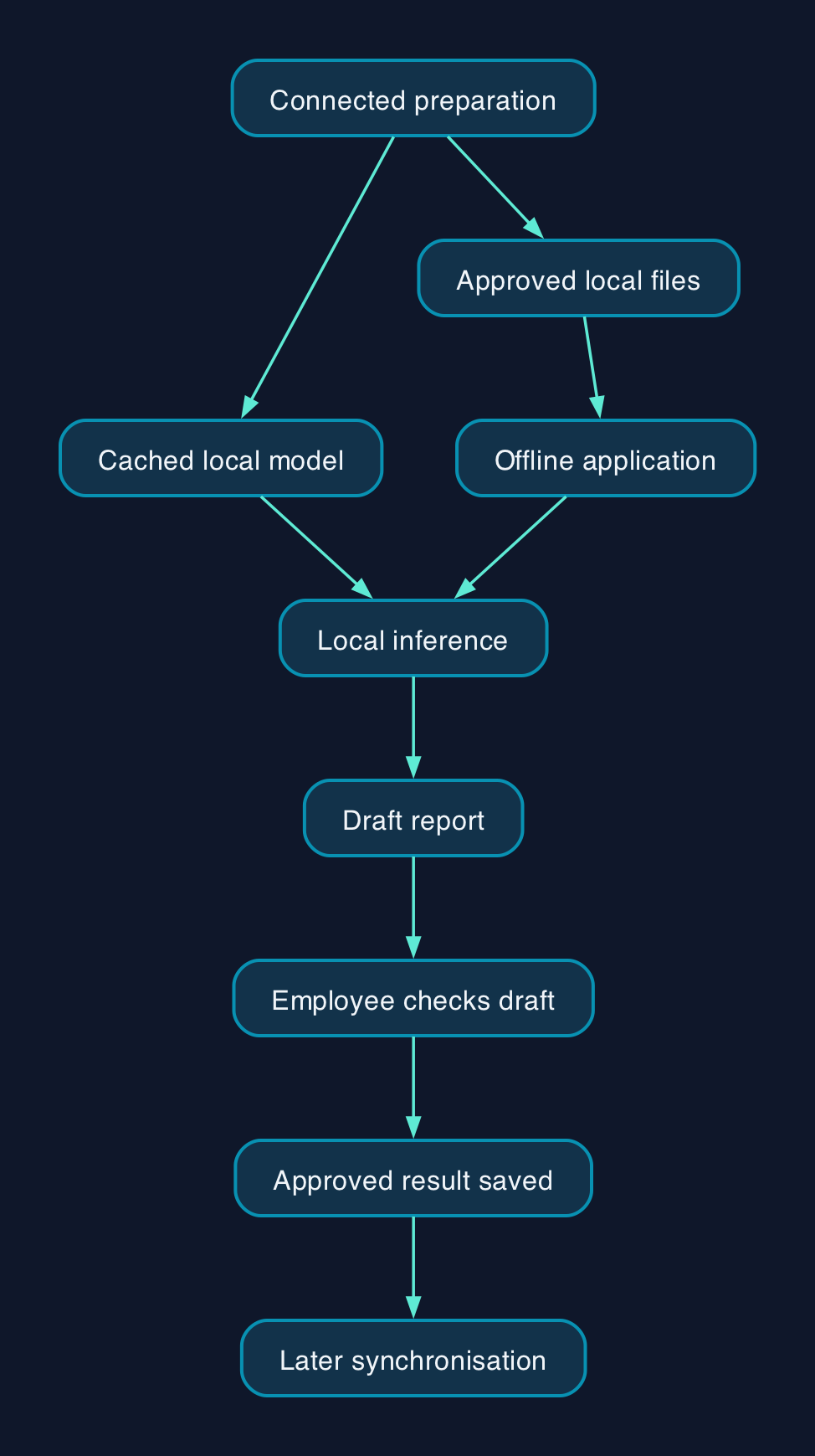
Consider a hypothetical UK engineering firm preparing inspection reports at customer sites. Before leaving, its surveyor saves the approved job notes and prepares the application and model. At the site, the application could turn those notes into a draft report using documented local summarisation and rewriting capabilities. The surveyor then checks the draft against the original notes. Documented text capabilities
The boundary matters. That proposed application could work from the saved inspection record. It could not obtain an office colleague’s newly uploaded correction while disconnected. The acceptance test therefore needs to distinguish “draft from this saved record” from “draft from the latest company information”.
For a small business, that is a useful way to limit the first project. Choose a task with known inputs and an output an employee can check, such as a report draft. Avoid making an undefined promise that “company AI will work offline”.
Which parts of a business task can run locally
Microsoft lists local language processing, speech recognition, OCR and image capabilities across its Windows AI tools. Their hardware requirements differ, so the supplier must identify the capability used by the proposed application. Windows AI overview
| Proposed task | Documented building block | Practical check |
|---|---|---|
| Turn saved inspection notes into a report draft | Phi Silica summarisation and rewriting. Transparency note | Compare the draft with the notes for omitted defects, altered measurements and lost qualifications |
| Extract text from a photographed form | OCR through Windows AI APIs on Copilot+ PCs. API hardware table | Test the forms, handwriting or print quality the employee actually encounters |
| Produce a transcript from recorded speech | Speech Recognition through Windows APIs or Whisper through Foundry Local. Windows AI overview | Test workplace noise, accents and specialist vocabulary |
| Rewrite a downloaded document for clarity | Phi Silica text rewriting. Transparency note | Check that the wording changes without changing the meaning |
These are candidate workflows, not measured CTC test results. The cited documentation does not provide accuracy, completion-time or battery measurements for these company tasks.
A useful trial includes awkward material. If the employee normally receives blurred forms or incomplete notes, a demonstration using clean sample text will leave the real question unanswered.
The application decides whether the workflow stays offline
For the proposed inspection workflow, the sequence is straightforward. Prepare the model and files while connected, open those files locally, generate a draft, check it and save the approved result. Any later synchronisation is a separate step.
Foundry Local requires internet access for the initial model download. Once the model is cached, Microsoft says inference can continue offline, including when the service cannot refresh its model catalogue. Foundry Local caching behaviour
That distinction changes deployment planning. Downloading the application before a site visit does not prove that its model is ready. Ask the supplier to demonstrate model readiness on a newly prepared device, then repeat the task after disconnecting and restarting.
The fallback behaviour also needs a decision. Microsoft describes an application pattern that tries Windows AI APIs, then Foundry Local, then a cloud service. That is a possible design, not a guarantee that an application remains local. Windows AI fallback example
If the business requires offline processing, specify a clear failure message when local processing is unavailable. Ask the developer to show what happens when a model has been removed or a required file is missing.
Microsoft’s statement that Foundry Local keeps inference inputs and outputs on the machine covers the model service. Assess the application’s saved files, logs and synchronisation separately before describing the entire workflow as local. Foundry Local data handling
Why the October and November transition affects a UK rollout
An application built around Phi Silica has a dated dependency to manage. Microsoft’s developer guidance sets out the following replacement schedule. Aion Instruct transition plan
| Scheduled stage | Microsoft’s stated change | What to ask the application supplier |
|---|---|---|
| Early October 2026 | A standalone Aion Instruct package becomes available for testing and LoRA training | When will you test our documents and compare outputs with the existing model? |
| October 2026 | Aion Instruct begins reaching Windows Insider Preview devices while Phi Silica remains present | Which test devices and application versions will you use? |
| November 2026 | Aion Instruct rolls out to retail devices and Phi Silica is removed | Who owns the application update and acceptance checks? |
These are planned stages, not evidence that a particular business application has passed compatibility testing.
LoRA is a method of adapting a model using a smaller set of trained adjustments. Microsoft’s plan tells developers to retrain those adapters for Aion Instruct using Foundry Toolkit. If a supplier has adapted Phi Silica for your business, ask whether that retraining is included in its support scope. Adapter definition and transition requirements
For a UK firm commissioning an application this autumn, the practical consequence is contractual. Put model-transition testing, responsibility and charges in the statement of work. A successful September demonstration should not be the only acceptance evidence for a deployment that depends on the November replacement.
What the UK hardware prices tell you
Microsoft UK Store extracts dated 28 September 2026 show the following displayed starting prices. Each is a GBP device-family reference, not a quotation for a complete offline AI system.
| Device family | Displayed starting price | What remains to confirm |
|---|---|---|
| Surface Pro for Business, 13-inch, 11th Edition, Snapdragon | £1259.10 | Starting specification, accessory bundle and VAT treatment. UK product page |
| Surface Laptop for Business, 13.8 and 15-inch, 7th Edition, Intel | £1661.55 | Which screen size and configuration the family starting price covers, plus VAT. UK product page |
| Surface Pro for Business, 13-inch, 11th Edition, Intel | £1946.55 | Starting specification, accessory bundle and VAT treatment. UK product page |
The supplied extracts do not establish VAT treatment or equivalent configurations for these starting prices. Do not rank them as like-for-like offers.
Request an itemised GBP quotation covering the device, application licence or development, model preparation, deployment, training and support. Budget for employees checking outputs and for maintaining the local document collection. The evidence does not price those activities, so a complete total cost cannot be calculated here.
There is a separate support question. Microsoft’s UK Surface Pro pages list business sales assistance from Monday to Friday, 9am to 6pm. That contact window does not establish support coverage for a custom offline application; name the application support owner in your order. UK business sales information
Three software routes explain why a new PC may be unnecessary
Microsoft provides three local development routes. These are components for building applications, rather than interchangeable finished assistants. Windows AI solution comparison
| Route | What it provides | What the business needs its supplier to establish |
|---|---|---|
| Windows AI APIs | Built-in capabilities such as OCR and Phi Silica text processing | Exact API support, model readiness and the Phi Silica replacement plan |
| Foundry Local | A choice of local models through an OpenAI-compatible interface | Chosen model, cached offline operation and support for the application’s software versions |
| Windows ML | A route for running a chosen model in ONNX, a machine-learning model format | Model compatibility, hardware execution and responsibility for maintaining the processing pipeline |
Foundry Local and Windows ML extend the options beyond Copilot+ PCs. That makes testing existing equipment a credible first step before a hardware refresh. Supported development routes
But “supported GPU” needs careful reading. Phi Silica’s GPU instructions require Windows Insider Experimental build 26300.8553 or later, Windows App SDK 2.2.2-experimental9 or later, Developer Mode and manufacturer graphics drivers. Treat that documented route as a separate development decision, not an assumption that an existing office PC is ready for deployment. Phi Silica GPU requirements
Microsoft’s broad FAQ still says Windows AI APIs require Copilot+ hardware, while its detailed API table lists exceptions. Use the feature-specific requirements and a device trial when agreeing what the supplier will support. General FAQ and API-specific hardware table
Editorial analysis
The business case is strongest when disconnection interrupts a specific task that local processing can complete. In the proposed engineering workflow, the outcome to measure is a checked report saved at the site.
Before authorising a wider purchase, have an employee complete that task on the quoted device with the network disconnected. Repeat after a restart. Record the time taken, corrections required and whether the result is ready for its intended use.
For an autumn deployment, add one further acceptance condition. The supplier should repeat those checks with the replacement model before signing off the transition. That connects the hardware spend, the employee’s work and Microsoft’s published timetable to an outcome the business can verify.
Sources
- Microsoft Learn – What are Windows AI APIs?
- Microsoft Learn – Get started with Phi Silica
- Microsoft Learn – Transparency Note for Phi Silica on Non-Copilot+ PCs
- Microsoft Learn – FAQs about using AI in Windows apps
- Microsoft Learn – Phi Silica platform card
- Microsoft Learn – Choose your Windows AI solution
- Microsoft Learn – Use local AI with Microsoft Foundry on Windows
- Microsoft UK Store – Surface Pro for Business, 13-inch, Snapdragon, price extract dated 28 September 2026
- Microsoft UK Store – Surface Laptop for Business, 13.8 and 15-inch, Intel, price extract dated 28 September 2026
- Microsoft UK Store – Surface Pro for Business, 13-inch, Intel, price extract dated 28 September 2026