
Start with a register of every service using a mobile connection, then verify the installed device, SIM, network and functions with its supplier. Prioritise alarms and other services where failure could harm people or stop operations. Do not plan around 2033 alone. Published UK schedules put nationwide retirement activity from 2029, with earlier local trials, so each affected device needs an owner, an upgrade decision and a tested replacement path.
Define the audit around business services
The audit should answer a practical question for each asset: can the business service continue when its available 2G connection disappears?
A list of handset models will not answer that question for a lift alarm supplied through a maintenance contract. Government guidance specifically directs users of smart devices and personal equipment to their service provider to establish compatibility. Official preparation guidance
For a small business, use one shared register with a named coordinator. Ask facilities, finance, operations and IT to contribute. Include leased premises and outsourced services in the scope, then establish who owns each device and who can authorise work.
As an audit search list, inspect alarm and lift contracts, vehicle equipment, payment equipment, remote monitoring, backup connectivity and spare phones. These are places to investigate, not a claim that every device in those categories uses 2G.
Record three separate conclusions:
- Confirmed 2G-only hardware, supported by documentation or written supplier confirmation.
- Potential 2G dependency, where another technology is supported but the required service has not been demonstrated without 2G.
- Verified replacement or retained service, supported by compatibility evidence and an agreed functional test.
Keep unidentified equipment open. “No information found” is an audit gap.
Establish the relevant network dates
The government’s connectivity timeline, updated on 29 July 2026, distinguishes the main operators’ plans. Those dates should inform supplier discussions, but local trial notices can bring an individual site’s deadline forward. Published connectivity timeline
| Network | Published milestone | Implication for the audit |
|---|---|---|
| EE | Switch-off begins from May 2029 | Obtain the relevant site or service schedule from the supplier. BT Business |
| Virgin Media O2 | Switch-off starts in summer 2029, with earlier localised trials anticipated | Ask whether any installation could fall within a trial area. Government timeline |
| Vodafone | Vodafone’s 2G network closes in spring 2030, with earlier retirement possible in some areas | Request the local transition plan rather than assuming service lasts until spring. VodafoneThree guidance |
These milestones are not equivalent completion dates. They also provide no basis for ranking replacement coverage or service quality.
Record the company billing you separately from the underlying mobile network. Where the supplier describes a connection as multi-network, request the networks and technologies available under that specific contract. Do not close an audit item on the strength of that description alone.
Build a register that connects equipment to responsibility
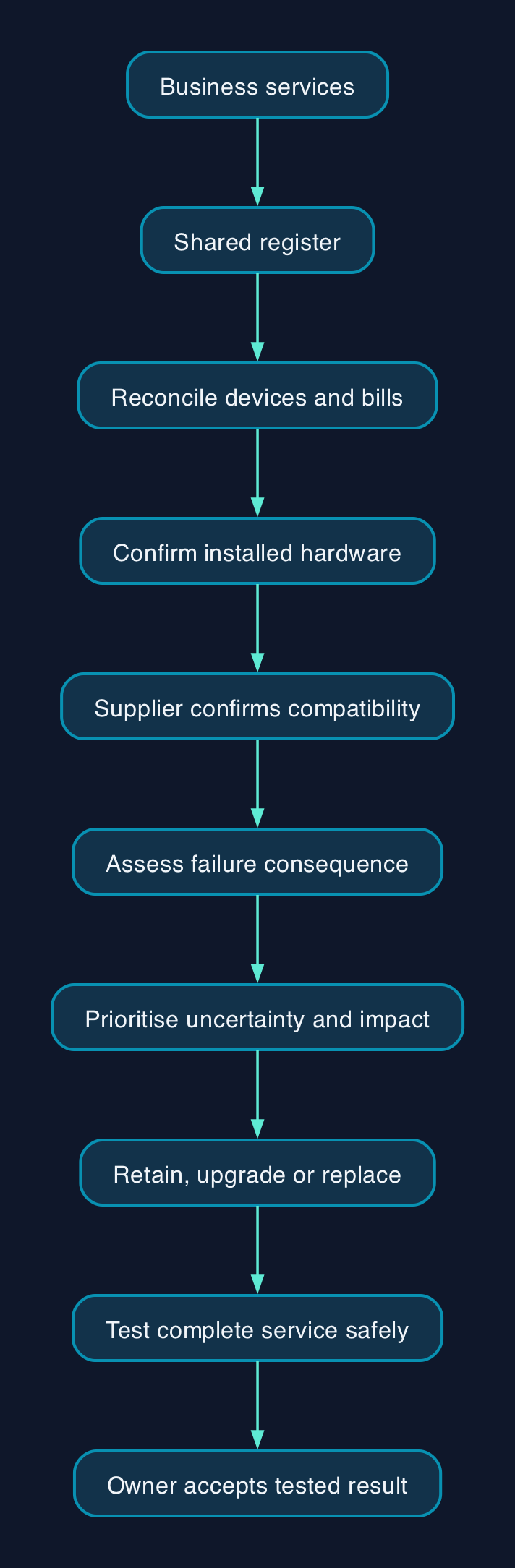
The proposed responsibility chain is straightforward. The business identifies the service and its consequence of failure. The equipment supplier confirms compatibility and upgrade options. The connectivity provider confirms the connection arrangements. The service owner accepts the tested result.
Use the following fields in your existing asset register or a spreadsheet.
| Record | Evidence to collect | Suggested owner |
|---|---|---|
| Service and location | Business function, installation position and consequence of failure | Operations or facilities |
| Installed hardware | Manufacturer, exact model, modem model where available, serial number and firmware | Maintainer or IT |
| Mobile connection | SIM identifier, billing supplier, underlying network and contract reference | Finance and connectivity supplier |
| Required functions | Voice, texts, data, alarm delivery and backup operation, as applicable | Service owner |
| Compatibility | Supported technologies and written confirmation for the installed configuration | Equipment supplier |
| Observed behaviour | Connection type, test date, location and end-to-end result | Authorised tester |
| Remediation | Action, responsible person, quotation, target date and acceptance evidence | Audit coordinator |
Device management screens can help recover identifiers. For example, Mushroom Networks’ modem documentation describes fields for model, firmware, the hardware identifier called IMEI, and the SIM identifier called ICCID. It states that the described information requires firmware version 1.18.0 or later and that available fields vary.
Treat such documentation as product-specific. A missing field should trigger a supplier enquiry, not a guessed value.
Audit the estate in five steps
1. Reconcile records with the physical estate
Start with mobile bills, maintenance agreements, equipment schedules and existing asset records. Ask each department to identify services with a mobile connection and name the person responsible for them.
Then inspect the relevant locations with an authorised employee or maintainer. Photograph accessible labels and record where each device is installed. Do not open restricted enclosures or disturb alarm wiring to obtain an identifier.
Reconcile both directions. Every billed connection needs an explanation, and every discovered device needs an owner or supplier enquiry. Include spare, seasonal and standby equipment rather than limiting the exercise to devices active on inspection day.
2. Confirm the installed hardware
Send the supplier the exact model, hardware revision and firmware where available. Ask for a written answer covering the installed configuration and each function the business needs.
Request confirmation of whether the equipment is 2G-only, whether an approved upgrade exists, and whether the proposed change covers the complete service or just its communications module. Also ask who must perform and approve the work.
For phones, the government recommends checking for a 4G or 5G indication while using mobile data with Wi-Fi off, alongside the calling settings. Use this as an initial check, then resolve uncertainty with the provider. Government phone checks
3. Separate capability from observed use
Record what the device supports separately from what it was using during inspection.
A 2G observation should trigger investigation. It does not, by itself, establish that the hardware supports nothing else. Conversely, accept a successful data connection only as evidence for the function actually tested. The government’s separate checks for mobile data and calling illustrate why one observation is insufficient. Compatibility guidance
Ask the supplier to explain any mismatch between the documented capability and observed behaviour. Leave the asset unresolved until that explanation and the required tests are recorded.
4. Prioritise by consequence and uncertainty
CTC recommends putting life-safety services first, followed by services whose failure would stop trading or leave a site unmonitored. Within each group, prioritise equipment with unknown compatibility, difficult physical access or an unresolved supplier relationship.
For a hypothetical small property business, that could mean investigating a lift alarm before replacing a spare handset. This is an audit priority, not evidence that either device is affected.
Assign each open item a next action and an owner. “Awaiting supplier” needs a follow-up date.
5. Test the complete service safely
Agree the test procedure with the maintainer and the person receiving the service. For an alarm, that means checking receipt at the intended monitoring destination, rather than accepting a connection indicator on the device.
Do not disable communications on a live safety system or place test calls to emergency services. Arrange any disruptive work, temporary safeguards and restoration procedure with the responsible specialist first.
Where the supplier can safely demonstrate operation without 2G, retain that result. Where it cannot, record the remaining uncertainty and the action needed to resolve it.
Budget for the work around the device
No applicable equipment or installation prices are supplied in the available evidence. Obtain quotations against the verified register, rather than applying an unsupported price per device.
Ask suppliers to separate the following costs.
| Cost component | What the quotation should specify |
|---|---|
| Survey and identification | Sites, assets, access arrangements and treatment of unidentified equipment |
| Hardware or module replacement | Exact model, compatible accessories and installation scope |
| Connectivity | Charging basis, contract term, activation, usage and cancellation charges |
| Installation and commissioning | Visits, out-of-hours work, configuration and end-to-end testing |
| Continuity during change | Temporary provision and any period of overlapping service |
| Ongoing support | Fault ownership, service hours, escalation and maintenance |
| Exit and disposal | Old contract closure, equipment removal and record updates |
Request GBP quotations with VAT treatment, exclusions and validity dates stated. Keep staff time, training and any unresolved work visible alongside supplier charges. A hardware subtotal is not the full migration cost.
Migration and rollout checklist
- [ ] Approve the scope. Each site and department has returned its equipment list or confirmed that it has nothing to report.
- [ ] Reconcile the register. Every discovered device and billed connection has an owner or a tracked investigation.
- [ ] Collect compatibility evidence. Retained equipment has written confirmation covering its installed configuration and required functions.
- [ ] Approve the replacement scope. The supplier has identified hardware, connectivity, installation, support and exclusions.
- [ ] Prepare recovery. Save relevant configuration and service records, agree temporary safeguards, and document how to restore service if commissioning fails.
- [ ] Pilot representative installations. Include relevant differences in location, equipment and service use before authorising wider rollout.
- [ ] Verify acceptance. The intended recipient confirms the service works, and the owner records the test result.
- [ ] Complete the handover. Staff receive operating instructions, contacts are updated, and obsolete contracts are closed only after acceptance.
An audit is ready for handover when unresolved items have explicit owners and funded actions. Migration is complete only when the affected services have passed their acceptance checks.
Choose between retaining, upgrading and replacing
Compare delivery approaches before selecting a supplier.
Retain and verify where written compatibility evidence and functional testing support continued use. Do not replace equipment solely because its documentation mentions 2G alongside newer technologies.
Upgrade through the existing maintainer where it offers a supported route for the installed system. Require it to state precisely which components and tests its quotation covers.
Replace the service or change provider where the existing arrangement cannot meet the required outcome. Compare candidates on site suitability, installation responsibility, support, contract commitments and exit arrangements.
EE, Virgin Media O2 and Vodafone have different published retirement milestones. The cited evidence does not establish which would provide the best replacement connection at your premises. Keep that decision conditional on the proposed equipment, contract and site testing.
Editorial analysis
The most useful audit output is a list of business services with evidence and accountable owners. Counting old devices alone leaves the harder question unanswered: who will ensure that the alarm, transaction or monitoring message still reaches its destination?
For a small or mid-sized business, start with the existing register and supplier relationships. Spend specialist effort on unidentified equipment, critical services and tests that require controlled intervention.
Sources
- DSIT and DCMS, Telecommunications Modernisation Connectivity Timeline, updated 29 July 2026
- BT Business, We’re saying goodbye to 2G
- Vodafone, VodafoneThree 2G switch-off guidance, dated 23 March 2026
- DCMS, Joint statement on the sunsetting of 2G and 3G networks, published 8 December 2021
- DSIT and DCMS, Preparing for the 2G switch-off, updated 29 July 2026
- DSIT and DCMS, 2G Switch-off Charter, updated 15 September 2026
- Mushroom Networks, Finding IMEI and detailed cellular modem information