
Before enabling an AI agent to act, put a named owner, restricted permissions, an approval step, an action log and a tested stop procedure in place. For a UK small or mid-sized business, our recommendation is to start with drafts and proposed changes. Expand access only after testing the exact workflow, including rejected requests, duplicate submissions and recovery. Approval should cover a specific action, with its consequences visible.
Define what the agent is allowed to do
Write an action specification before connecting the agent to a live mailbox, customer relationship management system, or company database.
For a hypothetical UK wholesaler, the initial task might be to read an account manager’s meeting notes, draft a customer follow-up and propose a CRM note. The permission to prepare those outputs should not automatically authorise sending the email, changing the sales forecast or updating payment details.
Our recommended specification records:
- The business owner and the administrator who can suspend access.
- The permitted source data, destination systems and actions.
- The records and fields the agent may change.
- The person authorised to approve each action.
- The evidence required to confirm success.
- The recovery procedure and escalation contact.
Start with a task whose result an employee can check without reconstructing the whole customer relationship. A proposed meeting note is a more manageable pilot than permission to rewrite an account’s commercial history.
For a small business, one administrator may operate several controls. Still record the business approval and technical configuration separately, so a supplier knows who can authorise a change in scope.
Make approval specific and enforceable
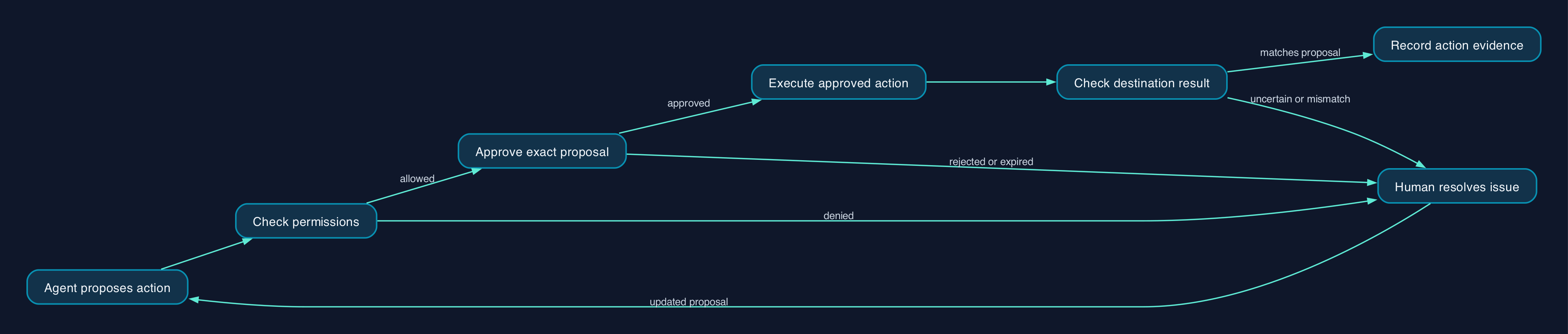
Our recommended design separates preparation from execution. The agent proposes an action; the surrounding application checks permission, obtains any required approval and performs the approved operation.
For email, show the approving employee the sending account, complete recipient list, subject, body and attachments. For a CRM update, show the record identifier, affected fields, old values and proposed values. Salesforce’s documented Coworker interface provides an example of displaying old and new values before confirmation. Salesforce record-change experience
Bind approval to that exact proposal. If a recipient, attachment or field value changes, require fresh approval. If the record changes while approval is pending, stop and present an updated proposal.
Ask the implementer to demonstrate that the tool cannot execute the action when approval is missing, rejected or expired. Make this an acceptance test, rather than relying on an instruction in the agent’s prompt.
Apply separate approval rules to separate consequences. Approving a CRM note should not also approve an email, even when both arise from the same meeting.
Put responsibilities around the workflow
The following is a proposed operating model, not a claim that every platform supplies these controls automatically.
| Stage | Required behaviour | Accountable owner | Acceptance evidence |
|---|---|---|---|
| Read | Access only the agreed sources and records | System administrator | A forbidden record cannot be retrieved |
| Prepare | Produce a draft or explicit change proposal | Workflow owner | Recipient details or field changes are visible |
| Check | Validate destination, permissions, fields and business rules | Implementer | Invalid requests are rejected before execution |
| Approve | Capture approval for the exact proposed action | Authorised employee | Approval identifies the proposal and approver |
| Execute | Perform only the approved operation | Application or connector owner | Destination returns a result tied to the request |
| Verify | Check the resulting message or record in the destination | Workflow operator | Saved values or sending status match the proposal |
| Recover | Suspend further actions and handle affected work | Incident owner | Stop and recovery procedures pass a rehearsal |
For unattended workflows, specify whose identity executes the action. Require narrowly scoped access and a named owner; do not give an integration unrestricted administrator credentials for convenience.
Identity behaviour varies by product. Salesforce documents that its hosted Model Context Protocol, or MCP, servers connect through individual user authentication and do not offer a shared service-account principal across sessions. Do not assume that a background-agent design will fit that access model. Salesforce hosted MCP security
Treat incoming emails, attachments and retrieved documents as material to process. In testing, include a document that tells the agent to ignore its rules, change a recipient or export unrelated records. The acceptance condition is that those instructions cannot expand permissions or bypass approval.
Set boundaries for customer and company data
Before a UK business connects customer or employee records, give the person responsible for data protection a concrete data-flow description.
Record which fields reach the model provider, which reach other services, what appears in logs, who can inspect those logs and how deletion is handled. Request contractual answers about processing locations, retention and subprocessors. Keep particularly sensitive fields outside the pilot unless the task requires them.
The available evidence does not establish UK processing locations, retention terms or legal suitability for every option discussed here. Those questions need the actual service terms and configuration.
For this pilot, our recommendation is to exclude payment instructions, payroll changes, access permissions, bulk deletion and marketing-consent changes. Adding one of these later should require a separate business decision and fresh testing.
Budget for implementation and operation
No verified GBP tariffs are available in the supplied evidence, so a defensible budget starts with cost components rather than a fabricated subscription comparison.
Ask for a GBP quotation that separates setup from recurring charges and states VAT treatment, billing commitment, included usage and support hours. Include permissions work, approval screens, testing, logging, staff training, incident support and eventual handover.
OpenAI’s runtime comparison assigns different responsibilities to managed infrastructure, the Agents SDK and direct Responses API integration. Use those differences to establish who must build and maintain the surrounding workflow. OpenAI runtime responsibilities
Google’s published quota units offer a measurable example of operational consumption.
| Gmail API operation | Quota units per request | Workflow relevance |
|---|---|---|
| `drafts.create` | 10 | Prepare a draft |
| `drafts.update` | 15 | Revise a draft |
| `drafts.send` | 100 | Send the draft |
These figures come from Google’s Gmail API usage limits. They are not GBP charges, email-delivery guarantees or recommended business limits. An implementation budget must also account for model usage, integration maintenance and employee review time.
During the pilot, record completed tasks, failed actions, review time and correction work. Use those observations to decide whether automation saves enough effort to justify operating it.
Migration and rollout checklist
Use this sequence as the release gate for the first live workflow.
- [ ] Agree the task. The business owner signs off the permitted actions, prohibited actions and intended outcome.
- [ ] Prepare test data. Use synthetic or appropriately sanitised records and a test mailbox. Identify the records needed to check recovery.
- [ ] Restrict access. Demonstrate that the execution identity cannot read an excluded record or modify a prohibited field.
- [ ] Test approval. Reject a proposal, alter an approved proposal and let another approval expire. None should execute using the original approval.
- [ ] Test hostile content. Put conflicting instructions in a sample email or document. Confirm that they cannot change the authorised destination or action.
- [ ] Test incomplete and stale data. Submit missing fields, ambiguous customer names and a record changed since the proposal was prepared. Confirm that the workflow stops for resolution.
- [ ] Test duplicate handling. Repeat a request and simulate a timeout after submission. Verify the destination before allowing a retry.
- [ ] Test the action log. Trace a completed operation through its proposal, approver, execution identity, destination result and timestamp.
- [ ] Rehearse recovery. Restore a test record without overwriting a later legitimate edit. For email, prepare a correction procedure rather than relying on recall.
- [ ] Rehearse suspension. Disable execution access and confirm that queued work cannot continue.
- [ ] Train the reviewer. Have the employee identify a wrong recipient, misleading attachment and incorrect field change in sample proposals.
- [ ] Approve a bounded live pilot. Name the participating users, records, review period and conditions that require suspension.
Before enabling live writes, verify backups or exports and explain any disruptive test to the affected staff. Keep a manual route available while the pilot runs.
Compare implementation routes by the controls you need
The documentation available for this guide supports a focused comparison of Google, Salesforce, OpenAI and Microsoft. These are different implementation routes, rather than interchangeable products. Product details reflect the evidence supplied for 28 September 2026.
| Route | Documented capability | What the buyer must establish |
|---|---|---|
| Google Gmail API integration | Separate draft and send operations, with published method quotas. Google documentation | Who implements action approval, recipient restrictions, duplicate handling and logs |
| Salesforce Agentforce Coworker | Confirmed CRM changes using existing user permissions. The documented editions are Enterprise, Unlimited and Agentforce 1. Salesforce controls | Whether its access controls, validation behaviour and audit limitations fit the proposed task |
| OpenAI Agents SDK | Application-controlled deployment, storage, approvals and runtime integration. OpenAI documentation | Who builds, supports and tests each action boundary |
| Microsoft Copilot Studio | Data policies governing connections and capabilities, including blocking tools and HTTP requests. Microsoft documentation | How individual action approval, destination permissions and result verification are implemented |
For an existing Salesforce customer, inspect Coworker’s limitations before enabling writes. Salesforce says it checks field-level requirements but not page-layout required fields. It also documents that its Agent Actions control cannot itself restrict create and update capabilities to particular users, objects or fields, although existing user permissions still apply. Salesforce configuration limits
For a business commissioning a custom integration, put the acceptance tests into the supplier’s statement of work. Require a handover covering credentials, monitoring, failure handling and exit. A UK provider’s location alone does not answer who maintains the workflow or who can stop it outside office hours.
Editorial analysis
Our recommendation is to keep external email behind approval of each message and introduce CRM writes through narrow, reviewable actions.
The decisive purchasing question is whether the business can demonstrate control over a specific operation. Ask the supplier to show a rejected request, a blocked field change, a duplicate submission and a disabled connector. Then inspect the destination.
An impressive demonstration of a successful action answers only part of that question. The release decision should also depend on what happens when permission is absent, the source data is wrong or the first attempt has an uncertain result.
Sources
- OpenAI — Agents and runtime options
- Google — Gmail API usage limits
- Salesforce — Give Users Access to Create and Update Records with Agentforce Coworker
- Salesforce — Search or Create and Modify Records with Agentforce Coworker
- Salesforce — How to Secure Salesforce Hosted MCP Servers
- Microsoft — Configure data policies for agents
- Microsoft — Govern connector access with Power Shield in Copilot Agent Kit