
For a small CIS subcontractor, Xero calculates the deduction on invoice labour for free and only charges to verify subcontractors and file the CIS300. Sage 50 Accounts bundles calculation, verification and filing into one paid CIS v2 module, none of it free. BrightPay has retired its desktop CIS module, and CIS now runs through BrightCIS, a standalone product priced by subcontractor count with no flat public rate.
Key pointers
- If you only receive CIS deductions and have no subcontractors or employees of your own, general bookkeeping software such as Xero or Sage 50 Accounts is the natural fit, not a payroll and CIS stack like BrightPay and BrightCIS.
- If you also pay your own subcontractors or run PAYE for staff, you need the contractor-side tools: subcontractor verification and CIS300 filing. None of the three routes here gives you that for free; Xero and Sage price it as a flat add-on, Bright prices it as a separate BrightCIS subscription.
- Split every subcontractor invoice into labour and materials before it reaches the software. CIS applies to labour only, and the vendor tools cannot fix a bad split after the fact.
- Budget for the add-on, not just the headline plan price: Xero's CIS filing tools cost £5 a month on top of Ignite or any higher plan, and Sage's CIS v2 module is £11 a month plus VAT on top of Sage 50 Accounts.
- BrightPay for Windows has already wound down for the 2026/27 tax year. If you were relying on its bundled desktop CIS module, you now need BrightPay Cloud for payroll plus a separate BrightCIS subscription for CIS, and should get a written quote for both rather than assuming the old desktop price still applies.
- Give every subcontractor a payment and deduction statement within 14 days of the tax month end, and file the CIS300 by the 19th of that same calendar month, whichever software you use.
- Verify each subcontractor's status with HMRC before the first payment. Getting the rate wrong is the contractor's liability, not a software problem the package can absorb for you.
What CIS Deduction Handling Means for a UK Subcontractor
Under the Construction Industry Scheme, a contractor deducts tax from a subcontractor's labour and pays it to HMRC as an advance against the subcontractor's own Income Tax and National Insurance bill. HMRC sets the rate when the contractor verifies the subcontractor: 20% if registered, 30% if not, or 0% if the subcontractor holds gross payment status (GOV.UK).
Many small subcontractors sit on both sides of the scheme at once. A groundworks firm that takes CIS deductions from a main contractor may also bring in its own labour-only gangs, which makes it a contractor for that part of its business. That dual role decides which software features actually matter. A pure subcontractor, who only receives deductions and never pays anyone else under CIS, mainly needs accurate labour and materials splitting on outgoing invoices, and a clear record of deductions suffered to support Self Assessment. A subcontractor that also pays its own subcontractors additionally needs HMRC verification, monthly CIS300 filing, and payment and deduction statements, the same obligations as any main contractor (GOV.UK).
This is why the three products in the query answer different halves of the question. Xero and Sage 50 Accounts are general bookkeeping software with CIS features layered on top, useful whichever side of the deduction you sit on. BrightPay is payroll software, and its current cloud version handles CIS only via BrightCIS, a separate Bright product for subcontractor verification, deductions and CIS300 filing. That combination only earns its keep if you are paying subcontractors, running PAYE, or both.
UK Compliance Mapping
CIS is a statutory HMRC scheme, not a voluntary standard. Applying the wrong deduction rate, missing a verification, or filing the CIS300 late are compliance failures with fixed financial consequences, not stylistic choices left to the software. A contractor that files a CIS300 one day late is charged £100; two months late, £200; six months late, £300 or 5% of the deductions on that return, whichever is higher (GOV.UK). None of Xero, Sage 50 Accounts or BrightPay can waive these penalties. They can only reduce the chance of missing the deadline, by calculating the deduction correctly and keeping the filing date visible.
A UK-hosted or UK-branded accounting package is not itself a compliance measure. What matters is whether the software applies the 20%, 30% or 0% rate to the correct base (labour only) and gets the return in on time, not where its servers sit. This is not legal advice; consult your legal counsel for CIS status disputes, gross payment status applications or penalty appeals.
Architecture Overview
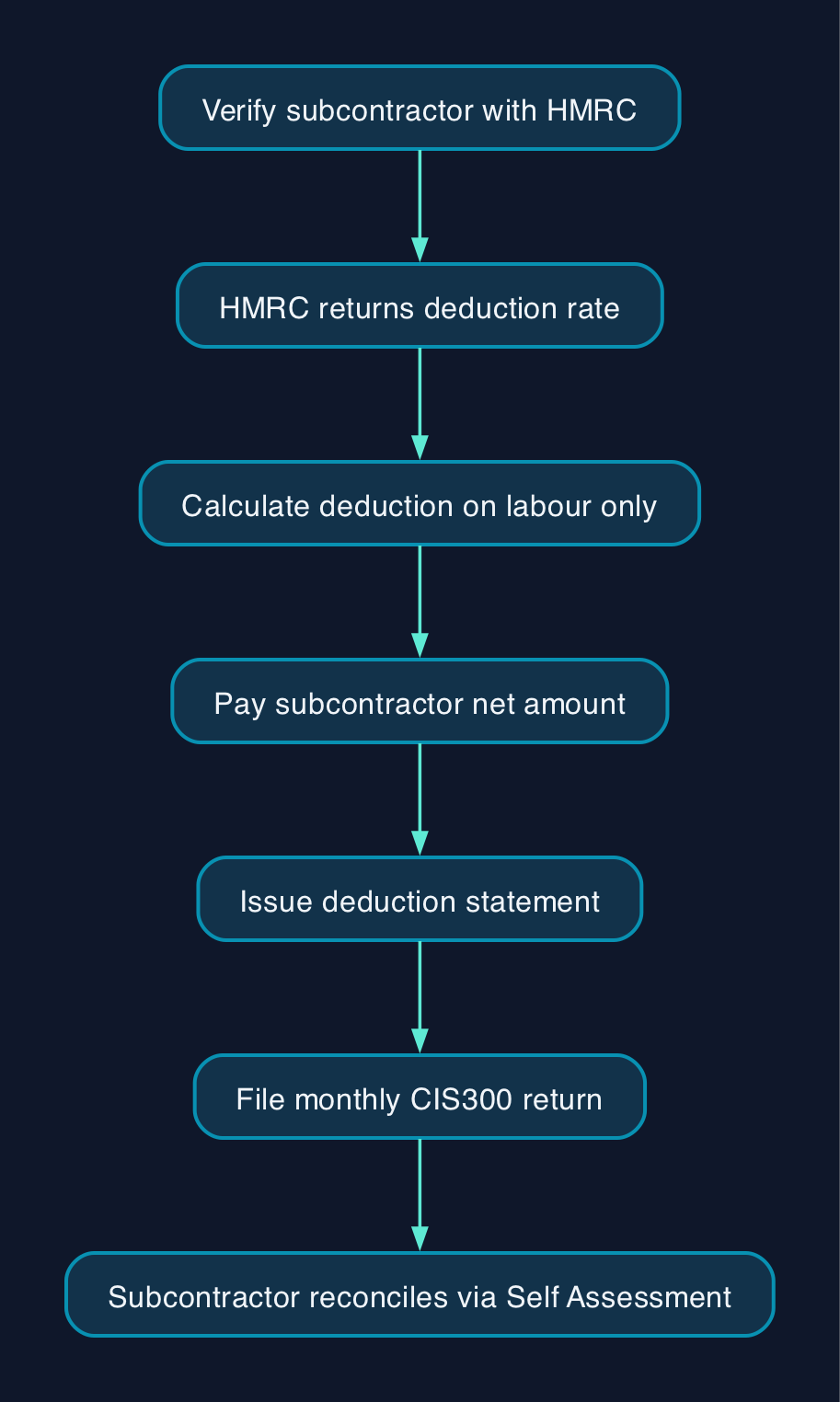
The mechanics are the same regardless of which software processes them. A contractor first verifies the subcontractor with HMRC, which returns the applicable deduction rate. The contractor calculates the deduction on the labour element of the next payment, pays the subcontractor the net amount, and issues a payment and deduction statement within 14 days of the tax month end (GOV.UK). At the end of the tax month (which runs from the 6th to the 5th), the contractor files the CIS300 return with HMRC by the 19th, 14 days later. The subcontractor, in turn, reports the gross income and the CIS deducted on their own Self Assessment return, and any overpayment is refunded there rather than by the contractor.
Where the three products differ is which of these steps sit inside the base subscription and which need an add-on or a second product. Xero automates the calculation and record-keeping steps on every plan, but the verification and filing steps sit behind its £5 CIS add-on. Sage 50 Accounts separates CIS out almost entirely into its CIS v2 module, which handles verification, rate application and filing as one paid unit. BrightPay Cloud handles payroll only; the whole verification-to-CIS300 sequence runs through BrightCIS, a separate Bright application that shares subcontractor and deduction data back into BrightPay's P30 rather than living inside the payroll engine itself.
Pricing and Cost Model
All prices below are excluding VAT, checked live on 29 September 2026 against each vendor's own pages, and reflect the entry-level plan that can take each vendor's CIS filing option.
| Software | Base plan with CIS calculations | Extra for verification and CIS300 filing | Combined entry cost |
|---|---|---|---|
| Xero Ignite | £18 a month | CIS add-on, £5 a month | £23 a month |
| Sage 50 Accounts Standard | From £115 a month | CIS v2 module, £11 a month plus VAT | From £126 a month |
| BrightPay Cloud (payroll only) | Quoted by active employee count, no published flat rate | BrightCIS, a separate subscription tiered by subcontractor count, no published flat rate | Two calculated quotes, not a single published price |
Assumptions. Xero's £23 is simple addition of the published base and add-on prices (£18 + £5). Sage's £126 adds the £11 CIS v2 module to the Standard plan's "Starts from £115.00 +VAT/mo" on Sage's own product page, and the price rises further with extra users and companies. BrightPay Cloud and BrightCIS are both priced through the vendor's own calculator rather than a fixed rate card, so no comparable monthly figure can be shown without inventing one. Whichever software you are pricing, treat any headline monthly figure as a starting point and get a dated quote before budgeting. None of these figures include payroll, if you employ staff separately from your CIS subcontractors, or any partner or bookkeeper fees for setup and monthly processing.
BrightPay's Windows desktop edition, which used to bundle CIS handling into one flat annual licence, wound down at the end of the 2025/26 tax year. The product page that once listed those desktop prices no longer carries any pricing content, so a subcontractor still quoting the old desktop figures should treat them as retired and request current BrightPay Cloud and BrightCIS quotes instead.
For a subcontractor who only suffers deductions and never pays anyone else under CIS, none of the vendor add-ons above are relevant. Xero's and Sage 50 Accounts' base plans already record CIS suffered for Self Assessment, so the cheaper entry-level plan without the contractor add-on, such as Xero Simple at £7 a month for a non-VAT-registered business, is the realistic comparison in that case.
Vendor and Option Comparison
| Capability | Xero | Sage 50 Accounts (formerly Sage 50cloud) | BrightPay Cloud + BrightCIS |
|---|---|---|---|
| Product type | Cloud bookkeeping software | Desktop accounting software with cloud connectivity | Payroll software (BrightPay Cloud) plus a separate CIS application (BrightCIS) |
| CIS deduction calculated on labour only | Included on every plan | Only with the separate CIS v2 module | Handled in BrightCIS, not BrightPay Cloud |
| HMRC subcontractor verification | Only with the £5 a month CIS add-on | Only with the separate CIS v2 module | Only with a BrightCIS subscription |
| CIS300 filed to HMRC from the software | Only with the £5 a month CIS add-on | Only with the separate CIS v2 module | Only with a BrightCIS subscription |
| Payment and deduction statements | Bulk email with the CIS add-on | Generated through the CIS v2 module | Generated in BrightCIS, gross deductions can flow into BrightPay's P30 |
| Entry price excluding VAT | £7 a month (Simple, non-VAT registered, no CIS add-on); £18 a month (Ignite) | From £115 a month (Standard) | No flat rate; both BrightPay Cloud and BrightCIS are quoted by headcount or subcontractor count |
| Best suited to | A subcontractor who also invoices, tracks stock or manages general bookkeeping alongside CIS | A larger contractor needing desktop-grade job costing and stock control as well as CIS | A subcontractor that already runs, or is about to start, PAYE payroll on BrightPay and wants a discounted CIS add-on from the same vendor |
No single product wins outright. A subcontractor who never pays anyone else under CIS gets no value from either BrightPay Cloud or BrightCIS, since both are built around paying people, not just recording what was received. A subcontractor who also employs staff and engages sub-subcontractors has to weigh two Bright subscriptions, discounted when bought together, against a single Xero or Sage add-on that already sits inside software they may already use for bookkeeping. A larger contractor already committed to desktop accounting for job costing has less reason to switch away from Sage purely over the CIS module price.
Expert Commentary
Editorial analysis. The clearest signal in this comparison is not which vendor calculates 20% correctly, all three do, but that none of them prices the parts of CIS that carry HMRC penalties, verification and filing, as a default included feature. Xero and Sage both treat those steps as a fixed add-on priced separately from the headline plan, which is easy to miss when comparing sticker prices. Bright has gone a step further and split them into an entirely separate product, BrightCIS, priced on its own calculator rather than a published rate. That makes BrightPay the hardest of the three to cost accurately in advance, even though it may end up the natural choice for a subcontractor already committed to BrightPay for payroll. The practical decision is less about which vendor's CIS engine is best and more about which side of the CIS relationship your business actually sits on, and how confidently you can get a written total from each vendor before committing.
Sources
- What you must do as a CIS contractor: make deductions and pay subcontractors, HM Revenue and Customs
- What you must do as a CIS subcontractor, HM Revenue and Customs
- What you must do as a CIS contractor: file your monthly returns, HM Revenue and Customs
- What you must do as a CIS contractor: keep records, HM Revenue and Customs
- File Your CIS Returns Online with Xero UK
- Xero pricing plans UK
- Activate the Sage 50 CIS module v2 for the first time, Sage
- Sage 50 Accounts, Sage
- CIS Software for the Construction Industry, BrightCIS
- Pricing (Desktop Version), BrightPay UK
- Sage CIS guide 2026/27, Trade Tax Specialists