

Okta's published prices run $6 to $17 per user per month, JumpCloud's a la carte modules run $9 to $15, and Keycloak carries no licence fee at all under its Apache 2.0 licence (Okta pricing; JumpCloud pricing; Keycloak, CNCF). That saving only holds if your team can run it, or you budget for a managed Keycloak host instead.
Key pointers
- Okta's cheapest published tier, Starter, is $6 per user per month and includes SSO, standard MFA and directory; Adaptive MFA, device access, API access management and lifecycle management are among the paid add-ons on that tier.
- Keycloak has no per-seat fee under its Apache 2.0 licence, but someone still has to patch, upgrade, back up and monitor it.
- A managed Keycloak specialist such as Skycloak charges a flat monthly fee per cluster, from $29 to $599 a month, regardless of how many users you add.
- JumpCloud's named packages (Platform Essentials, Platform, Platform Prime) are not publicly priced; you have to contact sales to get a number.
- Neither Okta nor JumpCloud publish a GBP price list; get a written quote in sterling before you budget.
- Switching identity provider touches every connected app, so plan for a parallel-running migration, not a weekend cutover.
- If nobody on the team can patch a Linux server or run a container platform, self-hosting Keycloak will cost more in contractor time than it saves in licence fees.
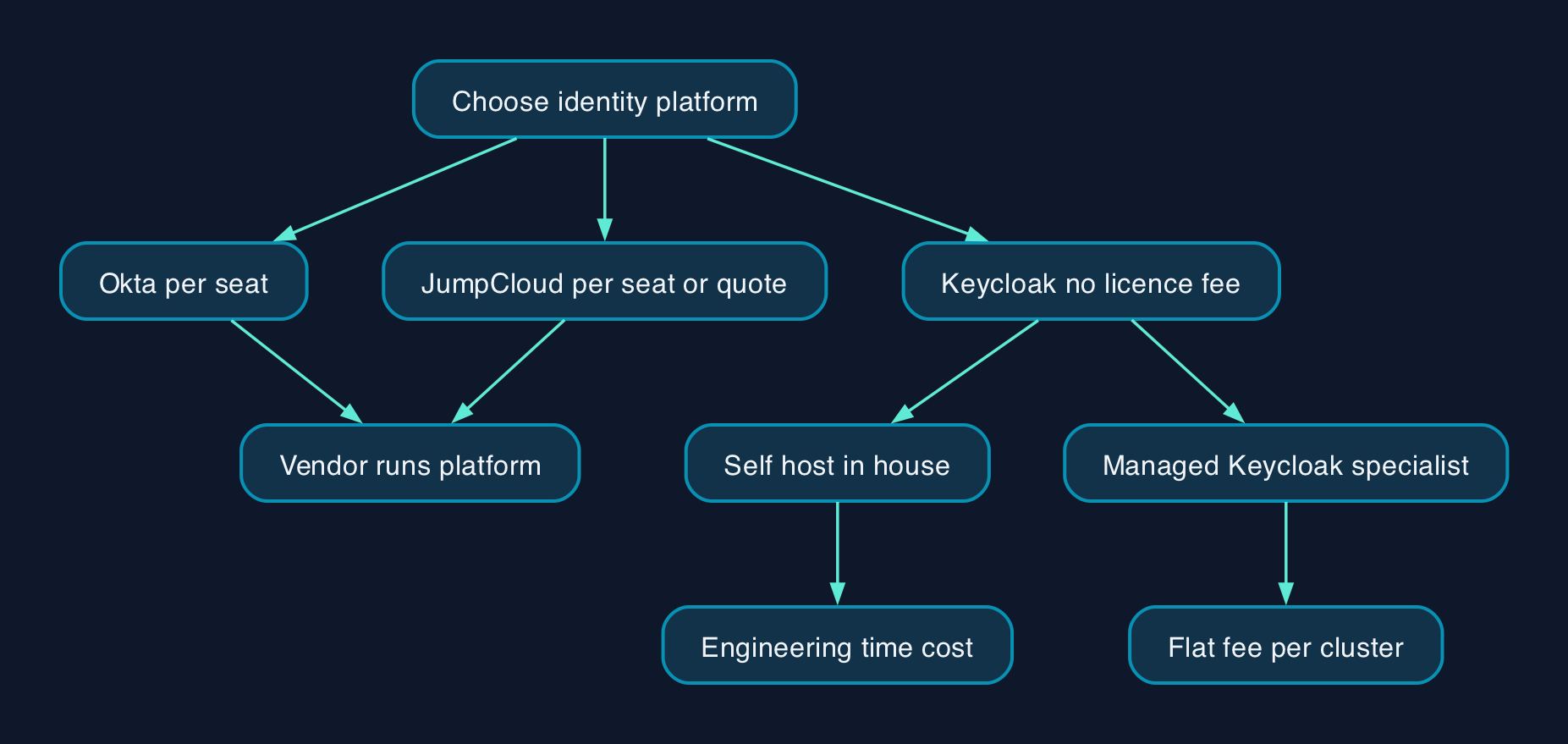
What Actually Drives the Cost
Okta and JumpCloud charge per user per month, so the bill grows in a straight line with headcount. That is simple to budget for, but it means a 200-person mid-market business pays roughly the same rate per person as a 20-person one, with no volume discount published on either company's website. Okta's Starter tier at $6 per user per month looks cheap next to Essentials at $17, but Starter does not include Adaptive MFA, Device Access or Lifecycle Management: those are paid add-ons on top, so a realistic like-for-like deployment usually lands on Core Essentials or Essentials rather than Starter.
Keycloak removes the per-seat line entirely. There is no cost to add the 201st user. Instead, the cost moves to infrastructure (a server or container, a database, TLS certificates, backups) and to the engineering time needed to install, configure, patch and monitor it. That is a real cost, just not one either vendor will put a number on for you, because it depends on your team's existing skills and how much of the work you already do for other internally hosted systems.
JumpCloud is a middle path worth understanding properly rather than treating as "cheap Okta". Its three packaged tiers, Platform Essentials, Platform and Platform Prime, are not publicly priced at all; you only get a number after a sales call. Its published a la carte pricing, from $9 to $15 per user per month depending on which modules you take, is a genuine like-for-like comparison point against Okta's per-user tiers, but it is not the same thing as the bundled package price a JumpCloud rep will eventually quote you.
Who Runs What Day to Day
With Okta, Okta runs the platform. Your team configures policies, connects applications and manages users, but patching, uptime and the underlying infrastructure are Okta's problem. The same is broadly true of JumpCloud's hosted service. This is the trade a UK mid-market IT lead is actually weighing: pay a monthly fee to make someone else responsible for keeping the identity platform running, or take that responsibility in-house.
Self-hosted Keycloak puts your team in charge of the server, the database, the upgrade cycle and the incident response when something breaks at 2am. Keycloak's own documentation describes an admin console for managing users, applications and fine-grained authorisation policies once it is running (Keycloak), but getting it running, and keeping it patched against new vulnerabilities, is work someone has to own. A managed-Keycloak specialist such as Skycloak exists precisely to take that operational load back off you while keeping the "no per-seat fee" pricing model: its plans run from $29 a month for a single small cluster up to $599 a month for two clusters with extended log retention and faster support response, priced on infrastructure rather than headcount (Skycloak pricing). That is a genuine third option between "pay Okta per seat" and "run it all yourselves", worth pricing against your expected user count before deciding either extreme is the only choice.
For a UK business with data residency questions, Okta publishes a cell architecture with regional options across the US, EMEA, Japan, Australia, Canada and India, letting a customer choose where identity data is processed and stored (Okta data residency). A self-hosted Keycloak instance can be placed in whichever UK or EU cloud region you already use, since you control the deployment, but you then also own the responsibility for proving where the data sits.
Pricing and Cost Model
| Platform | Entry price | Top published tier | Named packages | Currency shown |
|---|---|---|---|---|
| Okta Workforce Identity | $6/user/month (Starter) | $17/user/month (Essentials) | Professional, Enterprise: quote-only | USD only |
| JumpCloud | $9/user/month (device management, a la carte, annual) | $15/user/month (device + identity management, a la carte, monthly) | Platform Essentials, Platform, Platform Prime: quote-only | USD only |
| Keycloak (self-hosted) | $0 licence fee | $0 licence fee | Not applicable | Not applicable, licence is free |
| Managed Keycloak (Skycloak, as one example) | $29/month per cluster (Developer) | $599/month (Business, 2 clusters) | Enterprise: custom, quote-only | USD only |
Assumptions. Neither Okta nor JumpCloud publishes a GBP price list, including on Okta's UK-facing en-gb page, so the figures above are the vendors' own published US dollar prices, confirmed live on 29 September 2026. Ask for a written GBP quote, including any minimum seat count and annual-versus-monthly commitment, before comparing a total against a self-hosting budget. For Keycloak, the software itself is free, but a realistic total cost of ownership must add hosting (a server or container instance and a database), TLS certificates, backups, and the engineering time to install, patch, upgrade and monitor the service. None of those figures are published by any vendor because they depend on your existing infrastructure and team, so treat this as a build-your-own estimate rather than a quoted price: get your own infrastructure team or partner to cost the hours before deciding self-hosting is cheaper than it looks.
Vendor and Option Comparison
| Factor | Okta | JumpCloud | Self-hosted Keycloak | Managed Keycloak (specialist) |
|---|---|---|---|---|
| Who patches and runs it | Okta | JumpCloud | Your team | The specialist host |
| Pricing model | Per user per month | Per user per month (a la carte) or quote-only packages | No licence fee; infrastructure and staff time instead | Flat fee per cluster, not per user |
| Best suited to | Businesses that want SSO managed for them and a large pre-built app catalogue | Businesses that also want device management alongside identity, often MSP-managed estates | Teams with in-house Linux, container and security skills, or a strict "no per-seat SaaS" policy | Teams that want Keycloak's flexibility and no per-seat fee, without running the servers themselves |
| Who should not choose it | Teams with no capacity to manage a third identity add-on cost creep from tier add-ons | Buyers who need the exact named-package price before they can get budget sign-off, since packages are quote-only | Teams with no spare engineering capacity, or no one comfortable owning security patching | Teams whose user count is small enough that Okta or JumpCloud's per-seat price is still cheaper than a flat cluster fee |
| Exit route | Export users and reconfigure connected apps to a new IdP | Export users and reconfigure connected apps to a new IdP | You already hold the data and configuration; migrate the Keycloak instance itself | Export from the managed instance; Keycloak's open format avoids vendor lock-in |
No option is a universal winner. A UK mid-market business with, say, 250 staff and no spare infrastructure engineer will likely find Okta or JumpCloud's per-seat fee cheaper in practice than the hidden cost of running Keycloak badly. A business that already runs its own Kubernetes or container platform, and already carries the on-call rota to support it, may find Keycloak's zero licence fee, or a managed Keycloak cluster at a flat monthly rate, cheaper at scale and a better fit for a "no more SaaS sprawl" policy.
Migration Checklist
- Inventory every connected application before you touch anything: every app currently doing SSO, SCIM provisioning or MFA through the current platform needs a matching integration on the new one.
- Confirm protocol support for each app (SAML, OIDC or OAuth 2.0) against whichever platform you are moving to; Keycloak supports all three, but each integration still has to be configured and tested individually.
- Assign an owner for the new platform, whether that is an existing IT lead taking on Keycloak administration or a named contact at JumpCloud or Okta.
- Run both systems in parallel for a pilot group before a full cutover, so a failed login doesn't lock out the whole company at once.
- Back up user and group data from the outgoing platform, and confirm the new platform's import process before the pilot starts.
- Plan the credential and MFA re-enrolment every user will need to go through, and communicate the cutover date well in advance.
- Test break-glass access: confirm there is always at least one working path into critical systems if the new identity platform has an outage, especially in the early weeks of a self-hosted deployment.
- Set a rollback point: agree in advance how long you will run in parallel before removing access to the old platform entirely.
Editorial Analysis
The per-seat pricing model that Okta and JumpCloud both use is not inherently expensive; it is simple, predictable, and someone else carries the operational risk. The real question for a UK mid-market business is not "is Keycloak free", because it is, under the Apache 2.0 licence. The real question is whether the engineering time saved by not managing a SaaS invoice is worth more than the engineering time spent keeping a self-hosted identity platform patched, backed up and monitored. A business already comfortable running its own infrastructure, or willing to pay a managed-Keycloak specialist a flat fee instead of a per-seat one, has a genuine case for moving off Okta's escalating tiers. A business without that capacity is usually better off treating Okta's Starter-to-Essentials jump, or JumpCloud's quote-only packages, as the cost of not having to think about identity infrastructure at all.