
For UK small and mid-sized businesses, Power Automate is the stronger starting point for structured sign-off processes, while n8n deserves the first pilot when approval must control an AI agent’s individual actions. Microsoft documents assigned approvers and approval outcomes; n8n documents review before selected tools execute. Choose around the action being authorised, your team’s maintenance skills and the full operating cost.
Decide what the person is approving
The buying decision starts with the difference between approving a business request and approving an AI-selected operation.
Power Automate provides a documented structure for routing requests to named approvers. Its approval workflow guide covers documents and processes across services including SharePoint, Salesforce and Zendesk, with responses through email, the approval centre or the Power Automate app. Microsoft’s workflow guide
n8n’s documented AI review mechanism sits between an agent and its tools. When the agent attempts a protected operation, execution pauses and the reviewer sees what it wants to do. The review channel can differ from the channel where the original conversation happened. n8n’s tool approval mechanism
Consider an illustrative UK wholesaler using AI to prepare replies to trade customers. The sales manager might approve the wording of a quotation, authorise a discount, or permit the final email to be sent. Those are separate decisions. A satisfactory draft does not necessarily authorise its recipient, attachment or commercial terms.
Our recommendation is to write the approval requirement before choosing the platform. Specify the exact content, recipient, record change or transaction that the person must authorise. Then require the implementation to execute only that approved version.
For a small business, keeping a working manual approval stage can also be sensible. Automating draft preparation first provides a narrower pilot than simultaneously changing who approves, where they approve and how the final action happens.
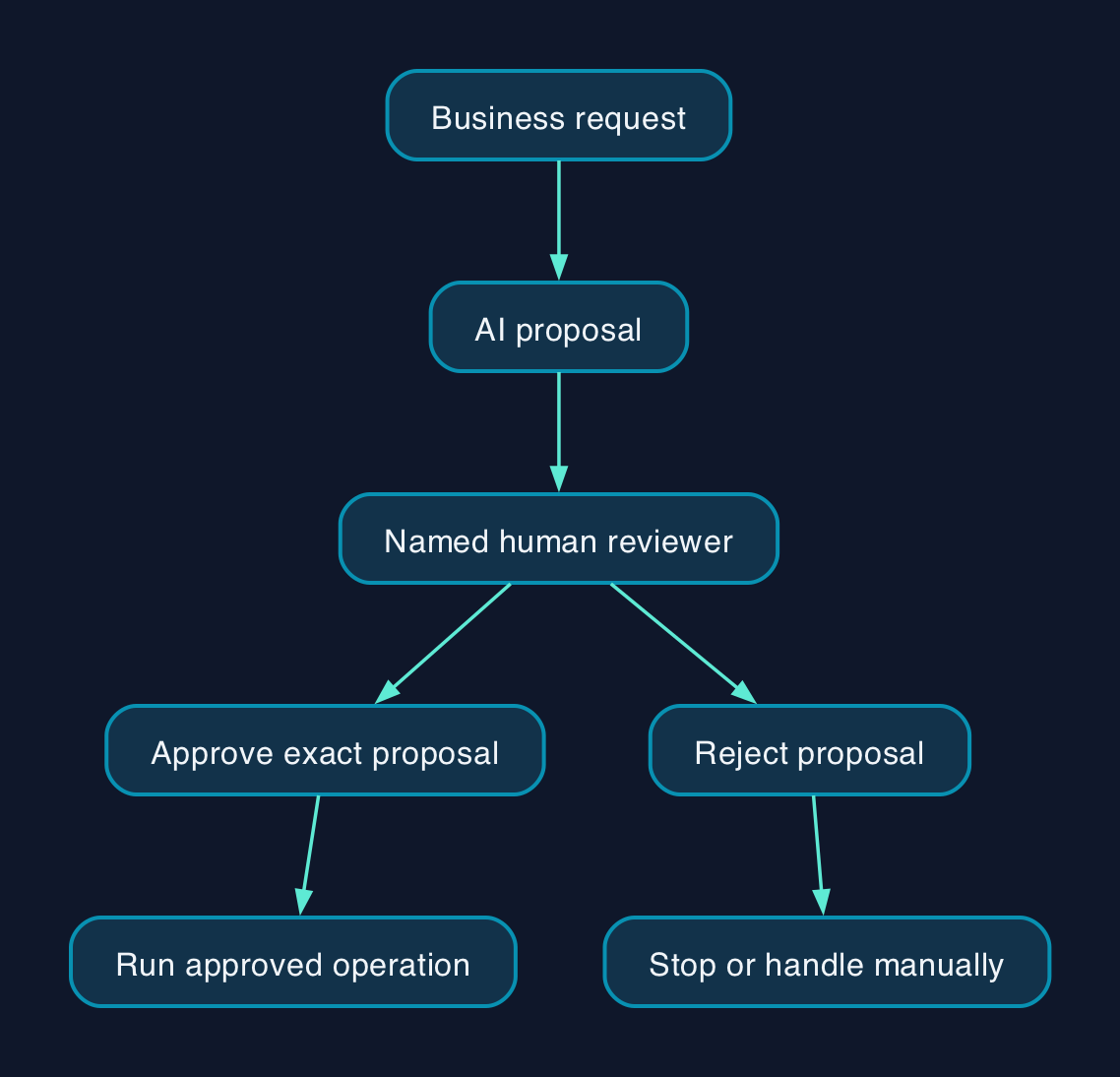
How the approval workflow should connect
The following is a proposed responsibility model, rather than a claim that either product supplies every control automatically.
| Stage | Proposed workflow behaviour | Accountable person |
|---|---|---|
| Receive the request | Capture the business request and identify its origin | Process owner |
| Prepare the proposal | Let AI draft content or propose a specific operation | Workflow builder |
| Present the decision | Show the proposed action, relevant source information and affected recipient or record | Workflow builder |
| Review | Authorise or reject the exact proposal within the reviewer’s authority | Named approver |
| Execute | Run the approved operation once and record the result | Automation owner |
| Handle exceptions | Stop, escalate or return to manual handling after rejection, expiry or failure | Service owner |
In Power Automate, place the approval before the consequential action and explicitly branch on its outcome. Microsoft documents using the approval’s Outcome output for subsequent processing and supports custom response choices. Approval customisation
In n8n, connect the tools requiring review through the human review step. The documented mechanism can cover every tool attached to an AI Agent or selected tools. Review messages can expose the proposed tool name and parameters. Tool review configuration
For either implementation, ask the builder to demonstrate that a changed proposal requires another approval. Also test whether a duplicate event or retry can repeat an already approved action. These are acceptance requirements, not capabilities established by the documentation reviewed here.
Make waiting and rejection part of the design
Microsoft documents a 28-day approval-flow wait limit. Beyond that wait, the flow fails but its approval can remain visible, requiring manual removal by the requester or environment administrator. Set reminders and escalation well before that boundary. Power Automate known issues
n8n’s Teams and Outlook nodes document a configurable wait limit that can resume execution when time expires. Treat that expiry as a separate outcome and require a test proving that it cannot authorise the protected action. Teams waiting behaviour, Outlook waiting behaviour
Notification status also needs testing. Microsoft warns that a Teams approval card may not update when someone responds through email or the approval centre. An operator should therefore have a defined place to check the actual workflow outcome. Approval notification mismatch
Pricing and the full cost model
A defensible UK price comparison needs equivalent workflow designs and current commercial terms. The available pricing evidence does not establish comparable official GBP prices for both platforms, so this comparison makes no price-winner claim.
The useful confirmed licensing point is narrower. Microsoft classifies its approval connector as standard and lists qualifying licensing routes. That does not price the AI model, every connected application or the complete deployment. Microsoft approval licensing
Use the following cost schedule when requesting quotations.
| Cost component | Power Automate quotation requirement | n8n quotation requirement |
|---|---|---|
| Platform entitlement | Map the proposed flow, connectors, builders and users to the required licences | Identify the proposed edition, deployment arrangement and applicable usage allowances |
| AI processing | Name the production AI service, charging unit and expected consumption | Name the model provider, charging unit and expected consumption |
| Integration work | Price connections, permissions, approval routing and exception handling | Price tool configuration, credentials, review channels and exception handling |
| Infrastructure and records | Establish any additional environment, storage or retention charges | Establish hosting, storage, backup and retention responsibilities for the proposed deployment |
| Training and administration | Include builder handover, approver training and ongoing ownership | Include maintainer handover, reviewer training and ongoing ownership |
| Support and recovery | Specify support hours, escalation and recovery work included | Specify support hours, escalation and recovery work included |
| Exit | Price workflow documentation, record export and replacement work | Price workflow documentation, record export and replacement work |
These are quotation requirements, not assertions that every item attracts an additional charge.
Assumptions for budgeting should state monthly request volume, AI calls per request, expected retries, reviewer time, retention period and the support arrangement. Request GBP figures with the quotation date, billing commitment, minimum quantities and VAT treatment shown separately.
Compare total cost over the same period. Include initial design and migration, recurring subscriptions and usage, staff time, support and exit work. Avoid counting a service twice when it is already bundled, and leave unknown costs visible rather than treating them as zero.
If an implementation partner is involved, require a named owner for failed approvals, expired credentials and changes to connected applications. The handover should specify who maintains the workflow after the original builder leaves.
Where each option fits
The suitability assessments below are editorial judgements based on the documented mechanisms, rather than hands-on performance results.
| Decision criterion | Power Automate | n8n |
|---|---|---|
| Structured business sign-off | Documented routing includes sequential and everyone-must-approve arrangements. Approval types | The cited AI review documentation establishes tool-level approve or deny behaviour; it does not establish equivalent multi-stage business routing. Tool review |
| Control over an agent’s next action | The documented approval action supplies a decision point; the builder must connect it to the intended downstream action. Approval workflow | Directly documented review before selected AI Agent tools execute. Tool review |
| Reviewer experience | Email, approval centre and app responses are documented. Response routes | Review channels include Teams, Outlook, Gmail, Slack and n8n Chat. Available channels |
| External approvers | Guest users need valid licensing, and pending tenant invitations can prevent assignment. Guest limitations | The cited pages do not settle external-reviewer identity controls or commercial requirements. Require a demonstration for the chosen channel. |
| Builder skills to assess | Environment administration, connector permissions and approval-outcome handling | Credentials, tool parameters, review-channel configuration and execution outcomes |
| Support and exit | Obtain the delivery scope and record-export arrangements for the proposed service | Obtain the delivery scope and record-export arrangements for the proposed service |
| Best first pilot | An established document or process sign-off with named internal approvers | An AI agent whose selected write or send operations need individual authorisation |
Using Microsoft Teams does not by itself settle the platform choice. n8n documents Teams as both an integration and a human review channel, although its credential options have different capabilities and permission requirements. n8n Teams credentials and review support
Likewise, avoid buying around an assumed chat experience. n8n’s Chat node requires the appropriate Chat Trigger configuration and excludes Embedded mode. Confirm the intended interface before commissioning the workflow. Chat configuration requirements
Editorial analysis
Power Automate deserves the first pilot where the difficult part is routing a request through a defined business approval process. Its documented approval types provide a concrete starting point for deciding who must respond and in what order.
n8n deserves the first pilot where the difficult part is stopping an AI agent immediately before a particular operation. Its documented tool review exposes the proposed operation and its parameters at that point.
Neither recommendation establishes that one platform produces better AI output. The model, prompt, source information and review design remain separate choices. Microsoft’s supplied AI Builder reference concerns a specific desktop preview action, so it cannot establish the production suitability of every Power Automate AI route. Desktop AI preview scope
Commission a narrow pilot with a recognisable pass condition. Require the builder to demonstrate approval, rejection, no response, an unavailable reviewer, a changed proposal and a failed downstream action. Select the implementation your team can operate and recover, with a named owner and an acceptable full cost.
Sources
- Microsoft Learn — Get started with approvals
- Microsoft Learn — Known issues with approvals
- Microsoft Learn — Top scenarios with approval flows
- Microsoft Learn — Create and test an approval workflow with Power Automate
- Microsoft Learn — AI Builder desktop actions in preview
- n8n Docs — Human-in-the-loop for tools
- n8n Docs — Chat node
- n8n Docs — Microsoft Teams node
- n8n Docs — Microsoft Outlook node