
A UK micro-manufacturer with fewer than ten staff moving off spreadsheets should pick QuickBooks Online Plus (£56 a month, ex VAT) only if it can live without a built-in bill of materials. Sage 50 Accounts Professional (£234 a month, plus VAT, one user) and Odoo Enterprise Standard both include one. Odoo starts at £18 per user per month on annual billing for eligible initial users’ first 12 months, with £22 the undiscounted rate.
Key pointers
- If a bill of materials matters (tracking what components go into a finished product), Sage 50 Accounts Professional and Odoo Enterprise both have one built in; QuickBooks Online needs a connected manufacturing application for that capability.
- QuickBooks Online Plus tracks stock quantity and cost at £56 a month ex VAT for up to 5 users, but does not natively assemble a finished product from components.
- Sage 50's £115 Standard and £234 Professional starting prices each cover one user, plus VAT monthly; extra users incur additional fees that Sage does not publish as a fixed per-user amount.
- Odoo Enterprise Standard includes accounting, stock and manufacturing apps, starting at £18 per user per month on annual billing for eligible initial users’ first 12 months, against £22 undiscounted.
- Odoo Community is free to self-host and includes core Inventory and Manufacturing, but lacks Enterprise features including Shopfloor, Control Panel and Scheduling, so budget for hosting and check the UK VAT filing route.
- Confirm Making Tax Digital VAT submission before buying: Sage 50 includes it, QuickBooks includes it in Simple Start, Essentials, Plus and Advanced but not Sole Trader Plus, and Odoo documents submission through its UK - Accounting Reports module.
- Get Sage's multi-user quote in writing and model Odoo's published undiscounted rates, because Odoo's introductory discount applies to initially ordered users and lasts 12 months.
What Buying a First Combined System Means for a UK Micro-Manufacturer
Under ten staff and still running the books, and a stock sheet, in spreadsheets is a common point for a UK maker to be at. A workshop building furniture, assembling electronics, or bottling drinks eventually hits the same wall: sales are recorded in one place, stock counts in another, and nobody can say with confidence what a finished batch actually cost to make.
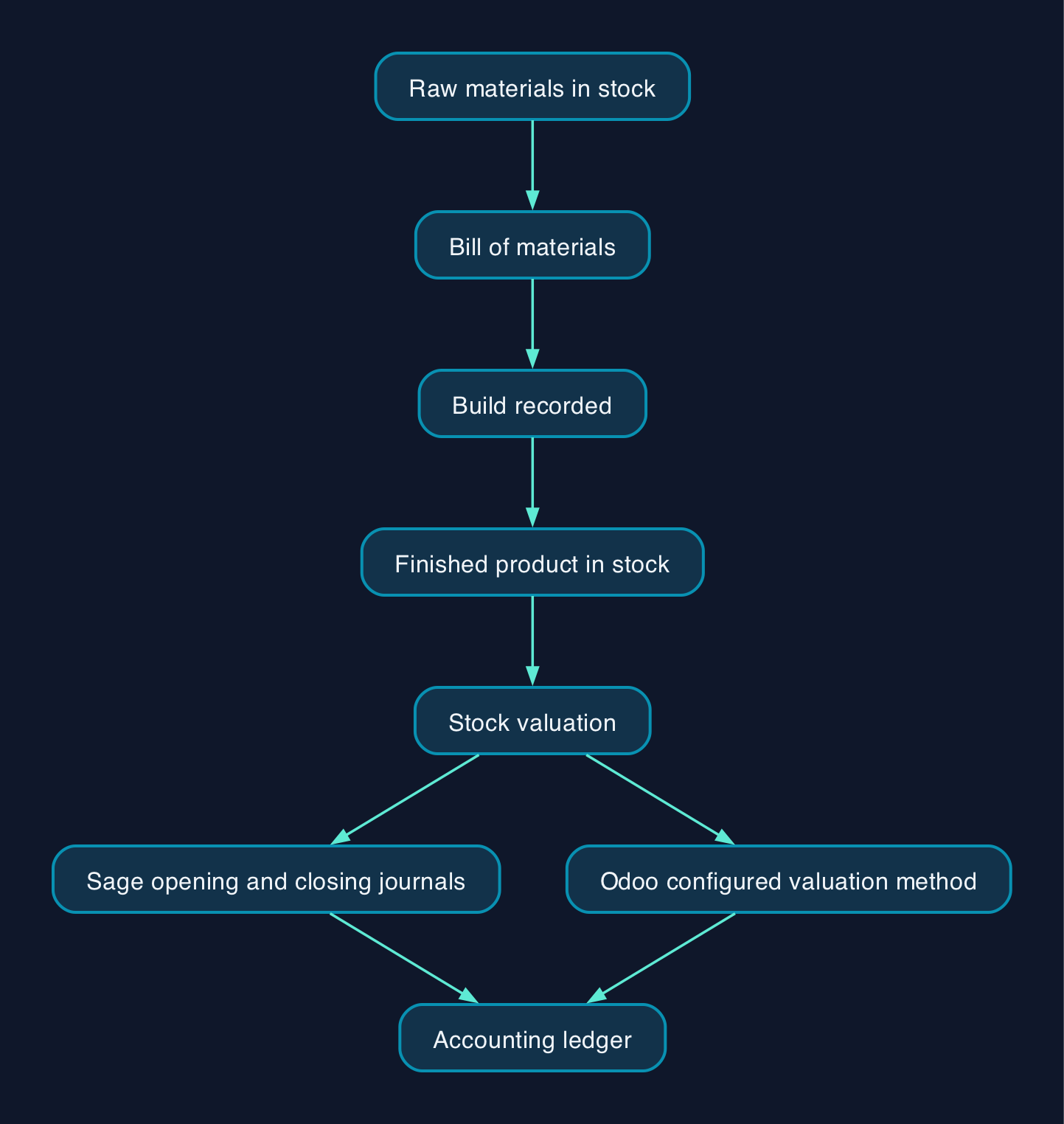
The decision here is not just which accounting package to buy. It is whether that package also understands manufacturing, meaning it can record what raw materials and components go into a finished product (a bill of materials, or BOM), turn a purchase of parts into stock, and record a build and sale. Sage 50 Professional and Odoo include BOM tools, but that does not establish automatic end-to-end stock accounting: Sage 50 requires opening and closing stock journals, entered manually or through its wizard, while Odoo's accounting treatment depends on version and configuration.
Odoo, Sage 50 and QuickBooks Online all handle UK VAT-registered bookkeeping and support HMRC Making Tax Digital VAT submission in appropriate editions and configurations. Where they differ sharply is stock and production: QuickBooks Online combines accounting with basic stock tracking; Sage 50 Accounts Professional adds a genuine, if simple, bill of materials tool; and Odoo offers connected accounting, inventory and manufacturing apps. Odoo Enterprise Standard includes all apps, whereas Community provides core Inventory and Manufacturing without the full Enterprise feature set, and One App Free covers one app and its dependencies.
This is not legal advice; consult your legal counsel on anything here that touches your specific Making Tax Digital or company reporting obligations.
How Stock and Manufacturing Work in Each System
Sage 50 Accounts is Windows desktop software you download and install, with your company file held locally or on a shared network drive and optional remote access through Remote Data Access so an accountant can work remotely (Sage 50 product information, Sage installation documentation). Standard receives purchased stock through manual adjustments in, while sales invoices and credits update stock levels; purchase-order receipt processing is available only in Professional. Professional adds a Bill of Materials screen where you list up to 50 subcomponents per finished product, see how many units you can currently build from stock on hand, and transfer components into the finished item once it is built (Sage BOM documentation). It is a manual, per-assembly tool rather than a scheduling or shop-floor system, which suits a business making a handful of distinct products rather than complex, high-volume runs. The BOM stock transfer does not replace the opening and closing stock journals needed for stock valuation in the accounts.
QuickBooks Online Plus records product cost, quantity on hand and reorder points, and can raise purchase orders to replenish stock (QuickBooks plan features). It has no native assembly or bill of materials feature. A manufacturer can track builds separately and adjust stock manually, or use a connected manufacturing application to manage assemblies and synchronise with QuickBooks Online (QuickBooks manufacturing options). That makes the cost and suitability of any connected application part of the buying decision.
Odoo includes Inventory, Manufacturing and Accounting in Enterprise Standard; Community includes core inventory and manufacturing capabilities but lacks Enterprise features such as Shopfloor, Control Panel and Scheduling. Its connected apps do not mean every stock movement automatically posts to the ledger. Odoo 19 distinguishes real-time physical stock valuation from accounting valuation, with accounting updates governed by invoicing or closing settings; Odoo 18 documents automatic stock-movement journal entries only after the relevant configuration (Odoo 19 inventory valuation, Odoo 18 automatic valuation). For Making Tax Digital, Odoo's own documentation names the UK - Accounting Reports module as the piece that submits VAT returns to HMRC's MTD-VAT API, but that page does not establish its availability in Community (Odoo UK documentation).
Pricing and Cost Model
Prices below are in GBP. Sage and QuickBooks figures exclude VAT; Odoo figures are shown as published, without an assumed VAT addition. Confirm Odoo's applicable tax treatment when obtaining a quote.
| Plan | Published subscription price | Users included at that price | Stock and production |
|---|---|---|---|
| Sage 50 Accounts Standard | £115/month plus VAT | 1 (extra users, fee not published) | Basic stock tracking, no BOM |
| Sage 50 Accounts Professional | £234/month plus VAT | 1 (extra users, fee not published) | Advanced stock, sales/purchase orders, BOM (up to 50 items) |
| QuickBooks Online Essentials | £38/month ex VAT | Up to 3 | No inventory |
| QuickBooks Online Plus | £56/month ex VAT | Up to 5 | Stock quantity, cost, purchase orders, no native BOM |
| Odoo Enterprise Standard | £18/user/month on annual billing or £23 on monthly billing for eligible initial users’ first 12 months; £22 and £28 respectively undiscounted | Per named user | Enterprise inventory and manufacturing apps included |
| Odoo Community | Free licence | Unlimited (self-hosted) | Core Inventory and Manufacturing; confirm the MTD filing route |
Assumptions: Sage and QuickBooks figures above are standard subscription prices. Odoo's £18 annual-billing and £23 monthly-billing figures are introductory prices, with the discount applying to initially ordered users and lasting 12 months; its displayed undiscounted rates are £22 and £28 respectively (Odoo pricing and offer terms). Odoo publishes per-user rates, so multi-user totals can be calculated, while Sage requires a quote for additional users.
- QuickBooks Online Plus: £56/month covers up to 5 users, so a three-person team costs £56/month ex VAT at the standard rate, with no native BOM; any manufacturing application is a separate cost.
- Odoo Enterprise Standard: three eligible initial users cost 3 × £18 = £54/month equivalent on annual billing, or 3 × £23 = £69/month on monthly billing, during the introductory period; undiscounted totals are 3 × £22 = £66/month and 3 × £28 = £84/month respectively, with BOM included.
- Sage 50 Accounts Professional: the £234/month headline price covers one user, plus VAT; Sage does not publish a fixed per-additional-user fee. For a multi-user figure absent from Sage's own published pricing, Vital Support Consultancy's 7 April 2026 price list lists £234/month for one user and £247/month for up to five users, excluding VAT. The latter is a partner's published package price, not a guaranteed direct Sage quote for three users.
On an undiscounted subscription basis, Odoo's £66 monthly equivalent for three users on annual billing is below Sage Professional's £234 one-user starting price. QuickBooks Plus is £56/month ex VAT, but lacks a native BOM and would need a separately costed manufacturing application for that capability. Odoo's introductory three-user annual-billing total is £54/month equivalent, below QuickBooks Plus's standard £56 price, but QuickBooks separately advertises an introductory discount, so those two figures should not be presented as a like-for-like promotional comparison (QuickBooks offer).
Odoo Community removes the per-user licence fee entirely but is not free once implementation is counted. It needs its own hosting, and a business with no in-house Odoo skills will likely need help establishing a suitable UK VAT filing arrangement. A micro-manufacturer with no in-house technical resource should treat Community as a "someone else manages this for us" decision, not a genuinely zero-cost one.
Vendor and Option Comparison
| Criterion | Sage 50 Professional | QuickBooks Online Plus | Odoo Enterprise Standard |
|---|---|---|---|
| Deployment | Windows desktop install, optional Remote Data Access | Browser-based, any device | Browser-based on Odoo Online; on-premise Enterprise deployment requires Custom |
| Bill of materials | Built in, up to 50 items | No native BOM; connected manufacturing applications available | Built in, multi-level |
| Users included at headline price | 1 (extra users, fee not published) | Up to 5 | Per named user, no cap |
| Direct HMRC MTD-VAT submission | Included | Included | Through UK - Accounting Reports and HMRC connection setup |
| Best suited to | A maker with a handful of finished products and a Windows-based office wanting UK phone support | A business needing basic stock accounting, or one willing to add a manufacturing application | A manufacturer that wants accounting, stock and production in one connected system |
| Who should not choose it | A business with no Windows PC and no appetite for desktop software | A business needing a built-in multi-component BOM without another application | A business with no time or partner support to manage an app rollout and a UK VAT setup |
None of the three is a universal winner. A micro-manufacturer assembling one or two simple products from a handful of parts, and mainly needing tidy books, may be well served by QuickBooks Online Plus, provided it has a workable way to record production. A business that genuinely builds products from a bill of materials tends to get more native manufacturing capability for its subscription spend from Odoo Enterprise Standard than from Sage 50 Professional, provided it is comfortable with a cloud-first, per-user platform and configures the stock accounting appropriately. Sage 50 Professional suits a business already committed to Windows desktop working and UK-specific phone support, with a quote covering its required users and companies.
Editorial analysis
The instinct to compare these three on headline price alone misses the actual fork in the decision. At undiscounted rates for three users, QuickBooks Plus has the lowest subscription price of the paid options compared here, but production needs either a separate workflow or a connected manufacturing application. Sage 50 Professional and Odoo include BOM tools in different forms: Sage adds a straightforward BOM screen to desktop accounting, with pricing affected by users and companies, while Odoo connects stock, production and accounting apps and charges per user. Neither arrangement removes the need to check how stock valuation reaches the accounts. For a business that expects to add a second or third person to the books and the shop floor over time, model Sage's quoted package and Odoo's undiscounted seats before signing, rather than assuming later users receive an introductory offer.
Sources
- Odoo Pricing - Odoo S.A.
- United Kingdom - Odoo 17.0 documentation - Odoo S.A.
- Inventory valuation - Odoo 19.0 documentation - Odoo S.A.
- Automatic inventory valuation - Odoo 18.0 documentation - Odoo S.A.
- Sage 50 Accounts - Finance Software - Sage UK
- Bill of Materials (BOM) - Sage 50 Accounts - Sage UK Knowledge Base
- Download and Install Sage 50 Accounts v26 - Sage Knowledge Base
- QuickBooks Pricing & Costs - Intuit QuickBooks UK
- Manufacturing Accounting Software - Intuit QuickBooks UK
- UK Small Business Software Waste Index 2026 - Whito
- Record keeping for VAT - Making Tax Digital for VAT - GOV.UK / HMRC
- Sage product price list, 7 April 2026 (PDF) - Vital Support Consultancy