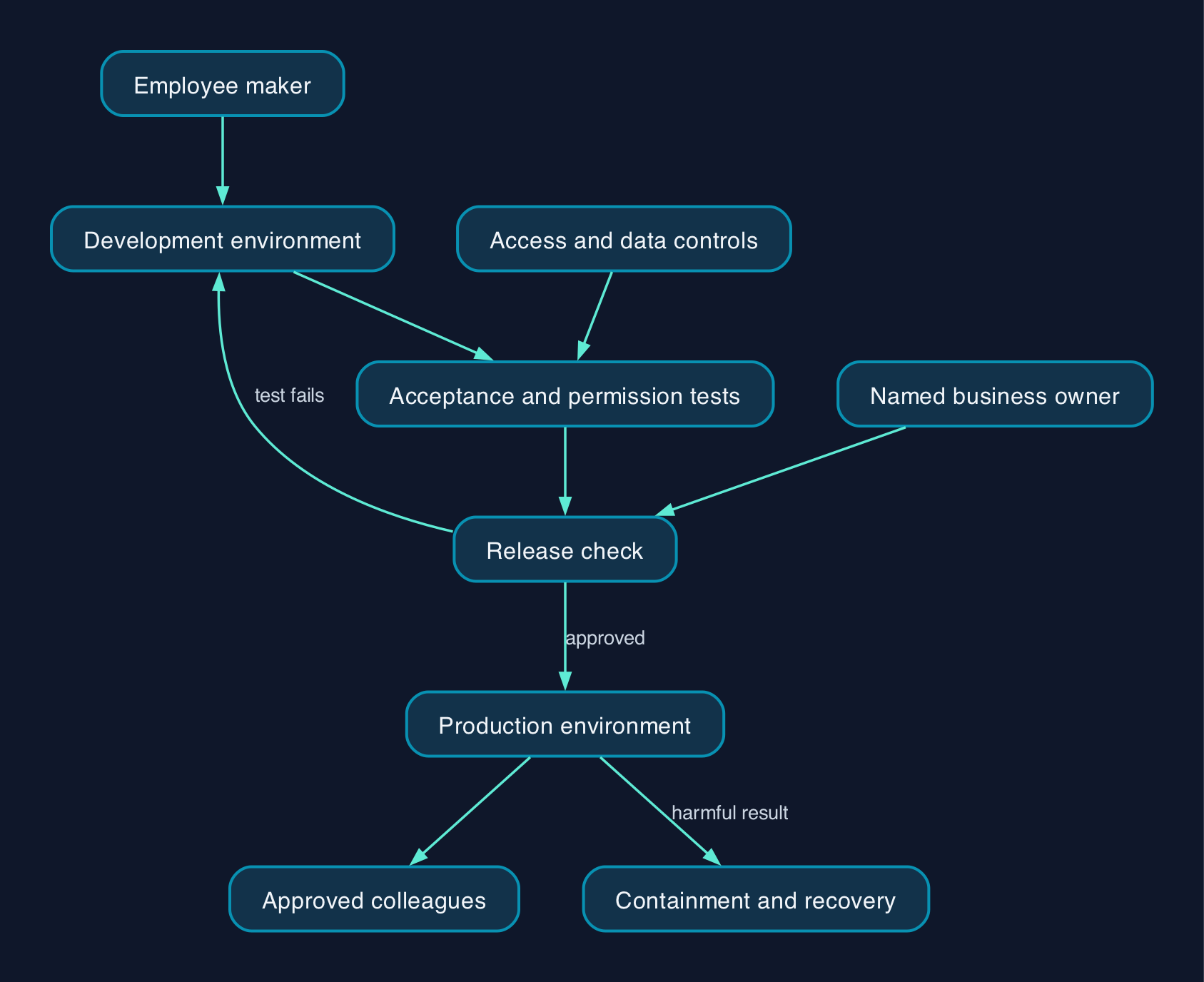
Give employees an approved place to build, but require a named owner, restricted data access and a release check before colleagues depend on an agent. Microsoft’s environment-based governance approach supports separating experimentation from production. For a UK small or mid-sized business, the practical priority is to control who can change an agent, what it can access, where it can be shared and who can stop it.
Start with the agent’s authority
Classify an employee-built agent by what it can read, change and distribute. A tool that answers questions from an approved handbook needs different checks from one that updates customer records or sends messages outside the company.
Microsoft recommends separating agents according to purpose and risk, with IT oversight for departmental agents and stronger development controls for critical applications. Its zoned governance model is a useful starting point, rather than a requirement to create a large governance department.
For a smaller UK company, give each agent a short record containing:
- Its purpose and business owner.
- Its maker and replacement support contact.
- Its environment, intended users and publication channels.
- Its knowledge sources, tools and connection identities.
- The changes it can make to other systems.
- Its spending owner, review date and shutdown procedure.
Treat missing ownership or unknown connection permissions as reasons to withhold wider release. An agent that already serves employees needs a dependency review before suspension, so a control change does not unexpectedly interrupt their work.
Discover existing agents before changing controls
Start by reconciling the agents employees report with the environments your administrator can inspect.
Microsoft’s Copilot Agent Kit inventory provides cross-environment agent records, ownership information, configuration indicators and usage data. Check the last successful synchronisation, environments covered and records with limited details before treating its dashboard as a complete account.
Use that information to identify agents with no accountable owner, unexpected sharing, sensitive knowledge sources or actions that change business records. Investigate these first.
Keep existing access in the review. Microsoft explicitly says new sharing rules do not affect users who already have access, so tightening the policy alone does not complete an access clean-up.
Separate building from permission to release
Use an approved development environment for experimentation, a test environment for acceptance checks and a controlled production environment for shared business use. Microsoft recommends reviewed releases from development through test to production.
Before configuring controls, identify the administrator who can apply them. Microsoft’s data-policy prerequisites specify a tenant administrator or Environment Admin role. Confirm the commercial entitlement for the controls you intend to use, including Managed Environments, before relying on them in the release process.
The following is a proposed responsibility model. In a small company, one person may hold several roles, but name a second person to review agents that can change records or communicate externally.
| Responsibility | Accountable person | Evidence required before release |
|---|---|---|
| Business purpose and permitted actions | Department manager | Written scope, intended audience and prohibited actions |
| Building and maintenance | Employee maker | Documented knowledge sources, tools and test results |
| Environment and access controls | IT administrator or contracted IT provider | Approved roles, sharing settings and data policies |
| Access to business information | Data or system owner | Confirmation of the records and operations permitted |
| Running costs | Budget owner | Approved billing arrangement and response to spending alerts |
| Release and recovery | Named release owner | Acceptance record, fallback process and tested containment steps |
Where an IT provider handles administration, agree who receives alerts, who can authorise an exception and who acts outside normal support hours. Retain a business owner inside the company.
Restrict data access and sharing
Apply data policies to the approved environment
In the Power Platform admin centre, review the agent’s required connections and configure the relevant data policy. Microsoft supports Business, Non-business and Blocked connector groups, and prevents data sharing between connectors in different groups. Its data-policy documentation also describes controls for HTTP requests, knowledge sources, tools, channels and triggers.
Block capabilities the project does not need. For example, a handbook assistant should not acquire an outbound HTTP connection simply because the maker wants to experiment with an unrelated service.
Test both an allowed operation and a prohibited operation after applying the policy. Record the expected result, actual result and account used. A policy that saves successfully has not yet demonstrated that your intended boundary works.
Require authentication for internal agents
Microsoft documents a specific control for preventing publication without authentication: block Chat without Microsoft Entra ID authentication in Copilot Studio in a data policy. New agents default to Microsoft authentication, but makers can otherwise select No authentication. Authentication policy controls
For an internal agent, test access with an approved employee account and an account outside the approved audience. The latter should be unable to use it.
Review each tool’s connection identity
Record whose credentials each tool uses and what that identity can do in the connected system. Microsoft documents the option to configure tools to use the user’s credentials, but that does not establish how an existing agent has been configured.
Prefer the user’s own permissions where the workflow supports them. Where a shared connection is necessary, restrict its authority and test it separately.
For a hypothetical sales agent, check whether an ordinary salesperson can retrieve another team’s restricted account notes or modify records beyond their responsibility. An accurate answer is still a failed test if the user was not entitled to receive it.
Limit editing and check old sharing
In a Managed Environment, configure who can grant Editor and Viewer access. Restrict Editor access to the individuals who maintain the agent, remembering that Editors can also share and publish.
Review existing assignments separately, then test new sharing attempts after allowing for the documented enforcement delay. Microsoft also documents a Dataverse for Teams exception: sharing rules do not affect publication to the team bound to that environment. Include that route in any Teams deployment review.
Budget for building and operating the agents
Approve the charging arrangement for each environment before opening it to experimentation.
Microsoft’s UK pricing page, supplied for this guide on 28 September 2026, lists Microsoft 365 Copilot at £23.10 per user per month, paid yearly, excluding VAT, with a qualifying Microsoft 365 business or enterprise plan required. That listing includes access to the Standard harness in Copilot Studio. It is not a price for every possible agent workload.
The same page offers standalone Copilot Studio pre-purchase and pay-as-you-go arrangements requiring an Azure subscription. The supplied extract does not establish a GBP unit rate for those arrangements, so obtain the applicable commercial terms before approving a spending forecast.
Identify the agent’s harness, meaning the execution framework it uses. Microsoft states that GitHub Copilot harness usage can consume credits during building, previewing and evaluation, and that this usage is not included in a user’s Microsoft 365 Copilot licence.
For those agents, review environment allocations, access to unallocated tenant capacity, pay-as-you-go settings and available agent limits. Agree whether reaching a limit should interrupt service or require an authorised exception.
Budget separately for administration, permission clean-up, testing, staff training, connected services and ongoing support. Use a measured pilot to forecast usage, and keep unpriced work visible rather than treating it as free.
Rollout checklist
Apply this checklist to a limited pilot before widening access.
- [ ] Assign ownership. Record the business owner, maker, administrator, budget owner and support contact.
- [ ] Capture the starting state. Preserve the current configuration, access assignments and a recoverable version using your supported release process.
- [ ] Review dependencies. Identify shared connections and other agents that could be affected by an environment policy change.
- [ ] Approve knowledge and actions. Obtain the system owner’s agreement for every data source and permitted write operation.
- [ ] Apply access controls. Configure the environment roles, authentication requirement, sharing restrictions and data policies.
- [ ] Run permission tests. Confirm that approved users can complete the intended task and excluded users cannot obtain restricted information or perform restricted actions.
- [ ] Run behaviour tests. Include misleading prompts, instructions embedded in retrieved content, missing information and requests outside the agent’s remit.
- [ ] Test consequential actions safely. Use test records and require explicit approval for pilot actions such as external messages or customer-record changes.
- [ ] Exercise failure handling. Test a broken connection, unavailable source and rejected action. Confirm that users receive an understandable outcome and know the manual alternative.
- [ ] Check capacity where relevant. For bursty or action-heavy workloads, test expected peaks and downstream limits, following Microsoft’s throughput planning guidance.
- [ ] Rehearse containment and recovery. Confirm how the administrator will restrict access or stop the affected workflow, and how an approved version or manual process will restore service.
- [ ] Approve the release. Retain test results, train pilot users and schedule the next ownership, access and spending review.
Changing shared connections, permissions or environment policies can disrupt other workloads. Check dependencies and arrange an appropriate change window before applying restrictive controls to an existing production environment.
If a test fails, keep the wider release closed while correcting the smallest relevant setting or permission. Avoid relaxing an environment-wide policy just to make one connector work.
Monitor operation and handle staff departures
Make ownership review part of the employee departure process. Check the departing maker’s agents, connections, credentials and support responsibilities before removing their access; test the replacement arrangement before colleagues depend on it.
Microsoft documents maker audit logs in Microsoft Purview and monitoring through Microsoft Sentinel. Confirm the configuration and licensing for whichever monitoring route you use, then assign someone to investigate changes rather than merely collect logs.
Review agent ownership, sharing, new connections, failures and consumption on a schedule proportionate to the workload. Re-run acceptance tests after changes to knowledge sources, tools, permissions or instructions.
Treat conversation transcripts as a separate access decision. Microsoft’s security-role documentation distinguishes authoring permissions from transcript permissions. Give reviewers only the access needed for their support or assurance task.
Editorial analysis
For a small business, the most useful release gate is a short evidence record that someone can actually maintain. It should answer who owns the agent, whose authority it uses, what it can change and how the business recovers when it fails.
Start with a read-only internal use case and make it pass the access and failure tests. Add write actions only when the business owner can explain the approval boundary and the administrator can demonstrate containment. That sequence gives employees room to build while making responsibility visible before the agent becomes part of daily operations.
Sources
The following Microsoft pages were supplied as evidence extracts for this guide on 28 September 2026.
- Microsoft Learn — Implement a zoned governance strategy
- Microsoft Learn — Secure your Copilot Studio projects
- Microsoft Learn — Control how agents are shared
- Microsoft Learn — Configure data policies for agents
- Microsoft Learn — Monitor agents using Agent Inventory in Copilot Agent Kit
- Microsoft Learn — Govern Copilot Credit consumption for agents powered by the GitHub Copilot harness
- Microsoft Learn — Plan Copilot Studio agent deployments for throughput and rate limits
- Microsoft Learn — Copilot Studio security and governance
- Microsoft — UK Copilot Studio pricing