
A UK manufacturer still emailing CAD and PLM files should assess Egnyte, Box or Dropbox Business against its existing write-access controls and recovery arrangements. Egnyte and Box mainly count versions per file, with 3 by default on Egnyte and plan-dependent limits including unlimited history on Box, while Dropbox uses a retention window. Match the platform to your retention needs and largest assembly size, and test locking in your actual CAD workflow.
Key pointers
- Review your CAD workflow after an accidental overwrite, including existing write-access controls and backups, because moving platforms does not guarantee prevention.
- Egnyte keeps only 3 file versions by default, so ask whoever administers the account to raise this before go-live if engineers need a longer history.
- Box Business caps a single uploaded file at 5GB, while the cheaper Starter team plan allows 2GB, so check your largest SolidWorks assembly, STEP export or point-cloud file before choosing.
- Dropbox Standard and Advanced keep versions for a fixed time, 180 days or a year, rather than a fixed count, which suits reconstructing what changed on a drawing last month.
- Box and Dropbox publish UK prices in pounds, while Egnyte's checked pricing page displays US dollars, so request a written GBP quote from Egnyte.
- Egnyte supports automatic locking through its desktop app; for CAD files on Box and Dropbox, train users to lock before editing, while recognising that Box also supports automatic locking in specified Office workflows.
- If you need formal revision, review and release sign-off rather than just file history, that is a product data management (PDM) purchase, such as Autodesk Vault, not a file-sync decision.
Where Shared-Drive CAD and PLM Workflows Need Checking
A shared network drive can support controlled CAD editing. SOLIDWORKS, for example, supports one user's write access while others open shared documents read-only, identifies the user holding write access and detects newer saved files. Recovery need not depend on manually renamed backups such as "bracket-v3-final2.SLDPRT" either: Windows shared folders can use shadow copies to restore accidentally overwritten files. Check which controls and recovery mechanisms your current setup actually provides before deciding to replace it.
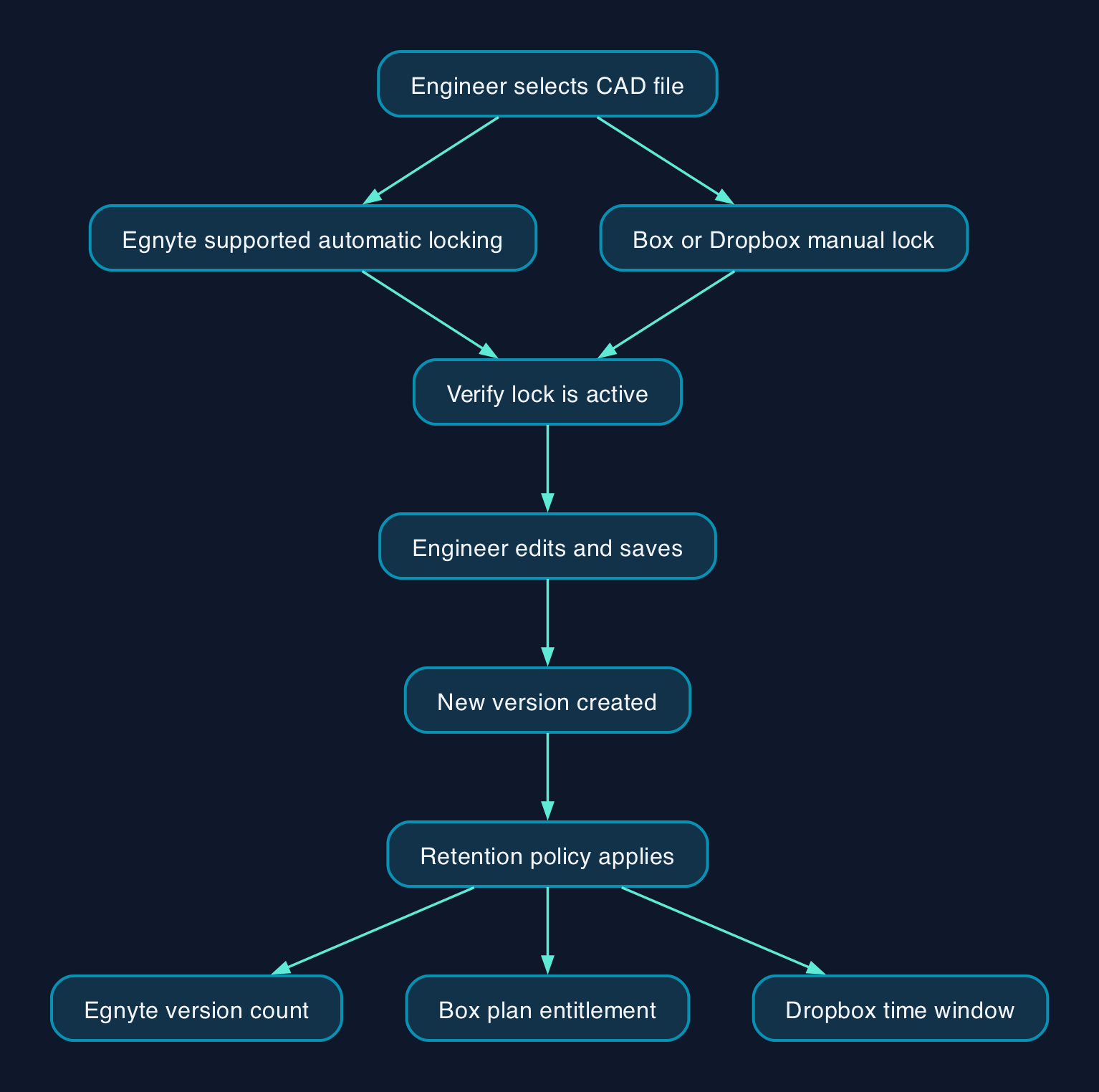
Egnyte, Box and Dropbox Business offer two related features: file locking, which restricts changes while a lock is active, and version history, which keeps earlier saves so a change can be undone. Opening a file does not universally lock it: Dropbox requires an explicit lock, while automatic locking on Egnyte and Box depends on the workflow. The platforms differ in how much version history they retain and how large a single CAD or PLM file is allowed to be, both of which matter more for engineering files than for ordinary office documents.
How Version Control Differs Between the Three
Egnyte creates a new version every time a file is saved, but by default retains only 3 versions in the file's version history. An administrator can raise that limit to a maximum of 999 versions if the plan allows it. Exceeding the limit moves older versions to Trash, which retains them for 30 days by default, rather than immediately destroying the drawing's history after three further saves.
Box also uses a count rather than a time window. Its default and maximum are 50 previous versions on Business and Business Plus, and 100 on Enterprise. An administrator can lower those limits, but increasing them requires an eligible upgrade: Enterprise Plus and Enterprise Advanced include unlimited version history, while Box Governance also offers unlimited prior versions. Box's settings support finite limits up to 100,000 or unlimited, depending on entitlement, and retain the current version in addition to the configured number of previous versions.
Dropbox takes a different approach: instead of counting versions, it retains history within a rolling time window. Standard keeps 180 days of history, and Advanced and Enterprise keep a full year. For a design that goes through many small saves in a short burst, this can mean far more recoverable versions than Egnyte's default 3 or Box Business's 50 previous versions; for a file that is rarely touched, it can mean fewer than a count-based system would retain. Teams with longer retention needs, for example to support a customer audit years after a part shipped, can add Dropbox's Extended Version History or Data Governance add-on to extend recovery to 10 years, though both are quoted individually rather than priced on the plans page.
File Locking and Access Control
Locking works differently enough between the three that it is worth checking before rollout. Egnyte locks files automatically when opened through its desktop app, WebEdit or supported Microsoft 365 and Google Workspace integrations, with locks maintained while the file is open and the computer is online. A manually applied lock releases automatically after 7 days if nobody unlocks it. Admins and folder owners can force-unlock files except those in active Microsoft 365 or Google Workspace co-editing sessions, which must end first; co-editing locks can take up to 35 minutes to release.
For CAD files, Box and Dropbox users should apply a manual lock before editing. Box lets the person locking a file set a duration, including an unlimited lock, and optionally disable downloads; manual locking is available through the web app, Box Drive, Box Edit or Box for Office, though not the mobile apps. Box for Office also automatically locks documents opened through that integration and unlocks them when closed. Separately, an administrator can enable automatic locking for supported Word, Excel and PowerPoint files in Box Drive on Windows; this does not provide automatic CAD-file locking.
Dropbox requires users to lock files explicitly. A team admin can unlock any team member's file or switch file locking off for the whole team from the admin console. Other users can make an editable copy of a locked file, but their changes do not merge back into the original.
For an engineering team, Egnyte's automatic-on-open behaviour is closer to what a dedicated PDM "check-out" system does, reducing the chance someone forgets to lock a drawing before editing it. Box and Dropbox CAD workflows still require users to apply the lock first. None of these arrangements guarantees that every overwrite or conflict will be prevented: Box warns that simultaneous saves can create conflicting copies when a file has not been locked.
File Size Limits for Large Assemblies
This is the figure most likely to catch out a manufacturer moving PLM data to the cloud, because CAD assemblies, machining simulation files and scanned point clouds can run into several gigabytes.
Box Starter caps a single upload at 2GB, while Business allows 5GB. Business Plus raises that to 15GB, and Enterprise to 50GB; Enterprise Plus and Enterprise Advanced go higher still, at 150GB and 500GB respectively. If a top-level assembly file or an export bundling multiple linked parts exceeds 5GB, the team needs a plan above Business.
Egnyte's Business plan allows files up to 100GB, rising to 150GB on Enterprise Lite and Enterprise. Dropbox publishes a maximum file size of 2TB, subject to available storage. Its 375GB browser figure is a reliability warning, not a separate hard upload limit: larger browser uploads may time out or be interrupted, so Dropbox recommends switching to the desktop app or compressing the file below 375GB.
Pricing and Cost Model
Prices below are per user, per month, for the selected business plans, using the supplied pricing evidence available for this comparison on 30 September 2026.
| Platform | Plan | Price (billed annually) | Price (billed monthly) | Currency |
|---|---|---|---|---|
| Egnyte | Business | $22 | not published as a separate monthly rate | USD on checked page |
| Box | Business | £12 | £16 | GBP; minimum 3 users |
| Box | Business Plus | £20 | £27 | GBP; minimum 3 users |
| Dropbox | Standard | £12 | not shown by default; annual billing is the default view | GBP |
| Dropbox | Advanced | £18 | not shown by default; annual billing is the default view | GBP |
Box and Dropbox both publish pounds sterling prices. Egnyte's checked pricing page displays US dollars, so ask Egnyte for a written GBP quote; if invoiced in dollars, the sterling cost will depend on the applicable exchange rate and fees. Dropbox's UK pricing page shows £12 for Standard and £18 for Advanced with annual billing selected.
Confirm VAT treatment before budgeting. Dropbox allows eligible business customers to add a VAT number to their billing details when paying by card, PayPal or direct debit; that facility alone does not establish the VAT treatment of a particular invoice.
None of these prices is full total cost of ownership. Add the admin time needed to set up folders, permissions and version policy correctly during rollout, staff training on locking and, if your version-history needs outgrow the included allowance, the cost of an eligible Box plan upgrade, Box Governance or Dropbox's quoted Extended Version History add-on.
Vendor Comparison
| Criterion | Egnyte Business | Box Business | Dropbox Standard |
|---|---|---|---|
| Default versions kept | 3, configurable up to 999 if the plan allows | 50 previous versions, the plan's maximum; eligible upgrades include unlimited history | Time-based retention of 180 days, not a count |
| Max file size per upload | 100GB | 5GB | 2TB, subject to storage; browser uploads over 375GB may time out |
| File locking | Automatic through supported workflows, plus manual | Manual for CAD, with optional duration and download block; automatic for specified Office workflows | Manual; admin can disable team-wide |
| Published UK price | No GBP price on checked page | £12/user/month billed annually; minimum 3 users | £12/user/month billed annually |
| Best fit | Teams with large CAD/PLM files who will set version policy properly at rollout | Teams whose files fit within 5GB, or who will budget for a plan with a higher limit | Teams comfortable with time-based rather than count-based history |
| Who should not choose it | Anyone who will leave the 3-version default unchanged despite needing a longer drawing history | A CAD-heavy team without checking assembly file sizes against the 5GB cap first | A team that requires a guaranteed version count rather than a rolling retention window |
Migration Checklist for Moving Off the Shared Drive
- Audit the existing shared drive and list every CAD, PLM and related document folder, noting which files are duplicated with names like "final2" or "latest" that suggest lost version history.
- Decide your version retention policy before go-live: for Egnyte, raise the 3-version default if necessary; for Box, check the plan's version limit is high enough; for Dropbox, confirm the 180-day or 1-year window suits how often drawings are touched.
- Set folder-level permissions so only the engineers and approvers who need to edit a design can do so, checking existing permissions rather than assuming the shared drive is open to everyone.
- Pilot the move with one active project first, including at least one supplier or external collaborator, before migrating the full archive.
- Train engineers to lock CAD files before editing on Box and Dropbox; on Egnyte, confirm the desktop app is installed and test automatic locking with the actual CAD application.
- Warn the team before the cutover date and disable write access to the old shared drive on that date, so no one keeps saving changes to files that are no longer the source of truth.
- Check the largest assembly, simulation or scan files against your chosen platform's per-file limit before the pilot, including Box's range from 2GB on Starter to 500GB on Enterprise Advanced, Egnyte's 100GB or 150GB limits, and Dropbox's 2TB maximum subject to available storage.
Editorial analysis
For a small UK manufacturer whose main problem is CAD and PLM files losing version history on a shared drive, the file size ceiling matters as much as the version-history style. Box Business's 5GB per-file cap means a team with larger files should budget for Business Plus at 15GB, or a higher tier if required, before migrating. Egnyte's 100GB Business limit accommodates larger files, but its 3-version default needs reviewing against the team's recovery needs. Dropbox offers time-based history and published GBP pricing, while Box also provides sterling prices; Dropbox's extended add-on lengthens the recovery window rather than guaranteeing a version count. None of the three should be treated as a replacement for dedicated PDM or PLM engineering change control simply because it provides recoverable file history.
Sources
- Egnyte Pricing
- File Versions, Egnyte Help Desk
- File Locking, Egnyte Help Desk
- Am I Subject to Any Restrictions?, Egnyte Help Desk
- Adjusting the Number of File Versions to Preserve, Box
- Understand the Maximum File Size You Can Upload to Box, Box
- Locking & Unlocking Files, Box
- Dropbox for business plans
- How to lock or unlock a Dropbox file
- How to add a VAT ID or GST ID number to your Dropbox account
- Extended Version History Add-On, Dropbox
- Autodesk Vault Software
- What is the Dropbox file size limit?, Dropbox Help Center