
Microsoft 365 keeps the service running, not your data. Recycle bins, retention holds and Microsoft's own $0.15-per-GB (USD) backup add-on all fall short of an independent copy that survives ransomware or a rogue admin. Druva, Keepit and HYCU all sell per-user Microsoft 365 backup, but none publish a UK list price. Expect a written quote, with the wider UK market running roughly £1.50 to £6.50 per user per month, and ask each supplier for that figure before choosing.
Key pointers
- Get a written quote from all three. None of Druva, Keepit or HYCU publish a per-user price online, so comparing them on a spreadsheet without a quote is guesswork.
- Check what "per user" actually includes. Druva calls its shared allocation "Dynamic Pooled Storage", quoting 300GB per user across every SaaS app it protects on the same page it separately calls the pool "unlimited"; Keepit's flat fee already includes unlimited storage; HYCU's published UK offer is priced by headcount band, not strictly per seat.
- Confirm Microsoft Teams and Microsoft Entra ID coverage in writing. HYCU lists Teams as standard; get the same commitment from Druva and Keepit before you sign.
- Ask where the backup copy is stored. Keepit has a UK data centre and lets you pick a region; Druva lets you pin a region, such as the EU, separately from your live Microsoft 365 data; confirm HYCU's UK or EU storage option directly.
- Budget roughly £1.50 to £6.50 per user per month as a market range, excluding VAT, then add the UK's 20% standard VAT rate and check the minimum term.
- Do not rely on Microsoft's native Microsoft 365 Backup add-on alone. It only protects OneDrive, SharePoint and Exchange, and the backup never leaves Microsoft's own environment.
- Compare retention limits, not just price. Keepit advertises retention up to 99 years and HYCU is unlimited by default; ask what happens, and what it costs, once you go past either vendor's standard window.
Why native Microsoft 365 tools are not a backup
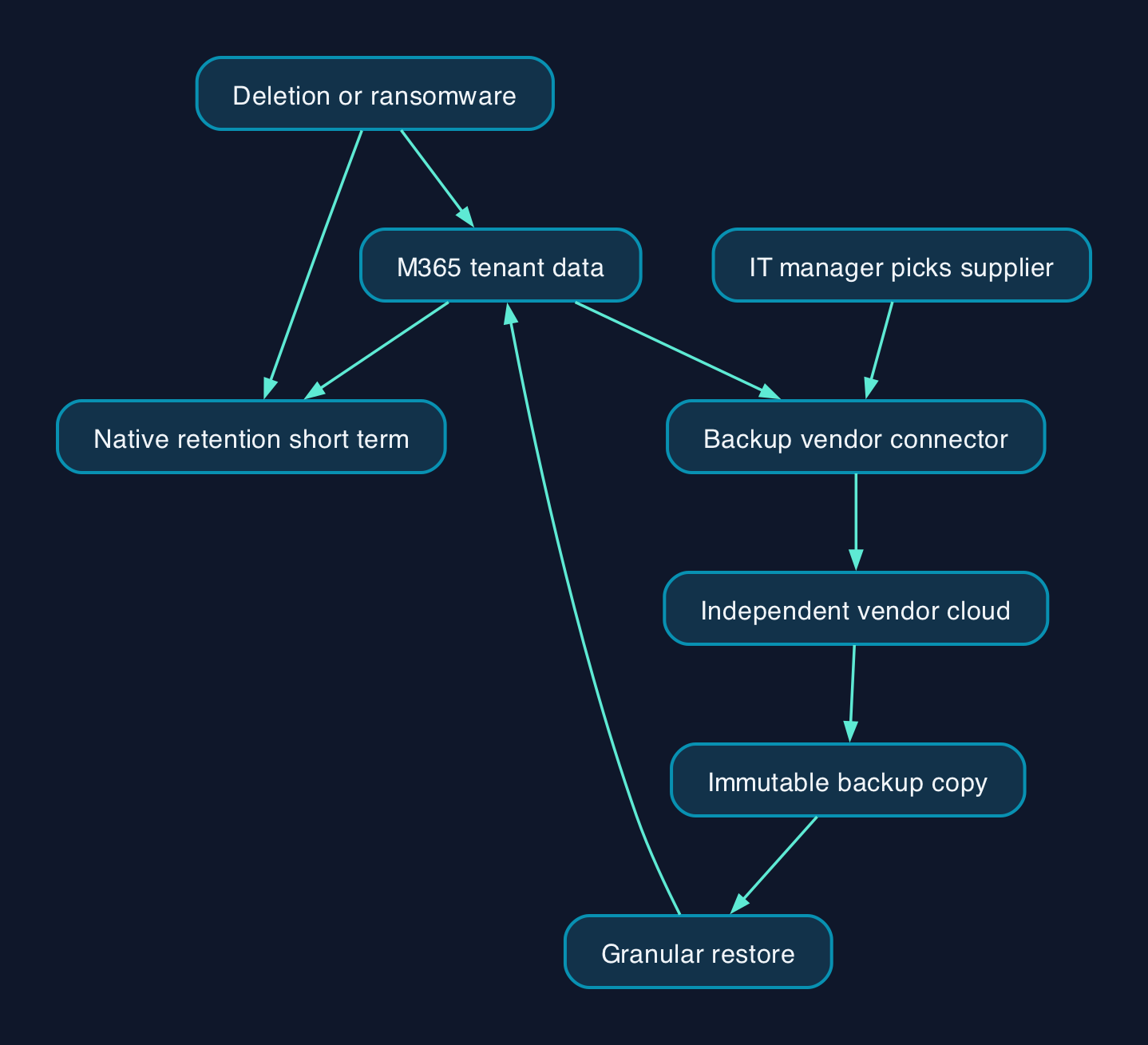
Microsoft is responsible for keeping Exchange Online, SharePoint and OneDrive running and resilient against outages. What happens inside your tenant, a deleted mailbox, a ransomware attack that encrypts files, an ex-employee who wipes their own data on the way out, is the customer's job under that shared-responsibility split. Native retention policies and the recycle bin are short-term safety nets, not a backup with an independent, immutable copy.
Microsoft has its own answer to this gap: Microsoft 365 Backup, a pay-as-you-go product billed at $0.15 (USD) per GB per month with restores included free. It is fast and its recovery window can be set up to two years. But it only covers OneDrive, SharePoint and Exchange, it does not touch Teams chat, Entra ID, Dynamics 365 or any non-Microsoft SaaS app, and Microsoft's own documentation is explicit that the backup "never leaves the Microsoft 365 data trust boundary." If your production tenant is compromised, that backup sits inside the same trust boundary as the thing that was attacked.
That is the gap Druva, Keepit and HYCU are built to close: an independent copy, stored outside your Microsoft tenant, that keeps working even if the tenant itself is compromised. For a UK mid-market IT manager with a small team and limited time, the practical question is not whether to run one of these, most organisations of this size should, but which vendor fits the estate and budget. University of Manchester's move to third-party Microsoft 365 backup at 1.35PB scale shows the same logic applying well beyond the mid-market, once native tools stop being enough for fast recovery.
How third-party Microsoft 365 backup fits your tenant
All three products work the same broad way. An administrator grants the backup vendor's application read access to Exchange, SharePoint, OneDrive and Teams data through Microsoft's own permission model. The vendor then pulls a copy of that data into its own cloud, separate from your Microsoft tenant, on a schedule set by policy. Druva describes this as a zero-trust, "data resident" architecture: backup data is encrypted before it leaves the source with envelope AES-256 encryption, vaulted into an air-gapped Druva cloud, and pinned to a geographic region you choose, such as an EU region, independently of where your live Microsoft 365 data sits. Keepit and HYCU follow the same pattern: an isolated cloud, immutable by default, that a ransomware attack or a compromised admin account inside your tenant cannot reach.
Recovery works in reverse. When something needs restoring, from a single deleted email to a full mailbox, the vendor's console lets an administrator search the backup and restore items, files or whole accounts back into the live tenant, either in place or to a new location. Because the copy sits outside the tenant, restores are unaffected by whatever caused the data loss in the first place, which is the core reason to run one of these platforms alongside, not instead of, Microsoft's own tools.
Pricing and cost model
None of Druva, Keepit or HYCU publish a Microsoft 365 backup price list for UK buyers. All three sell on a quote, and none of the public pages reviewed here show a checkout or price calculator.
| Vendor | Pricing model | What is published | Indicative UK context |
|---|---|---|---|
| Druva | Per-user licence, Dynamic Pooled Storage quoted at 300GB per user across every covered app | No list price; sales quote only | Typical total contract value $25,000 to $500,000-plus a year (USD), whole platform, not M365-only (see Fast Facts) |
| Keepit | Flat per-seat fee, unlimited storage, retention and egress included | No list price; sales quote only | Market range for M365 backup generally: roughly £1.50 to £6.50 per user per month, ex VAT (see Fast Facts) |
| HYCU | Per-organisation tiered bundle (broader tech stack, not M365-only) or a custom quote for larger tenants | UK Starter Bundle: £5,000 a year (under 100 staff), £7,500 a year (100 to 200 staff) | Mid-market tenants above 200 seats need a bespoke quote |
HYCU's published UK figures are the only vendor-stated prices in this comparison, but they cover its wider tech-stack bundle, not a Microsoft 365-only SKU, so they are only a rough guide to per-user cost. Dividing the two published starting prices by the relevant headcount band gives an illustrative £4.17 per user per month at the under-100 tier (£5,000 ÷ 100 users ÷ 12 months) and £3.12 per user per month at the 100-to-200 tier (£7,500 ÷ 200 users ÷ 12 months). Treat those as CTC's own calculation from HYCU's published bundle price, not a Microsoft 365-specific quote.
For a broader market steer, that £1.50 to £6.50 per user per month range, excluding VAT, gives a working figure for budgeting. On a 150-seat mid-market tenant, that scales to roughly £2,700 a year at the low end and £11,700 a year at the high end (150 users × 12 months × the low and high per-user rates). Add the UK's standard 20% VAT rate to any figure a supplier quotes you, and confirm the billing term: HYCU's published bundle carries a 12-month minimum, and multi-year terms typically bring the per-user rate down across this market.
Comparing Druva, Keepit and HYCU
| Criterion | Druva | Keepit | HYCU |
|---|---|---|---|
| Coverage beyond Microsoft 365 | Google Workspace, Dynamics 365, Salesforce, Power Platform, Entra ID, Active Directory, Okta | Google Workspace, Salesforce, Entra ID, Dynamics 365, Zendesk, Azure DevOps | Broader tech-stack bundle covers on-prem, VM and cloud workloads alongside Microsoft 365 |
| Storage model | 300GB pooled per user, shared across every app covered | Unlimited, always-hot storage included in the flat fee | Unlimited retention by default |
| Data isolation | Air-gapped, zero-knowledge AES-256 encryption, choice of pinned region | Independent cloud, no third-party sub-processors, choice of 7 regions including the UK | End-to-end encryption in transit and at rest |
| Published certifications | Not stated on the pages reviewed for this article | ISO/IEC 27001:2013, ISAE 3402-II | Backup storage target: SOC 1, 2 and 3, ISO 27001 |
| Published UK price | None | None | £5,000 to £7,500 a year, Starter Bundle, under 200 staff only |
| Best fit | Estates already running several Microsoft and non-Microsoft SaaS apps that want one pooled licence | Buyers who want the simplest flat per-seat model with UK data residency by default | Smaller UK businesses on the published bundle, or larger tenants wanting Microsoft 365 backup alongside on-prem and cloud infrastructure backup |
None of the three is a universal winner. Druva's pooled per-user licence suits an organisation already protecting Google Workspace, Salesforce or Entra ID alongside Microsoft 365, since the storage and admin overhead are shared across one contract rather than several. Keepit's flat per-seat model, with unlimited storage built in, suits a buyer who wants the simplest possible bill and a UK-resident data centre as a default rather than an option to negotiate. HYCU's published bundle is priced for organisations under 200 staff that also want backup for infrastructure outside Microsoft 365; a UK mid-market business above that headcount is out of the published tier and needs a bespoke HYCU quote, at which point it competes on the same quote-only basis as Druva and Keepit.
This is CTC's editorial reading of what each vendor's own published pages emphasise, not an independent lab test: none of the three vendors' features were run against each other here, and the "best fit" judgements above should be treated as a starting point for your own shortlist, not a final answer.
Choosing between Druva, Keepit and HYCU for a mid-market tenant
Start with what you already run outside Microsoft 365. If Google Workspace, Salesforce, Dynamics 365 or Entra ID are also in scope, ask Druva and Keepit for a single quote that covers all of them under one contract, since both are built around multi-app, per-user licensing. If Microsoft 365 is the only SaaS estate that needs protecting, Keepit's flat per-seat, unlimited-storage model is the simplest to budget for, and its UK data centre answers residency questions from UK-only customers without extra configuration.
If your business sits under 200 employees, get a like-for-like quote from HYCU against its published Starter Bundle price, since that gives you an actual anchor figure to negotiate from, something Druva and Keepit do not offer publicly. Above 200 employees, all three suppliers are quote-only, so put the same seat count, retention period and coverage list (Exchange, SharePoint, OneDrive, Teams, and whether Entra ID and Teams chat messages are included or an add-on) in front of all three and compare the written quotes line by line, not the marketing pages.
Whichever supplier you shortlist, ask for the minimum contract term, what happens to your backed-up data if you leave, and whether the price is truly per user or banded by employee count, before you sign.
Sources
- Overview of Microsoft 365 Backup, Microsoft Learn
- Druva SaaS Universal License, Druva
- Druva Essentials Pack, Druva
- Azure, Sovereign Stacks, and the Myth of Data Sovereignty, Druva
- Keepit opens UK headquarters to complete UK market entry, Keepit
- Data centre security, Keepit
- Keepit, independent cloud for resilience and recovery, Keepit
- HYCU Starter Bundle, HYCU
- HYCU R-Cloud Backup and Recovery for Microsoft 365, HYCU
- Microsoft 365 backup comparison, Servnet
- Druva Software Pricing and Plans, Vendr
- VAT rates, gov.uk
- University of Manchester backs up 1.35PB of Microsoft 365 data with Veeam, Compare the Cloud