For a single till or laptop, Backblaze Personal Backup at $99 a year for unlimited data on one computer is the cheapest, simplest off-site copy. If the accounting software keeps an open database file, iDrive explicitly backs up open QuickBooks and Quicken files and can also reach a NAS. If there is more than one till or computer, a Synology NAS that copies itself off-site with Synology's C2 OneStorage service gives one central backup instead of several separate subscriptions.
Key pointers
- A single till or laptop needs a computer backup agent, not a NAS: Backblaze Personal Backup is $99 a year, unlimited data, per computer.
- Backblaze will not reach a networked till or file server: it does not back up network drives (NAS drives) on its Personal or Business plan.
- iDrive is the only one of the three that names accounting software directly: its plan comparison lists open-file backup for QuickBooks and Quicken.
- A Synology NAS needs buying before any cloud subscription starts: a diskless Synology DiskStation DS225+ 2-bay unit costs £379.99 including VAT, plus drives.
- Synology's own cloud target, C2 OneStorage, does not include VAT in its quoted price; VAT is added at checkout by billing address.
- HMRC requires a sole trader to keep business records for at least 5 years after the 31 January submission deadline, so the backup that matters most is the one still there years later, not just the newest one.
- Backblaze's file version history is 30 days by default, but extending it to 1 year costs nothing extra; only the Forever tier, for versions older than a year, adds a charge.
- A NAS route to the cloud is not locked to Synology's own service: Backblaze publishes its own guide to pointing Synology's Hyper Backup app at B2 instead of, or alongside, C2.
What a Sole Trader Actually Needs to Protect
"Point-of-sale and accounting data" for most sole traders and small retailers is not one tidy folder. It is the till or EPOS software's local database, exported sales reports, supplier invoices, receipts kept for HMRC, and any accounting software's local backup file, usually all living on the same PC or Mac that runs the shop. If that machine is stolen, dropped or its drive fails, the live records disappear at the same time as the copy in the till.
This is not legal advice; consult your legal counsel. HMRC's own guidance states a sole trader must keep business records for at least 5 years after the 31 January submission deadline of the relevant tax year, and longer again if a return is filed more than four years late. That retention period, not the length of a subscription's free trial, is the real test for any backup choice here: the copy has to survive years, not weeks.
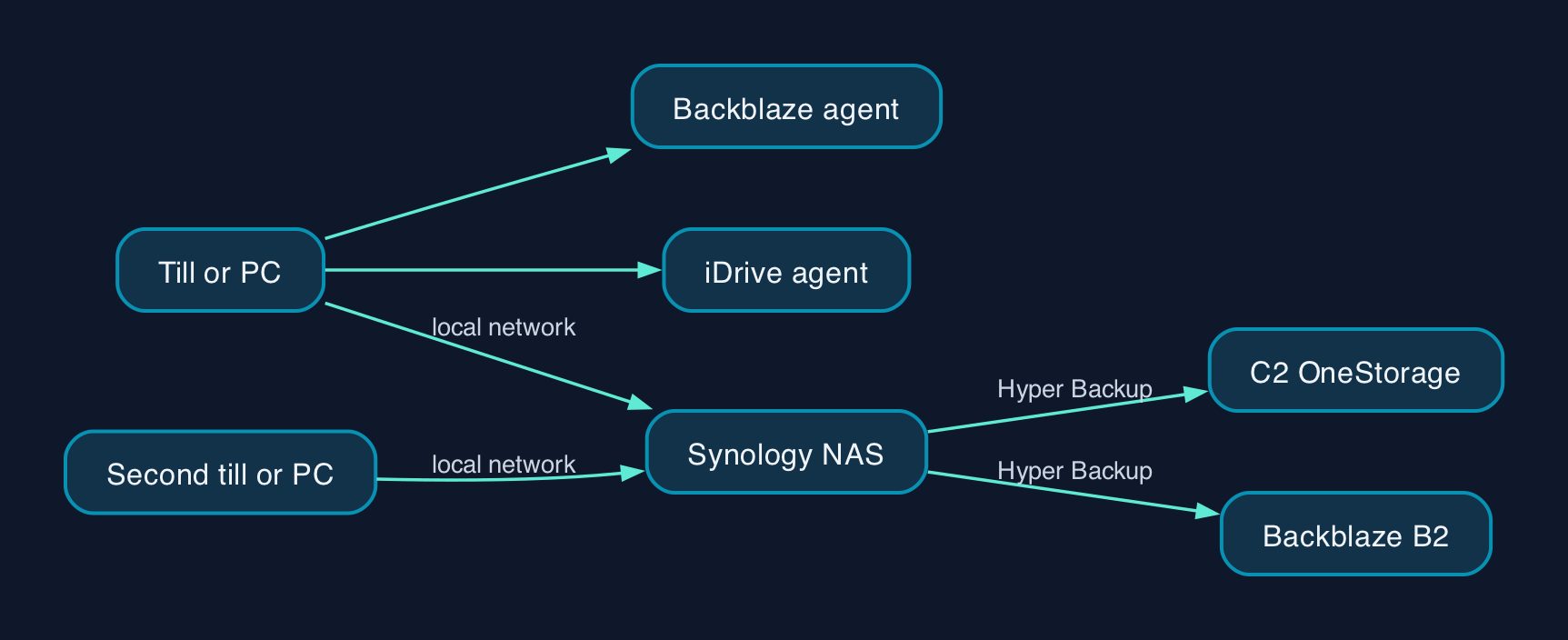
The three options in this comparison solve the problem differently. Backblaze and iDrive both install an agent on the computer that runs the till or the accounts, and copy its files to the cloud in the background. A Synology NAS is different: it is a small box of disks on the shop's own network that other devices back up to first, and the NAS then copies itself off-site, usually to Synology's own cloud or a third-party target.
Pricing and the Real Annual Cost
Backblaze prices Personal Backup and Business Backup the same way, at $99 a year per computer, for unlimited data, with Business Backup adding multi-user management on top. iDrive's cheapest useful tier, Personal 5 TB, is $11.99 a month if paid monthly; billed annually it is listed at $9.99 a month, discounted to $6.99 a month for the first year only, which works out at $83.88 for year one and $119.88 a year after that, still for 5 TB shared across multiple computers under one login.
A Synology route has two separate costs. The hardware comes first: a diskless DS225+ 2-bay NAS is £379.99 including VAT, before adding two hard drives, which a retailer prices separately from the enclosure. Then comes the cloud subscription that copies the NAS off-site. Synology's own service, C2 OneStorage, charges $79.99/€79.99 a year per TB from 1 TB upward, or a flat $29.99/€29.99 a year for a 300 GB starter tier, with VAT added on top at checkout. A sole trader who would rather not use Synology's own cloud can instead point the NAS's Hyper Backup app at Backblaze's B2 Cloud Storage, priced at $6.95 a TB a month, a calculated $83.40 a TB a year.
None of the three shows a UK price by default. Backblaze and iDrive both bill in US dollars regardless of the visitor's location, so a UK card is simply charged the dollar amount at the card issuer's daily exchange rate. Synology is the only one of the three that says so plainly on its pricing page: C2 prices do not include VAT, and VAT is calculated from the billing address at checkout.
Vendor and Option Comparison
| Backblaze Personal/Business Backup | iDrive Personal | Synology NAS + C2 OneStorage | |
|---|---|---|---|
| What it protects | One computer's local and attached drives | One or more computers under one login, plus supported NAS devices | The NAS itself, once other devices have copied their files to it |
| Reaches a networked till or NAS | No, network drives are excluded on Personal/Business Backup | Yes, dedicated apps back up Synology, QNAP, Netgear and Asustor NAS devices | Yes, that is its purpose |
| Open accounting database files | Not named by the vendor | Named directly for QuickBooks and Quicken | Depends on what backs up to the NAS first |
| Starting price | $99 a year, unlimited, per computer | $11.99 a month for 5 TB | £379.99 hardware plus $79.99/€79.99 a year per TB cloud |
| Version history | 30 days by default | Set by the plan, not detailed on the pricing page | Set by the NAS's own Hyper Backup schedule |
| Setup effort | Install one app, leave it running | Install one app, leave it running | Buy, rack and set up a NAS, then configure its own off-site copy |
| Suits | A shop with one till or one office PC | A shop using QuickBooks or Quicken, or wanting a NAS covered from the same login | A shop with more than one till or computer that wants one central backup |
Which Option Suits Which Retailer
A sole trader running one till and one laptop for the books has the least to gain from a NAS. Backblaze's flat $99-a-year, unlimited-data price is hard to beat for that single machine, provided everything that matters lives on its local drive rather than a network share, since Backblaze will not reach a NAS or a shared folder. Its 30-day default version history is enough to undo a recent mistake, and switching to 1-year retention costs nothing extra, but that still falls short of HMRC's roughly five-year record-keeping window, so a shop that wants restore points that far back should budget for the paid Forever tier rather than assuming the free upgrade is enough.
A retailer whose accounting package keeps a file open all day, commonly the case with desktop QuickBooks or Quicken, gains something specific from iDrive: it is the only one of the three that names open-file backup for those products on its own pricing and comparison page. The same iDrive login can also reach a NAS if one is added later, which Backblaze's consumer tier cannot.
A retailer with more than one till, or a back office and a shop floor computer that both need protecting, is the clearest case for a Synology NAS. Buying a diskless DS225+ at £379.99 plus drives, then letting every till and PC on the network back up to it, turns several separate subscriptions into one. That NAS then needs its own off-site copy, either through Synology's C2 OneStorage or, as Backblaze's own documentation confirms is supported, by pointing its Hyper Backup app at Backblaze's usage-priced B2 storage instead. The extra hardware and setup only pay off once there is more than one device to protect.
Sources
- Backblaze Cloud Backup pricing
- Backblaze: Which files are being backed up?
- Backblaze: What does Backblaze Backup?
- iDrive pricing plans
- Synology Knowledge Center: Understanding the C2 Storage plan changes
- Synology C2 Backup for Individuals pricing
- Synology DiskStation DS225+ 2 Bay Desktop NAS Enclosure, Scan UK
- Backblaze B2 Cloud Storage pricing
- Backblaze: How to Integrate Synology Hyper Backup with Backblaze B2 and Fireball Rapid Ingest
- gov.uk: Business records if you're self-employed, how long to keep your records
- Backblaze: Version History documentation