Neither platform is cheaper by default. Snowflake's per-credit rate already includes the compute infrastructure underneath it, but costs a third more in UK regions than the US (Enterprise edition: $4.00 per credit against $3.00). Databricks prices compute separately in Databricks Units (DBUs); most of those rates carry no UK premium, but classic compute types add a separate cloud VM bill on top. The right answer depends on workload mix and in-house skills, not the sticker price.
Key pointers
- UK region pricing hits Snowflake on every edition (roughly 33-35% more than US East), but Databricks only marks up its serverless SKUs and SQL Pro Compute in UK South; the DBU-metered classic types (Jobs Compute, Jobs Light Compute, All-Purpose Compute and SQL Classic) cost the same in the UK as in the US.
- Get the committed-use discount in writing before you compare quotes. Microsoft's Azure Databricks pricing page publishes exact percentages for 1- and 3-year DBCU pre-purchase tiers (4% to 37%); Snowflake does not publish a percentage for its equivalent Capacity discount at all, and Databricks' own pricing page for AWS and GCP also just says "contact us".
- Move scheduled Databricks pipelines off All-Purpose Compute and onto Jobs Compute: the published rate drops from $0.55 to $0.30 per DBU-hour for identical work, because the only difference is whether a person is watching a notebook.
- Snowflake's credit price already includes the underlying compute. Databricks' classic (non-serverless) DBU rate does not, so budget your Azure, AWS or GCP bill on top of the DBU line.
- Staffing, not the software licence, dominates a data platform's running cost. Model your engineering headcount before you argue over $0.20 on a DBU rate.
- A same-hours worked example below shows how each vendor's own published rate converts into a monthly bill; a Snowflake credit and a Databricks DBU are not equivalent units of compute, so read it as a methodology check, not a verdict on which platform wins.
- Decide the workload mix first. Snowflake suits SQL and BI-first teams; Databricks suits ML, streaming and cross-cloud governance. Many UK enterprises end up running both rather than picking one.
What Consolidating Analytics Means for a UK Enterprise
Consolidating analytics means picking one primary platform to hold the governed, "single source of truth" layer that dashboards, finance reporting and ad hoc SQL all query, rather than leaving copies of the same tables scattered across a warehouse, a lake and several BI extracts. For a head of data platforms, the decision usually follows a merger, a legacy Hadoop retirement, or simply too many teams each running their own Snowflake account or Databricks workspace with no shared governance.
The two platforms start from different architectures. Snowflake began as a managed cloud data warehouse: storage and compute are separate, but Snowflake owns and prices both across its Standard, Enterprise, Business Critical and Virtual Private Snowflake editions, and you interact with it almost entirely in SQL. Databricks began as a managed Apache Spark service and grew into a "lakehouse": your data typically sits in your own cloud storage account (Delta Lake tables on Azure Data Lake Storage, S3 or GCS) and Databricks charges for the compute that reads and writes it, in DBUs. That architectural split is the reason a straight dollar-for-dollar credit-versus-DBU comparison is misleading on its own. A Snowflake credit and a Databricks DBU are not the same unit of processing power, and neither vendor claims otherwise.
For a small business the practical difference rarely matters; a handful of tables and a couple of dashboards run cheaply on either. For a UK enterprise consolidating several years of accumulated data infrastructure, the difference in billing architecture changes what you actually have to model: Snowflake gives you one number per hour of warehouse use, while Databricks gives you a DBU number that still needs a separate cloud infrastructure bill added on top for most compute types.
Architecture Overview
Snowflake's billing runs through Platform Credits. A virtual warehouse consumes credits at a rate fixed by its size (1 credit/hour for Extra-Small, doubling at each size up to 512 credits/hour for 6X-Large), multiplied by a per-credit dollar price that depends on your Snowflake edition and region. That per-credit price already includes the cloud infrastructure Snowflake runs underneath it. Storage is billed separately, per compressed terabyte per month, again set by edition-independent regional pricing. A background "Cloud Services" layer bills at 4.4 credits/hour but is waived on any day it stays under 10% of that day's warehouse credits, so most customers never see it on the invoice.
Databricks splits the bill in two. Databricks bills on a pay-as-you-go basis with no up-front cost, charging per second for DBUs consumed by whichever compute type you choose (interactive notebooks on All-Purpose Compute, scheduled pipelines on Jobs Compute, SQL warehouses on SQL Classic, SQL Pro or Serverless SQL), and you separately pay your cloud provider (Azure, AWS or GCP) for the virtual machines those clusters run on. The exception is Databricks' Serverless options, where the DBU rate folds the VM cost in, which is also why Serverless DBU rates are noticeably higher than their classic equivalents. Your data itself lives in your own cloud storage account rather than a Databricks-managed store, so storage cost follows your existing cloud storage agreement rather than a Databricks price list.
Who owns which part of that bill matters operationally as much as financially. On Snowflake, one line item (the warehouse credit spend) covers compute end to end, which is easier for a finance team to reconcile but gives less granular control over the infrastructure underneath. On Databricks, a platform team with cloud engineering skills can tune instance types, use spot pricing on Jobs clusters, and negotiate cloud committed-use discounts independently of the Databricks contract, which rewards in-house infrastructure capability but adds a second invoice to track.
Pricing and Cost Model
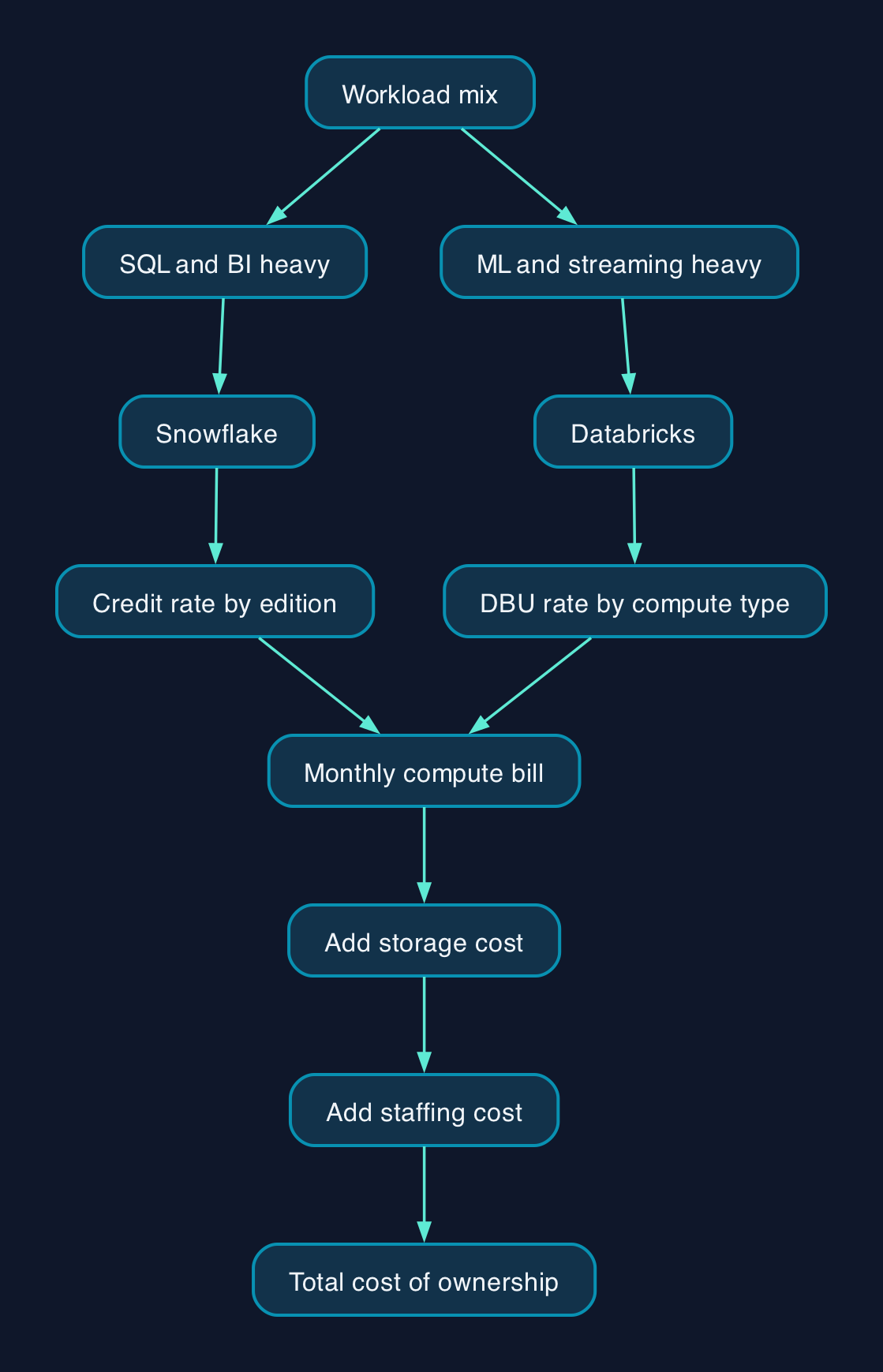
Assumptions for the worked example below: one analytics compute workload running 8 business hours a day, 22 working days a month (176 hours/month), on Azure, in the UK South region, on-demand pricing (no committed-use discount applied). Snowflake pricing is effective from 28 September 2026; Azure Databricks pricing was retrieved on 29 September 2026. Snowflake is modelled on Enterprise edition using a Medium warehouse (4 credits/hour). Databricks is modelled on a 12-DBU Serverless SQL cluster, because Serverless is the only Databricks compute type whose published rate already includes the underlying virtual machine, making it the fairest all-inclusive comparison to Snowflake's all-inclusive credit price. A 12-DBU cluster and a Medium Snowflake warehouse are not claimed to do equivalent work; they are simply each vendor's own published rate applied to the same clock hours, which is the number a finance team can actually check against an invoice.
| Item | Snowflake (Enterprise, Medium warehouse) | Databricks (Serverless SQL, 12-DBU cluster) |
|---|---|---|
| Published rate | $4.00/credit x 4 credits/hour = $16.00/hour | $11.40/hour (12 DBU x $0.95/DBU-hour, VM included) |
| Hours modelled | 176 hours/month | 176 hours/month |
| Compute subtotal | $2,816.00/month | $2,006.40/month |
| Storage (10TB compressed, illustrative) | $240.00/month (Snowflake's own bundled rate) | Billed separately through your Azure Data Lake Storage account; not a Databricks line item, so not shown here |
| Modelled monthly total | $3,056.00 (about £2,306 at the 28 September 2026 GBP/USD market rate of 1.3251, FXStreet) | $2,006.40 compute-only; add your own ADLS storage bill before comparing directly to Snowflake's total |
That exchange-rate conversion is an estimate for orientation, not Snowflake's or Databricks' UK list price. Snowflake's Consumption Table and Databricks' own price list are both denominated in US dollars; the currency you are actually invoiced in depends on your specific agreement with each vendor, so check that separately rather than assuming it matches the list price currency.
If the workload is a scheduled overnight pipeline rather than interactive SQL, Databricks' Jobs Compute is the more typical fit: it costs $0.30 per DBU-hour in UK South, identical to the US rate, but that figure excludes the Azure virtual machine underneath it, which Microsoft bills separately at standard UK South compute rates. Whether that classic (non-serverless) route ends up cheaper or more expensive than a Serverless SQL cluster for the same workload depends entirely on the VM instance size and type you choose, which Microsoft's own Azure Databricks page states is what determines DBU consumption; model both from your actual cluster configuration rather than assuming one wins.
Microsoft's Azure Databricks pricing page lists an exact committed-use discount: Databricks Commit Unit (DBCU) pre-purchase tiers running from 4% off list at the smallest 1-year, 12,500-DBCU tier up to 37% off at the largest 3-year, 6,000,000-DBCU tier. Snowflake's Consumption Table states only that Capacity (pre-purchased) pricing applies "the Platform Credit Discount in your Order Form" to the on-demand price above, without publishing a percentage on its pricing page or Consumption Table. If you are comparing a genuine enterprise-scale deal, ask Snowflake for that discount in writing before treating its on-demand rate as the number to compare against Databricks' published DBCU tiers.
Snowflake on-demand credit price by edition
The chart below sets out Snowflake's published on-demand credit price by edition for the UK regions covered in its consumption table (Azure UK South, AWS Europe London and GCP Europe West 2 London all price identically): Standard at $2.70, Enterprise at $4.00, Business Critical at $5.40 and Virtual Private Snowflake at $8.10 per credit.
Databricks Premium-tier DBU rate by compute type
The second chart sets out Databricks' published Premium-tier DBU rate by compute type in UK South: SQL Classic and Jobs Light Compute both at $0.22, Jobs Compute at $0.30, All-Purpose Compute at $0.55, SQL Pro Compute at $0.74 and Serverless SQL at $0.95 per DBU-hour.
Vendor and Option Comparison
| Criterion | Snowflake | Databricks |
|---|---|---|
| Billing unit | Platform Credits, one rate per hour of warehouse use, storage billed separately at a Snowflake rate | Databricks Units (DBUs) per compute type, plus a separate cloud VM bill for every type except Serverless |
| UK region premium | Applies to every edition (roughly 33-35% over US East) | Applies to serverless SKUs and SQL Pro Compute (roughly 5-36% over US East); Jobs Compute, Jobs Light, All-Purpose and SQL Classic match US pricing |
| Storage | Snowflake's own separate rate, $24.00/TB/month in UK regions | Your own cloud storage account (Delta Lake on ADLS, S3 or GCS); billed by your cloud provider, not Databricks |
| Core strength | SQL-first BI and reporting workloads, low day-to-day operational overhead | ML training, streaming pipelines and multi-cloud governance through Unity Catalog |
| Skills needed in-house | SQL and warehouse-sizing discipline; little infrastructure engineering | SQL plus Spark, cluster and cloud infrastructure skills to avoid the classic-compute cost trap |
| Committed discount | Platform Credit Discount, negotiated per Order Form, percentage not published | Azure DBCU pre-purchase plan, published tiers from 4% to 37% off list; AWS/GCP committed-use terms not published, contact sales |
| Exit and portability | Data can be unloaded to open formats (Parquet, Iceberg support growing) but the platform itself is proprietary | Delta Lake is an open storage format by default, which can ease a later move away from Databricks compute |
| Who should not choose it | Teams whose workload is mostly ML training, streaming or governance across several clouds | Teams whose workload is almost entirely ad hoc SQL and BI dashboards with limited platform-engineering capacity |
Neither platform is a universal winner on this table, and the comparison above should not be read as one. A UK retailer running dashboards for finance and merchandising, with no in-house Spark expertise, will usually find Snowflake's single compute rate easier to forecast and staff. A UK insurer building fraud-detection models on streaming transaction data, with an existing cloud engineering team, will usually get more out of Databricks' governance and ML tooling for the same budget.
Editorial analysis
Cost surprises hit both platforms, for different reasons. Snowflake's risk is the always-on warehouse: many small queries or dashboards left refreshing overnight keep a warehouse running, and without query-level monitoring and auto-suspend policies, spend can run well ahead of budget within months. Databricks' risk is cluster mismanagement: always-on interactive clusters, oversized worker nodes, and jobs left on All-Purpose Compute that should have moved to Jobs Compute months earlier, as one EMEA-focused platform consultancy's comparison of the two sets out. Both risks are operational, not architectural; a well-run estate on either platform is competitive, and a poorly monitored one on either platform is expensive.
The bigger number for most UK enterprises is not the platform bill at all. Data engineer and analytics engineer salaries, plus the 20 to 25% typically added for employer National Insurance, pension and overheads, routinely make up 70 to 80% of what a data platform costs to run year on year, according to Grey Skull Analytics' UK benchmarking. Even the few-hundred-pound-a-month gap between Snowflake and Databricks compute bills in the worked example above is worth negotiating hard on. It is rarely worth letting it override a genuine skills or workload-fit mismatch, because the wrong platform for your team's existing skills costs more in slow delivery and contractor day rates than it saves on the DBU or credit line.
The realistic outcome for many UK enterprises consolidating analytics is not "either/or". Snowflake holding the governed, BI-facing analytical layer while Databricks handles ingestion, streaming and ML training, with data passed between them at the gold layer, is a workable and increasingly common pattern once integration engineering time (typically a few weeks, not months) is budgeted for rather than treated as a rounding error.