
For 50 staff, Microsoft’s published Business Premium with Copilot bundle works out at £14,760 a year excluding VAT, before preparation, training and ongoing administration. If you already have suitable Microsoft 365 licences, the Copilot Business add-on is reported at £9,660 annually for 50 users. Neither is a complete implementation budget. Compare your existing contract with a bundle quotation, then price the work required to make the rollout useful. (Microsoft pricing, add-on pricing guide)
Decide how many of the 50 staff need paid Copilot
Headcount is the starting point for a budget, not evidence that every employee needs the same software.
For this buying decision, identify the work you want to improve. Proposal drafting, reviewing long correspondence and preparing meeting follow-ups are sensible pilot candidates because you can compare the finished output, time spent and corrections required. Select participants by their work rather than seniority.
Microsoft’s bundle places Copilot inside familiar productivity applications and connects its AI chat to work data. Those capabilities establish what to evaluate; they do not establish how much productive time your business will recover. (Microsoft’s bundle description)
Keep two budget views:
- Incremental investment measures the extra spending caused by adopting Copilot, compared with keeping your existing arrangement.
- Total operating cost includes the underlying Microsoft 365 subscriptions, Copilot and the people and services needed to run them.
An existing subscription belongs in the total operating cost. Only its increase belongs in the incremental investment. Keeping those views separate prevents an inflated business case or an understated operating budget.
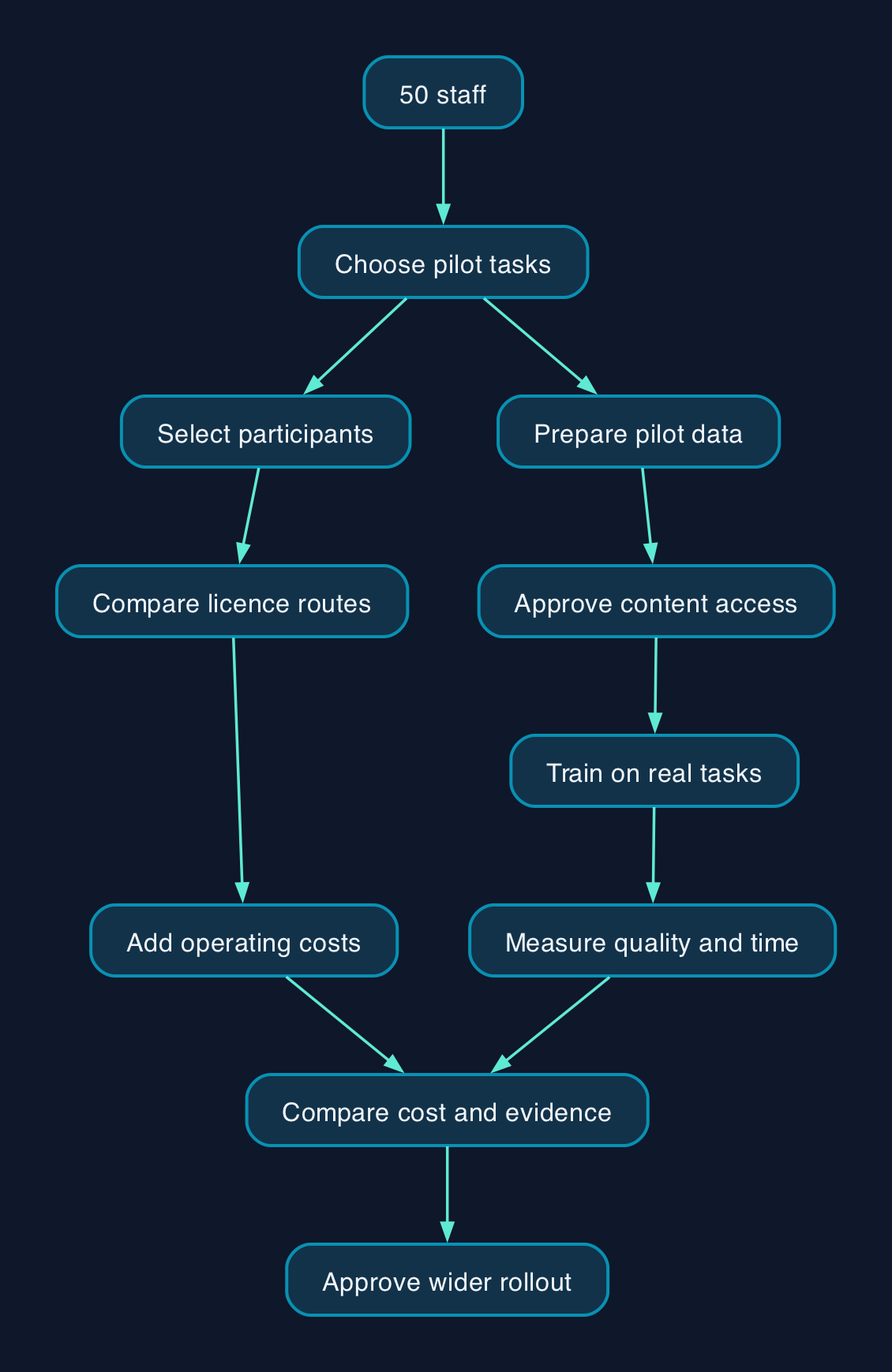
Who prepares the data and runs the service
Microsoft’s implementation module covers prerequisites, data preparation, licence assignment, oversharing controls and adoption. Buying the subscription therefore leaves several practical responsibilities to allocate. (Microsoft Learn implementation module)
The following is a proposed responsibility model for a 50-person organisation.
| Workstream | Suggested accountable owner | Evidence of completion |
|---|---|---|
| Licensing and contract | Finance lead with IT administrator | Named users, exact products, billing commitments and renewal terms recorded |
| Document access | Department owners with IT administrator | Sensitive pilot content reviewed and access decisions approved |
| Content quality | Owners of the relevant business records | Authoritative documents identified and obsolete material handled |
| Configuration and support | Internal IT team or contracted provider | Pilot configuration documented and escalation route tested |
| Training and output review | Department managers | Participants complete representative tasks and check their results |
| Value and renewal | Business sponsor | Measured benefits compared with software and operating costs |
For data preparation, start with the content needed by the pilot. Ask who owns it, who should access it and which version staff should trust. Microsoft’s training identifies search preparation and oversharing controls as separate tasks, so a document tidy-up alone should not count as completion. (Microsoft Learn)
If a provider performs this work, require a written scope. “Copilot readiness” should specify the locations examined, checks performed, changes included and unresolved issues handed back to your team.
Pricing and the first-year cost model
The supplied Microsoft pricing extract supports the Business Premium with Copilot bundle at £24.60. The add-on and promotional figures below come from the pricing guide, which says it checked Microsoft pricing on 23 September 2026; the supplied Microsoft extract does not independently establish those rates or their eligibility conditions. Use them for planning and obtain a dated quotation before committing.
Licence costs for 50 users
All figures below are GBP, excluding VAT. The monthly figures are equivalents under annual subscriptions paid yearly, not monthly cancellation terms.
| Purchase route | Monthly equivalent per user | Annual software cost for 50 users | What remains outside this figure |
|---|---|---|---|
| Business Premium with Copilot bundle | £24.60 | £14,760 | Preparation, training and other rollout or operating work |
| Copilot Business add-on at reported standard rate | £16.10 | £9,660 | Existing qualifying Microsoft 365 licences and implementation work |
| Copilot Business add-on at reported first-year promotional rate | £13.80 | £8,280 | Base licences, implementation work and subsequent renewal pricing |
The figures are from Microsoft’s UK bundle listing and the dated add-on pricing guide. The latter reports the promotional purchase window as 1 July to 31 December 2026.
Assumptions
The calculations assume all 50 staff receive the selected product for 12 months. They use the stated rates without a negotiated discount and exclude VAT, additional consumption charges and services.
The arithmetic is:
- Bundle monthly equivalent for the organisation = 50 × £24.60 = £1,230. Annual payment = £1,230 × 12 = £14,760.
- Standard add-on monthly equivalent = 50 × £16.10 = £805. Annual payment = £805 × 12 = £9,660.
- Promotional add-on monthly equivalent = 50 × £13.80 = £690. First-year payment = £690 × 12 = £8,280.
These are licence calculations, not competing all-in quotations. The bundle includes the base suite; the add-on rows do not.
Put preparation and training into the budget
The evidence supplied does not establish a defensible price for preparing this business’s data or training its staff. Those costs need a scoped quotation or an internal estimate based on the work identified.
| Cost component | What to include | How to establish the amount |
|---|---|---|
| Licence changes | Copilot, necessary base-plan changes and overlapping subscriptions | Compare the current contract with the proposed order |
| Data preparation | Access review, content ownership, remediation and validation | Define the pilot data scope, then estimate staff hours or obtain a fixed-scope quote |
| Configuration | Setup, testing, documentation and handover | Ask for named deliverables and acceptance checks |
| Training | Role-specific sessions, exercises, materials and follow-up | Separate trainer fees from employee attendance time |
| Internal staff time | Preparation, pilot participation, administration and support | Record hours by role and apply your own employment-cost assumptions |
| Ongoing operation | Helpdesk work, onboarding, access reviews and refresher training | Assign owners and estimate recurring effort |
| Additional services | Any proposed agents, integrations or separately charged tools | Require an explicit schedule of included and additional charges |
| Exit | Handover, workflow changes and contract commitments | Record the contractual and operational steps before purchase |
For a first-year total, add the chosen software route, one-off implementation costs, internal labour, recurring support and any separately charged usage. Include transition or exit costs where they fall within that period.
Keep cash spending and internal labour visible as separate subtotals. Staff time consumes capacity even when it creates no additional invoice. Conversely, do not count the same training or support work both within a provider’s package and as a separate supplier charge.
Ask for a second-year budget too. Remove genuinely one-off implementation work, retain administration and training for new starters, and use the quoted renewal price.
Rollout checklist
Use the following acceptance conditions before expanding beyond the pilot.
- [ ] Define the decision. Name the tasks being tested and the quality standard each finished output must meet.
- [ ] Record the baseline. Measure task time and correction work before introducing Copilot.
- [ ] Confirm the order. Obtain the exact product, eligible base plans, seat quantity, VAT treatment, commitment, payment schedule and renewal terms in writing.
- [ ] Approve the pilot data scope. Assign an owner to each relevant content area and resolve inappropriate access.
- [ ] Protect existing work. Record settings and access arrangements before changes, and confirm recovery arrangements before moving or deleting content.
- [ ] Train through real tasks. Require participants to practise checking source material, identifying errors and deciding when an output is unsuitable.
- [ ] Test support. Confirm who receives incidents, who can change settings and how unresolved issues escalate.
- [ ] Define the stop procedure. Document how to pause the pilot and restore affected working practices; check contract terms separately before assuming charges can stop.
- [ ] Approve expansion from evidence. Compare adoption, output quality, net time saved and support effort with the full cost.
- [ ] Schedule the renewal review. Give finance sufficient time to act before the contractual deadline.
Access changes can disrupt existing work. Obtain the content owner’s approval and test required access after remediation.
Compare the buying and delivery options
The meaningful alternatives are different licence routes and different amounts of implementation support.
| Option | Best fit | Skills and support required | Main cost or exit question |
|---|---|---|---|
| Retain the current suite and add Copilot Business for selected users | Existing setup meets requirements and only some roles have a demonstrated use case | Someone must validate eligibility, administer access and support adoption | What additional commitment does each seat create? |
| Buy Business Premium with Copilot | The business needs the bundled suite and can align the purchase with its existing contract | Configuration, data preparation and training still need owners | Will existing subscriptions overlap with the new bundle? |
| Use a provider to support either licence route | Internal IT capacity or relevant deployment experience is limited | Retain a business owner who can approve access and judge outcomes | Which remediation, training and ongoing support tasks are actually included? |
| Retain the current setup while completing a pilot or readiness work | The use case, data ownership or expected benefit remains unclear | Assign responsibility for resolving the specific gaps | What evidence will trigger a purchase decision? |
The product routes are described in Microsoft’s bundle listing and the add-on guide. Suitability assessments in the table are editorial recommendations.
Do not choose a provider solely because it offers a licence discount. Compare equivalent scopes, including remediation limits, training attendance, escalation, change requests and handover. A cheaper subscription quotation may still leave your staff doing most of the implementation.
Editorial analysis
For this 50-person business, the first purchase should follow evidence about specific jobs. A licence assigned to someone without a useful workflow adds a recurring cost without establishing a benefit.
Data preparation and training should have their own acceptance tests. “Ready” should mean that owners have approved the pilot content and access arrangements. “Trained” should mean that participants can complete a relevant task and recognise an unreliable result.
Measure time saved after checking and correcting outputs. Then identify what happens to that capacity: additional client work, a shorter backlog or another observable improvement. Recovered minutes do not automatically become a cash saving.
The buying recommendation is to obtain comparable add-on and bundle quotations, scope the preparation work, and test the intended workflows before committing all 50 seats. That produces a budget the finance lead can defend.
Sources
- Microsoft | Microsoft 365 Copilot plans and pricing. Supplied extract dated 28 September 2026; publication date not established.
- QuantSpark | Microsoft 365 Copilot pricing for UK businesses. Published and prices reportedly checked on 23 September 2026.
- Microsoft Learn | Implement Microsoft 365 Copilot. Supplied extract dated 28 September 2026; publication date not established.
- Copilot 365 | Microsoft Copilot UK pricing guide. Dated 23 May 2026; cited only for selective user licensing.