Yes: DocuSign, Adobe Acrobat Sign and Dropbox Sign are all fine choices for a small UK accountancy or law firm's client sign-off, and the three land close together on price once VAT is counted in. DocuSign Standard is £20 a user a month, billed annually plus VAT. Adobe bundles signing into an Acrobat subscription from about £14 a user a month. Dropbox Sign Standard is £24 a user a month, or £20 billed annually, two-user minimum, with no statement on VAT.
Key pointers
- DocuSign Standard is £20/user/month billed annually (£240/year, plus VAT) with no minimum seat count and a 50-user self-serve ceiling.
- Adobe's self-serve plans for individuals and small teams bundle e-signing into an Acrobat Standard, Pro or Studio subscription; a standalone, sales-led "Acrobat Sign Solutions" product exists only for larger or more complex requirements.
- Dropbox Sign shows UK visitors prices in pounds sterling, but its pricing page does not say whether VAT is included, so confirm the VAT position at checkout.
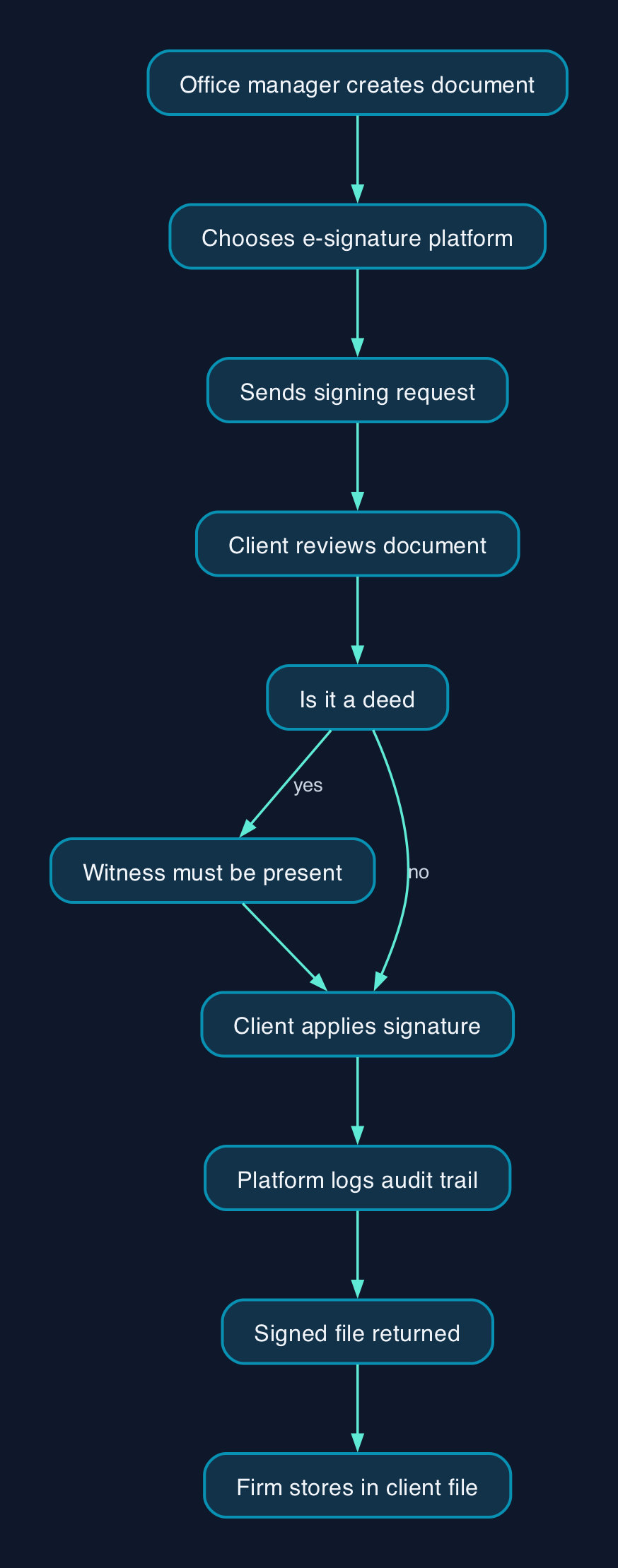
- A deed, such as a property transfer, still needs a witness physically in the room, whichever platform you use.
- Ask each supplier what counts as a "user": on DocuSign and Dropbox Sign only staff who send documents for signature need a paid seat, not the clients who sign.
- If your firm regularly sends more than 100 envelopes per user a year, get DocuSign's exact overage terms in writing before you sign, since the headline price does not cover it.
- Adobe's team plans are self-serve only up to 10 licences; DocuSign is self-serve up to 50; Dropbox Sign's Standard plan self-serve tops out at 5.
What client sign-off software means for a UK accountancy or law firm
An e-signature platform is not a document management system. It sends a document to a named recipient, records how and when they signed, and hands back a certificate with an audit trail. A firm still needs somewhere to store the signed file, whether that is practice management software, a shared drive or a dedicated legal document management system such as iManage Work or NetDocuments.
For an accountancy office, the everyday use case is client engagement letters, tax return sign-off, letters of representation and VAT registration paperwork. For a law firm, it stretches further: client care letters, retainer agreements, and, more carefully, property transfers, leases and some partnership deeds, where the law imposes a witnessing requirement that no software can remove.
What the reader actually needs is usually simple: a way for an office manager to send a document, get it signed within a working day, and prove later that it was signed by the right person. What the three suppliers sell alongside that core job differs a lot. DocuSign and Dropbox Sign are dedicated signing platforms. Adobe folds signing into a PDF editor subscription, so a firm that already redacts, compares or fills in PDF forms gets that in the same bill; a firm that only needs to collect a signature is paying for tools it may not use.
A small firm without in-house IT should also budget who sets this up. All three are self-service web tools with no server to install, so a competent office manager can configure templates and add colleagues without a specialist partner. The main task is deciding who in the firm is a "sender" (a paid seat) versus a "recipient" (free, no account needed), since that decision has the biggest effect on the final bill.
Legal validity and witnessing deeds
Electronic signatures have been admissible in evidence in England and Wales since the Electronic Communications Act 2000, and the Law Society's own guidance says a court would treat a document signed through a platform such as DocuSign, Adobe Acrobat Sign or Dropbox Sign as strong, tamper-evident evidence that it was genuinely signed, because the platform generates a completion certificate recording the time, IP address and authentication method used.
Deeds are the exception that matters most to a law firm. The Law Society is clear that a deed, such as a property transfer or certain partnership and company documents, must still be signed with a witness physically present, even when both the signatory and the witness are applying electronic signatures. Video-link witnessing is not accepted for this purpose. Separately, HM Land Registry will accept most electronically signed documents lodged for registration through a defined "conveyancer-certified electronic signature" process, which requires the conveyancer to control the signing setup and keep the platform's audit report on file; it does not name or favour any of the three products in this comparison. This is not legal advice; consult your legal counsel.
For an accountancy firm, the position is simpler: most client engagement letters, tax return authorisations and VAT paperwork are not deeds, so a simple electronic signature captured by any of the three platforms is generally sufficient.
Pricing and cost model
All three price per named user (a "sender"), not per document signed, though the signing allowance behind that price differs. DocuSign charges a capped number of envelopes a year per user; Dropbox Sign's paid plans have no cap; Adobe's current bundled Acrobat plans do not publish an equivalent figure, so check at checkout if your firm sends a high volume.
| Plan | Price per user | Billing | VAT | Self-serve seats | Signing allowance |
|---|---|---|---|---|---|
| DocuSign Standard | £20/month | Annual commitment | Plus VAT | 1 to 50 | 100 envelopes/user/year |
| DocuSign Business Pro | £33/month | Annual commitment | Plus VAT | 1 to 50 | 100 envelopes/user/year, expandable |
| Adobe Acrobat Standard for teams | about £14.16/month | Annual commitment, billed monthly | Excludes VAT | Up to 10 | Not published |
| Adobe Acrobat Pro for teams | about £20.22/month | Annual commitment, billed monthly | Excludes VAT | Up to 10 | Not published |
| Dropbox Sign Essentials | £15.83/month (£11.67 paid annually) | Monthly or annual | Not stated | 1 only | Unlimited |
| Dropbox Sign Standard | £24/month (£20 paid annually) | Monthly or annual | Not stated | 2 to 5 | Unlimited |
Adobe's per-licence figures are cross-checked against a UK reseller review from July 2026; confirm the total at checkout, since Adobe can vary team pricing by contract length and volume.
Assumptions and a worked example. For a firm with five people who need to send documents, paying annually:
- DocuSign Standard: £20 x 12 x 5 = £1,200 a year, plus 20% VAT (£240) = £1,440 a year.
- DocuSign Business Pro: £33 x 12 x 5 = £1,980 a year, plus 20% VAT (£396) = £2,376 a year.
- Adobe Acrobat Standard for teams: £14.16 x 12 x 5 = £849.60 a year, plus 20% VAT (£169.92) = £1,019.52 a year.
- Adobe Acrobat Pro for teams: £20.22 x 12 x 5 = £1,213.20 a year, plus 20% VAT (£242.64) = £1,455.84 a year.
- Dropbox Sign Standard: £20 x 12 x 5 = £1,200 a year. This is Dropbox Sign's self-serve seat ceiling for five users. The pricing page does not say whether VAT is included; if 20% VAT is added on top, the total is £1,440 a year.
These figures cover licence cost only. None of the three lists deployment, migration or training as a separate charge, since all three are set up by an office manager through a web browser rather than an installed system.
<div data-chart-id="chart-1"></div>
Vendor and option comparison
| Criterion | DocuSign | Adobe Acrobat Sign | Dropbox Sign |
|---|---|---|---|
| What you are actually buying | A standalone e-signature platform | E-signature features bundled inside an Acrobat PDF subscription | A standalone e-signature platform owned by Dropbox |
| Best fit | Firms that mainly need signing and want the wider template and integration ecosystem | Firms that already edit, redact or convert PDFs regularly and want one bill | Firms that want the simplest self-serve purchase and unlimited sends |
| Signing volume | 100 envelopes per user a year included, both tiers | Not published for the bundled plans; confirm at checkout | Unlimited signature requests on paid plans |
| Minimum team size | None; buy from 1 user | None; buy from 1 licence | 2 users on Standard |
| Self-serve seat ceiling | 50 users | 10 licences | 5 users |
| Currency and VAT | GBP, plus VAT | GBP; individual plans include VAT, team plans exclude it | GBP, as shown to a UK visitor; VAT treatment not published |
| Witnessing a deed | Logs an audit trail; a physically present witness is still required by law | Same legal position | Same legal position |
| Who should look elsewhere | Firms wanting PDF editing bundled in for the same money | Firms that only need occasional signing and do not want Acrobat's other tools | Firms that need a fixed, predictable GBP bill |
None of the three is a universal winner. A firm that already runs Adobe Acrobat for redlining contracts gets e-signing close to free at the margin by moving to the "for teams" tier. A firm that wants the deepest template library and the widest range of third-party integrations, and does not mind paying a little more, tends to land on DocuSign. A firm whose signing volume is hard to predict should weigh Dropbox Sign, whose £20 annual Standard seat matches DocuSign Standard on headline price but carries no annual envelope cap.
<div data-chart-id="chart-2"></div>
Expert Commentary
Editorial analysis. The most consequential difference between these three products is not the per-seat price, which sits within a few pounds of parity once VAT is added back. It is the signing allowance model. DocuSign caps volume and expects a firm to plan ahead; Dropbox Sign removes the cap entirely; Adobe does not publish a figure at all for its current bundled plans. A firm that expects steady month-to-month growth in client paperwork, such as a growing conveyancing team, is better protected against a mid-year surprise bill on Dropbox Sign's uncapped model than on a capped-envelope plan, even though the headline DocuSign price looks similar.
Sources
- DocuSign, products and pricing — DocuSign
- Adobe Acrobat Pro pricing & options — Adobe
- PDF and e-signature pricing and plans for business — Adobe
- Plans & Pricing, Dropbox Sign — Dropbox Sign
- Q&A on how to use electronic signatures and complete virtual executions — The Law Society
- Practice guide 82, electronic signatures accepted by HM Land Registry — HM Land Registry, gov.uk
- Adobe Acrobat Sign review — signatures.com, checked July 2026 (secondary source, used for one Adobe team-plan price not published by Adobe)
- How to Digitise Client Onboarding for a UK Financial Services Firm While Meeting FCA Consumer Duty — Compare the Cloud