
For a ten-employee UK small business running payroll in-house, Sage Payroll Essentials is the cheapest standalone option today at £24 a month excluding VAT. Xero costs more once you add its cheapest plan to the £1.50-per-person payroll add-on, at £33 a month. BrightPay no longer publishes a flat price at all: it moved to calculator-only cloud billing for the current tax year, so you now need a quote before you can compare it properly.
Key pointers
- For 10 employees, Sage Payroll Essentials is the cheapest published, standalone option: £24/month excluding VAT.
- Xero has no standalone payroll product. The cheapest route, Ignite plus the payroll add-on, costs £33/month excluding VAT for 10 people.
- BrightPay stopped selling its Windows desktop licence for the current tax year. It is cloud-only now, priced by an online calculator or a sales quote, not a published rate.
- Ask each vendor for a quote covering the exact number of people you pay each month, not the "from" price on the homepage.
- Confirm RTI submission and pension auto-enrolment are switched on and included, not a paid extra, before you commit.
- If you already run Xero for bookkeeping, adding payroll may work out cheaper overall than buying a second, separate tool.
- All published prices from Sage and Xero exclude VAT. Add 20% for your real monthly cost.
- If you are moving off BrightPay desktop, budget time to re-enter employee records and get a cloud quote before your next pay run.
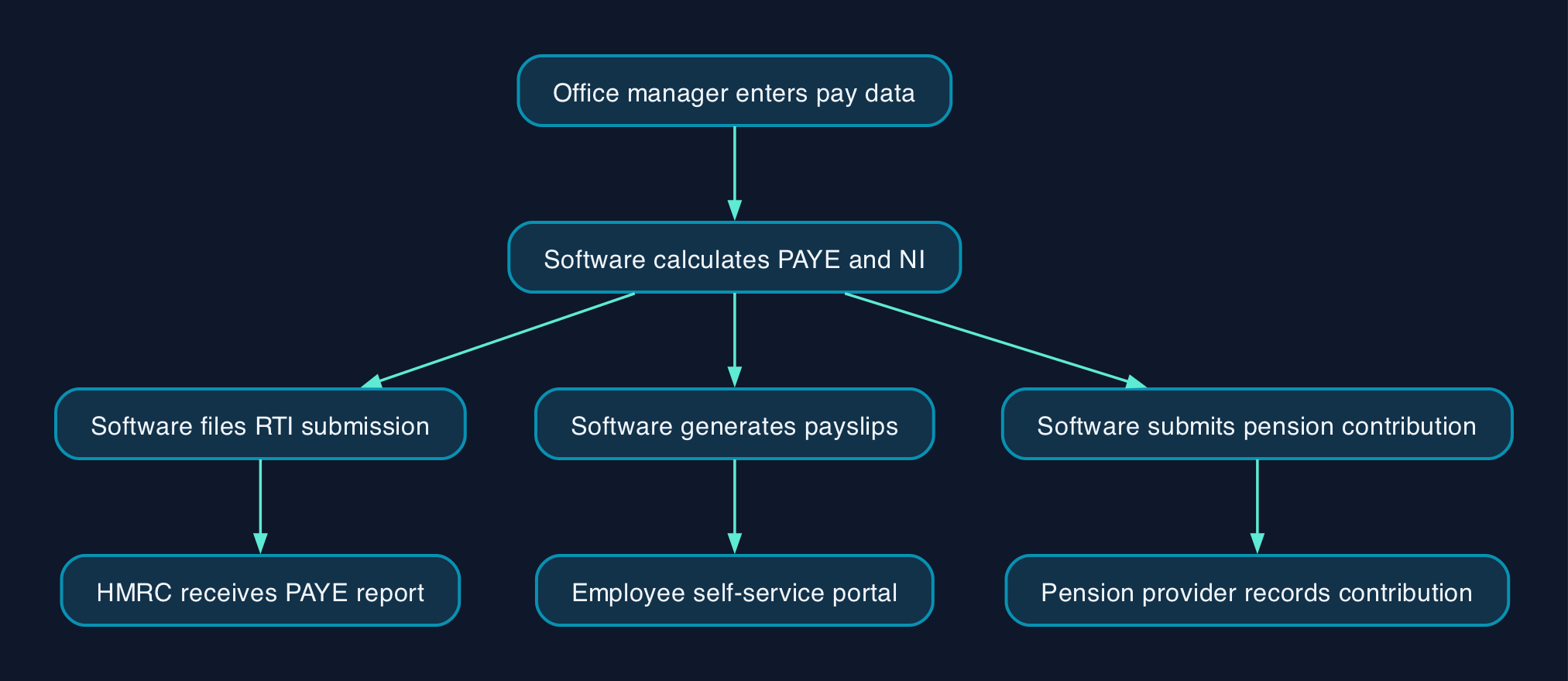
What Running Payroll Through These Three Platforms Actually Involves
An office manager running payroll in-house needs software that calculates PAYE and National Insurance correctly, produces payslips, files Real Time Information (RTI) to HMRC on or before each payday, and manages workplace pension contributions. GOV.UK's payroll guidance confirms employers must use recognised software to report pay and deductions this way. All three products here handle this core job. What differs is how they are bought, priced and supported.
BrightPay, Sage Payroll and Xero Payroll sit in different commercial models. BrightPay was historically a one-off annual licence you installed and ran without a subscription. Sage Payroll is a standalone monthly cloud subscription, bought and run independently of any accounting package. Xero Payroll only exists as an add-on inside a Xero accounting subscription, so choosing it means buying accounting software too, whether or not you need it.
UK Compliance Requirements These Platforms Must Meet
Two legal duties apply regardless of which product you pick. Employers must report pay, tax and deductions to HMRC through RTI each time they run payroll, using recognised software, as set out in GOV.UK's running payroll guidance. Employers must also automatically enrol eligible staff into a workplace pension scheme and keep making contributions, under the duties GOV.UK sets out for workplace pensions. Sage, Xero and BrightPay all build RTI filing and auto-enrolment support into their payroll products, so this is not a reason to choose one over another. It is a reason to check, in writing, that both are switched on and included in whichever plan you buy, not sold as a paid extra. This is not legal advice; consult your legal counsel.
Pricing and Cost Comparison for a Ten-Employee Team
Assumptions
- Ten employees, all paid monthly, single UK employer, standard entry-level plan on each platform.
- Prices are the vendors' own published monthly rates, checked live on their pricing pages, excluding VAT unless stated.
- Standard UK VAT is 20%, confirmed on GOV.UK's VAT rates page.
Sage Payroll Essentials, 10 employees
Base plan covers 5 employees at £12/month. Employees 6 to 10 are charged at £2.40 each.
£12 + (5 x £2.40) = £12 + £12 = £24/month excluding VAT (£28.80 including VAT).
Xero, 10 employees
Xero has no standalone payroll product, so the accounting plan cost has to be included. The cheapest combination is the Ignite plan, which includes no payroll people, plus the per-person add-on.
£18 (Ignite base) + (10 x £1.50) = £18 + £15 = £33/month excluding VAT (£39.60 including VAT).
Xero's Grow, Comprehensive and Ultimate plans include some payroll people free (1, 5 and 10 respectively), but each of those plans costs more overall than Ignite plus the add-on for exactly 10 people, because you are also paying for accounting features an office manager running payroll alone may not need.
BrightPay, 10 employees
BrightPay's last published flat price, for the 2025/26 tax year, was £149 a year excluding VAT for a single employer with up to 10 employees, paid once rather than monthly. The same desktop licence scaled with headcount: £84 a year for up to 3 employees, £149 for up to 10, £239 for up to 25, and £339 for unlimited employees on one employer. That product is no longer available for the current 2026/27 tax year. BrightPay Cloud, the only option now on offer, is priced through an online calculator based on your highest recorded employee count, or a sales quote, with no published base rate for a direct employer. Get a written quote for your exact headcount before comparing it with Sage or Xero.
| Provider | Plan | Monthly cost, 10 employees (excl VAT) | Monthly cost (incl VAT) | Billing model |
|---|---|---|---|---|
| Sage Payroll | Essentials | £24.00 | £28.80 | Monthly rolling subscription, standalone |
| Xero | Ignite + payroll add-on | £33.00 | £39.60 | Monthly rolling subscription, requires an accounting plan |
| BrightPay | Cloud (current tax year) | Not published, quote required | Not published | Calculator or sales quote, monthly or annual |
| BrightPay | Desktop, 2025/26 tax year (discontinued) | £12.42 equivalent (£149/year) | £14.90 equivalent | One-off annual licence, no longer sold |
Feature and Licensing Comparison
| Factor | BrightPay | Sage Payroll Essentials | Xero (Ignite + payroll add-on) |
|---|---|---|---|
| Sold standalone | Yes, as BrightPay Cloud | Yes | No, requires a Xero accounting subscription |
| Headline pricing model | Calculator or quote, per active employer and employee | Flat base for 5, then per extra employee band | Flat accounting base, then per person paid |
| Where you run it | Browser (BrightPay Cloud); Windows desktop no longer sold | Browser | Browser |
| Multi-PC or multi-device access | Cloud version, any device; desktop licence installable on up to 10 PCs | Any device, cloud-based | Any device, cloud-based |
| Employee self-service portal | Included in BrightPay Cloud | Included in Essentials | Included, via the Xero Me app |
| RTI submission to HMRC | Included | Included | Included |
| Pension auto-enrolment | Included | Included | Included |
| Billed by | Highest recorded employer/employee count | Employee count, fixed monthly bands | Number of people actually paid that month |
| Switching cost if you outgrow it | Move within BrightPay Cloud tiers, or get a new quote | Upgrade to Standard or Premium in-product | Upgrade to Grow, Comprehensive or Ultimate in-product |
Which Platform Suits Which Business
Choose Sage Payroll if you want payroll on its own, without buying accounting software you do not use, and you want a fixed, published monthly price you can budget against without a sales call. At £24/month for 10 employees, it is the cheapest of the three that publishes a firm rate today.
Choose Xero if you already run, or plan to run, your bookkeeping through Xero. Once accounting and payroll sit on one bill, the marginal £1.50 per person is competitive, and you avoid running two separate logins and two separate supplier relationships. Choosing Xero purely for payroll, with no plan to use the accounting side, is the more expensive route of the two published options.
Get a BrightPay Cloud quote before assuming it is still the cheap option. It has a strong reputation on price and support among UK payroll bureaux for the desktop product it just retired, but the current cloud product has no public price list, so you cannot compare it fairly against Sage or Xero until you have a number in writing for your own headcount.
Do not choose on headline price alone. Confirm what each plan actually includes for statutory pay (SSP, SMP), P60 and P45 production, and support hours, before you commit a live payroll to any of them.
Switching Checklist
If you are moving off an existing payroll system, particularly off BrightPay desktop, treat this as a project rather than a same-day swap.
- Export or note down current employee records: names, tax codes, National Insurance numbers, pay rates and year-to-date figures, before your account is closed or downgraded.
- Get a firm, written monthly quote for your actual headcount from BrightPay Cloud, Sage or Xero, not the homepage "from" price.
- Confirm your chosen platform is HMRC-recognised for RTI and supports your workplace pension provider before you commit.
- Run a parallel test pay run on the new system alongside your last pay run on the old one, and check the net pay, tax and NI figures match.
- Time the switch to the start of a tax month where possible, to keep your RTI submission history clean.
- Confirm employees can access the new self-service portal or app before their first payslip goes out on it.
- Keep read-only access to your old system's payslip and RTI history until at least the end of the current tax year, for reference and HMRC queries.
Editorial analysis
The three products tell three different pricing stories. Sage sells payroll as a self-contained monthly product with a published rate card, which suits a small business that wants a number it can plan around. Xero folds payroll into its accounting subscription, so its real cost only makes sense once you know whether you also need the accounting side. BrightPay has just removed the option that made it attractive to price-sensitive small employers, a flat annual licence fee, in favour of a calculator-driven cloud model with no public base rate. For a business that valued BrightPay specifically because it was cheap and did not require an ongoing subscription, that change is worth getting a firm quote on now rather than assuming last year's numbers still apply.
Sources
- BrightPay pricing (desktop, 2025/26 tax year)
- Sage Payroll pricing
- Sage Payroll billing bands, per-employee rates
- Xero pricing plans
- BrightPay Review, Pricing, Alternatives, SelectSoftwareReviews
- Xero Payroll Pricing UK 2026, Acey Bookkeeping
- VAT rates on different goods and services, GOV.UK
- Running payroll, overview, GOV.UK
- Set up and manage a workplace pension scheme, GOV.UK